
The best alarm clock for college students is the DreamSky Alarm Clock with Battery Backup and USB Charging, a practical fit for students who want a bedside alarm and a way to charge a device. The Amazon Basics Small Digital Oval Alarm Clock is a simpler, compact alternative, while the uscce Wooden Digital Alarm Clock suits students who want a dimmable display with a less utilitarian look. The main tradeoffs are display brightness, backup power, desk space, and whether extra lighting or charging features are worth choosing over a basic clock. Dorm rooms and shared bedrooms make easy-to-read controls and comfortable nighttime brightness especially relevant. Read on for the full comparison and picks for different student needs.

Get furniture and decor delivered free with Prime
- Fast, free delivery on millions of items
- Prime Video, Amazon Music and more included
- Member-only deals all year
Complete the kit


Key Takeaways
- The DreamSky Alarm Clock with Battery Backup and USB Charging stands out for combining outage backup with device charging, while simpler models avoid extra features.
- Brightness control matters in shared rooms: the uscce, DreamSky small display, and Odokee models offer adjustable brightness, a useful distinction for students sensitive to light at night.
- Compact clocks suit crowded desks and bedside tables: the Amazon Basics oval and Peakeep small LED models prioritize a smaller footprint over a more decorative look.
- Wooden designs offer a different balance: the uscce and two DreamSky wooden clocks bring a softer visual style, but students should compare their display and control needs rather than choosing by appearance alone.
- Extra features change the use case: USB charging, battery backup, and night lighting can simplify a dorm setup, while the Sharp red LED clock keeps things more basic.
| Amazon Basics Small Digital Oval Alarm Clock with Nightlight and Battery Backup |  | Best Compact Pick | Display: 0.7-inch green LED | Shape and color: Oval, black | Power: AC power | VIEW ON AMAZON | See Our Full Breakdown |
| uscce Wooden Digital Alarm Clock with Dimmable Display |  | Best for Shared Schedules | Display: Digital, 1.8-inch numbers with amber digits | Brightness: Continuously adjustable from 0–100% | Alarms: Dual alarms | VIEW ON AMAZON | See Our Full Breakdown |
| DreamSky Small Digital Alarm Clock for Bedroom with Large Display and Brightness Dimmer |  | Best for Easy-to-Read Simplicity | Display: 2-inch LED | Brightness: Adjustable dimmer | Alarm: Single alarm with adjustable volume | VIEW ON AMAZON | See Our Full Breakdown |
| DreamSky Alarm Clock with Battery Backup and USB Charging |  | Best for Low-Maintenance Timekeeping | Display: 5-inch LCD | Brightness: 6 levels plus auto dim | Power and backup: AC power with 3 AAA backup batteries, not included | VIEW ON AMAZON | See Our Full Breakdown |
| Peakeep Slim Digital Mirror Alarm Clock for Bedrooms and Desk Decor |  | Best Style-Focused Pick | Display: 6 x 3 inches | Brightness: 6 adjustable levels | Power: AC/DC adapter with 60-inch cable | VIEW ON AMAZON | See Our Full Breakdown |
| Peakeep Small Digital Alarm Clock with Large LED Display |  | Best for Heavy Sleepers | Display: 6-inch LED; 6 × 3 inches | Brightness: 6 levels | Alarm volume: 5 levels, 55–100 dB | VIEW ON AMAZON | See Our Full Breakdown |
| Odokee Digital Alarm Clock with Large Display, Adjustable Brightness, Night Light, and USB Charging |  | Best Dorm-Room Multi-Function Pick | Display: Digital LED; 2-inch digits | Brightness: 5 levels | Time format: 12-hour or 24-hour | VIEW ON AMAZON | See Our Full Breakdown |
| DreamSky Wooden Digital Alarm Clock with Large Numbers |  | Best for a Warm, Minimalist Desk | Display: Digital; 1.8 inches | Brightness: 6 levels | Alarm volume: 5 levels, 70–105 dB | VIEW ON AMAZON | See Our Full Breakdown |
| DreamSky Wooden Digital Alarm Clock for Bedrooms and Desk |  | Best Wooden Clock with USB Charging | Display: 1.8-inch digits | Brightness: 5 adjustable levels plus off | Time format: 12-hour or 24-hour | VIEW ON AMAZON | See Our Full Breakdown |
| Sharp Digital Alarm Clock with Red LED Display |  | Best Compact, No-Fuss Pick | Display: Digital red LED; 3.87-inch screen | Power: Corded electric | Backup: 2 AAA batteries required, sold separately; display lights after power returns | VIEW ON AMAZON | See Our Full Breakdown |
| Topski Digital Alarm Clock with RGB Night Light | 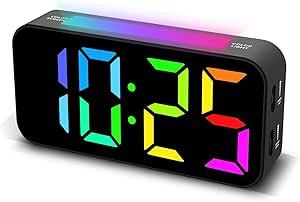 | Best for a Colorful Bedside Setup | Display: 7-inch digital LED display | Digit height: 2.36 inches | Night light: 9 RGB color effects | VIEW ON AMAZON | See Our Full Breakdown |
| alarm clock for college student | Display | Snooze | Brightness | Power and backup |
|---|---|---|---|---|
| Amazon Basics Small Digital Ov | 0.7-inch green LED | Repeating | — | — |
| uscce Wooden Digital Alarm Clo | Digital, 1.8-inch numbers with amber digits | 9 minutes | Continuously adjustable from 0–100% | Corded electric; 3 AAA batteries required for backup, not included |
| DreamSky Small Digital Alarm C | 2-inch LED | 9 minutes | Adjustable dimmer | — |
| DreamSky Alarm Clock with Batt | 5-inch LCD | — | 6 levels plus auto dim | AC power with 3 AAA backup batteries, not included |
| Peakeep Slim Digital Mirror Al | 6 x 3 inches | 9 minutes | 6 adjustable levels | — |
| Peakeep Small Digital Alarm Cl | 6-inch LED; 6 × 3 inches | 9 minutes | 6 levels | — |
| Odokee Digital Alarm Clock wit | Digital LED; 2-inch digits | — | 5 levels | AC adapter; 2 AAA alkaline batteries, not included; display stays off on backup |
| DreamSky Wooden Digital Alarm | Digital; 1.8 inches | 9 minutes | 6 levels | Corded electric; backup preserves alarm and time settings; batteries not included |
| DreamSky Wooden Digital Alarm | 1.8-inch digits | — | 5 adjustable levels plus off | AC adapter included; 2 AAA batteries not included |
| Sharp Digital Alarm Clock with | Digital red LED; 3.87-inch screen | 9 minutes | — | — |
| Topski Digital Alarm Clock wit | 7-inch digital LED display | 9 minutes | — | Corded electric; 2 AAA batteries (not included) preserve settings during outages but do not run the clock |
More Details on Our Top Picks
Amazon Basics Small Digital Oval Alarm Clock with Nightlight and Battery Backup
For a crowded dorm nightstand, this small oval clock keeps the basics within reach without taking much space. Its 0.7-inch green LED display is easy to spot in the dark, and the built-in nightlight adds a little ambient light without needing a separate lamp. The repeating snooze suits students who want a simple way to delay getting up. Compared with the larger DreamSky Small Digital Alarm Clock, this Amazon Basics model gives up display size and brightness adjustment, so it is less flexible for viewing across a room. Its advantage is a straightforward, compact setup. The 9V backup battery can preserve the time and alarm settings for up to eight hours, but it is not included and does not replace AC power for regular use.
Pros:- Compact 4.5-inch-wide oval body fits tight nightstand spaces
- Green LED display is easy to read in a dark room
- Built-in nightlight adds low-level bedside illumination
- Backup retains time and alarm settings during a short outage
Cons:- Backup battery is not included and lasts for settings retention only up to eight hours
- Small display has no listed brightness adjustment
- AC power is required for normal operation
Best for: Students with a small bedside table who want a basic, easy-to-read clock with a nightlight and snooze.
Not ideal for: Students who need large adjustable digits, multiple alarms, or a clock that runs normally without an outlet.
- Display:0.7-inch green LED
- Shape and color:Oval, black
- Power:AC power
- Backup:1 9V battery, not included; retains settings for up to 8 hours
- Nightlight:Built-in
- Snooze:Repeating
- Dimensions:4.5 x 3.5 x 2.4 inches
- Weight:0.4 pounds
Our verdict“Choose this compact Amazon Basics clock if nightstand space and a simple nightlight matter more than a large, adjustable display.”
uscce Wooden Digital Alarm Clock with Dimmable Display
The uscce is the strongest fit here for roommates with different wake-up times: dual alarms let each student set a separate schedule, while five volume levels offer a way to tailor how forcefully the clock wakes them. Its 1.8-inch amber digits and continuously adjustable brightness make it more adaptable to a dorm room than the Amazon Basics Small Digital Oval Alarm Clock, whose display is smaller and has no listed dimmer. A USB charging port can also reduce bedside cable clutter. The tradeoff is that this is a plug-in clock: its display stays lit only with power, and the AAA backup batteries are not included. The wooden look is more decor-conscious than the practical DreamSky Small Digital Alarm Clock, but this model takes more space and has more controls to set.
Pros:- Dual alarms support different class and work schedules
- Large 1.8-inch digits with full-range brightness adjustment
- Five alarm volume levels provide more control over wake-up intensity
- USB charging port can keep a phone close by overnight
Cons:- Display requires plug-in power and does not stay lit during an outage
- Three AAA backup batteries are not included
- Larger tabletop footprint and added controls may be more than a single-schedule user needs
Best for: Roommates or students who need separate alarm times and want large dimmable digits with adjustable volume.
Not ideal for: Students who need a battery-powered clock, a portable travel option, or a display that remains lit during an outage.
- Display:Digital, 1.8-inch numbers with amber digits
- Brightness:Continuously adjustable from 0–100%
- Alarms:Dual alarms
- Alarm volume:5 levels, 45–105 dB
- Snooze:9 minutes
- Power and backup:Corded electric; 3 AAA batteries required for backup, not included
- USB:Device charging port
- Time format:12- or 24-hour
- Dimensions and weight:5.9 W x 2.8 H inches; 8 ounces
Our verdict“Pick the uscce if two people need separate alarms and display brightness control, and a permanent outlet is available.”
DreamSky Small Digital Alarm Clock for Bedroom with Large Display and Brightness Dimmer
The DreamSky Small Digital Alarm Clock prioritizes visibility without adding the dual-schedule setup of the uscce Wooden Digital Alarm Clock. Its 2-inch LED display and adjustable dimmer make it a better match for students who want to read the time from bed, while its single alarm keeps setup straightforward. A USB charging port is useful when outlets are scarce, and adjustable alarm volume gives more wake-up control than the fixed-volume DreamSky Alarm Clock with Battery Backup and USB Charging. The tradeoff is that this model is not a portable, battery-powered clock: it needs its included adapter for normal operation. Its two AAA batteries only preserve settings during outages, rather than running the display or alarm as a substitute power source.
Pros:- Large 2-inch LED digits are easy to read from bed
- Adjustable brightness helps limit glare in a dark dorm room
- Adjustable alarm volume and 9-minute snooze allow a more tailored wake-up
- USB charging port adds convenience at a crowded bedside outlet
Cons:- Requires the included adapter for normal operation
- Two AAA backup batteries are not included and do not power the clock
- Single alarm is less suitable for roommates with different schedules
Best for: Students who want a large, dimmable display, one easy-to-set alarm, and a USB port for bedside charging.
Not ideal for: Students who need two separate alarms, battery-powered operation, or a display that remains active without an adapter.
- Display:2-inch LED
- Brightness:Adjustable dimmer
- Alarm:Single alarm with adjustable volume
- Snooze:9 minutes
- Power:Adapter included
- Backup:2 AAA batteries, not included; retains settings during outages
- USB:Charging port
- Design:Compact streamlined design
Our verdict“Choose this DreamSky model if display legibility and simple one-alarm operation matter more than dual alarms or battery operation.”
DreamSky Alarm Clock with Battery Backup and USB Charging
This DreamSky is a practical pick for students who want a clock that handles time changes with less manual adjustment. Automatic time setting and DST adjustment, plus support for multiple U.S. time zones, make it more convenient when moving between home and campus than the DreamSky Small Digital Alarm Clock, which focuses more on display dimming and alarm-volume control. Its 5-inch LCD is easy to check from across a room, and the display has six brightness levels plus auto dim. The compromises matter for shared dorms: there is only one alarm, and its beeping volume is not adjustable. The two USB ports serve different purposes—one powers the clock and the other charges a device—while backup batteries retain settings rather than replacing wall power.
Pros:- Automatic time setting and DST adjustment reduce manual clock changes
- Large 5-inch display has six brightness levels plus auto dim
- Shows date and temperature as well as time
- Separate USB ports support clock power and device charging
Cons:- Single alarm does not support separate roommate schedules
- Alarm volume is not adjustable
- Three AAA backup batteries are not included, and AC power is still required
Best for: Students who move between time zones or want automatic DST adjustment and a large display with date and temperature.
Not ideal for: Roommates needing separate alarms or students who require adjustable alarm volume or battery-powered operation.
- Display:5-inch LCD
- Brightness:6 levels plus auto dim
- Power and backup:AC power with 3 AAA backup batteries, not included
- USB ports:2: one for clock power and one for device charging
- Alarm:Single beeping alarm with snooze
- Time features:Automatic time setting; automatic DST adjustment
- Time zones:7 U.S. zones plus Newfoundland NST
- Additional display:Date and temperature
- Dimensions:6.2 x 4.1 x 1.5 inches
Our verdict“Pick this DreamSky when automatic time and DST adjustments and a large information-rich display outweigh alarm customization.”
Peakeep Slim Digital Mirror Alarm Clock for Bedrooms and Desk Decor
The Peakeep makes sense for a student who wants a clock to blend into a desk or dorm setup rather than look purely utilitarian. Its mirror-like face and large display give it a more decorative presence than the compact Amazon Basics Small Digital Oval Alarm Clock, while six brightness levels help adapt the display to a dark bedroom. Five alarm volume settings provide more wake-up flexibility than the fixed-volume DreamSky Alarm Clock with Battery Backup and USB Charging. That style and customization come with a simpler feature set: there is no listed USB charging port, date display, or dual alarm. The clock uses an adapter for power; four AAA batteries are required but not included, and the supplied information does not specify that they power the alarm during an outage.
Pros:- Mirror-like face offers a more decorative look than basic plastic clocks
- Large 6 x 3-inch display is paired with six brightness levels
- Five alarm volume settings offer more control over wake-up intensity
- 9-minute snooze provides a familiar way to delay the alarm
Cons:- Four AAA batteries are not included
- No listed USB charging port or extra time information such as date and temperature
- Battery backup power behavior is not specified, so outage operation is uncertain
Best for: Students who want a large, adjustable display with a mirror-like finish that suits a modern desk or bedside setup.
Not ideal for: Students who want USB charging, dual alarms, or confirmed battery-powered alarm operation during an outage.
- Display:6 x 3 inches
- Brightness:6 adjustable levels
- Power:AC/DC adapter with 60-inch cable
- Batteries:4 AAA batteries, not included
- Alarm volume:5 levels, 55–100 dB
- Snooze:9 minutes
- Design:Mirror-like face
Our verdict“Choose the Peakeep if appearance and adjustable alarm volume matter more than charging features or multiple alarms.”
Peakeep Small Digital Alarm Clock with Large LED Display
The Peakeep suits a student who needs a clear time readout and an alarm that can be turned up for a hard-to-wake morning. Its 6-inch LED display is larger than the Odokee’s 2-inch display, while six brightness settings give more room to adjust for a shared or light-sensitive bedroom. Five volume levels reach 100 dB, though the DreamSky Wooden Digital Alarm Clock with Large Numbers offers a higher stated maximum of 105 dB. The Peakeep’s backup can retain settings and trigger the alarm during an outage, a useful safeguard in a dorm where power interruptions happen. The tradeoff is that it needs an outlet for normal use, and its four AAA backup batteries are not included; this is a practical bedside pick, not a cordless one.
Pros:- Six-inch LED display is easy to read from across a small room
- Six brightness settings accommodate different dorm lighting and sleep preferences
- Five alarm volume levels reach up to 100 dB
- Backup batteries retain settings and can trigger the alarm during a power outage
Cons:- Requires a power outlet for normal operation
- Four AAA backup batteries are not included
- No USB charging port or alternate wake-up sounds
Best for: Students who sleep through quieter alarms and want oversized digits with adjustable brightness for a dorm bedside table
Not ideal for: Students who need a clock that runs fully from batteries or want phone charging built into the clock
- Display:6-inch LED; 6 × 3 inches
- Brightness:6 levels
- Alarm volume:5 levels, 55–100 dB
- Snooze:9 minutes
- Power:Corded electric; 60-inch adapter cord
- Backup:4 AAA batteries, not included; retains settings and can trigger alarm
- Dimensions and weight:6 W × 3.5 H inches; 0.24 kg
- Material and mounting:Plastic; tabletop
Our verdict“Choose the Peakeep if an especially readable display and a loud adjustable alarm matter more than USB charging or battery-powered operation.”
Odokee Digital Alarm Clock with Large Display, Adjustable Brightness, Night Light, and USB Charging
For a student who wants one bedside device to cover waking, low light, and basic charging, the Odokee brings more functions together than the Peakeep Small Digital Alarm Clock with Large LED Display. It combines five wake-up sounds, a volume range up to 110 dB, an eight-color night light, and a USB charging port. That mix can be handy when desk and outlet space are limited, though the USB port’s presence does not make this a full charging station. Its 2-inch digits are smaller than the Peakeep’s 6-inch display, and the screen stays dark on battery backup, even though the alarm is backed up. Five brightness settings and a 12/24-hour choice add useful flexibility. I’d pick this over a simpler clock for students who value options, but skip it if outage-time visibility matters.
Pros:- Five wake-up sounds and adjustable volume from 30 to 110 dB
- Eight-color night light adds a low-light option beside the bed
- USB charging port helps make use of limited bedside space
- Offers five brightness levels and 12- or 24-hour time
Cons:- Display does not light on battery backup
- Two AAA backup batteries are not included
- Its 2-inch digits are smaller than the Peakeep’s display
Best for: Students sharing a compact room who want adjustable alarm sounds, a night light, and a USB charging port in one tabletop clock
Not ideal for: Students who need the time display to remain visible during a power outage or prefer an especially large screen
- Display:Digital LED; 2-inch digits
- Brightness:5 levels
- Time format:12-hour or 24-hour
- Alarm:5 sounds; 30–110 dB; 9-minute snooze
- Night light:8 colors
- Power and backup:AC adapter; 2 AAA alkaline batteries, not included; display stays off on backup
- USB charging:USB port included
- Dimensions and weight:5.5 × 4 inches; 171 g
- Warranty:18 months
Our verdict“Choose the Odokee for a flexible dorm bedside setup with a night light and USB port, but not if you need outage-time screen visibility.”
DreamSky Wooden Digital Alarm Clock with Large Numbers
The wood frame gives this DreamSky a less utilitarian look than the black plastic Peakeep, making it a good fit for students who want a clock that can sit on both a dorm desk and bedside table. Its 1.8-inch digits, six brightness settings, and five alarm-volume levels cover the essentials without adding a night light or USB port. The stated alarm range reaches 105 dB, slightly above the Peakeep’s 100 dB maximum, while the Odokee offers a wider selection of wake-up sounds. This model’s battery backup preserves alarm function and time settings, but the display only lights while plugged in, so it will not show the time during an outage. DST and 12/24-hour settings are useful practical touches; students seeking charging features should compare it with the USB-equipped DreamSky Wooden Digital Alarm Clock for Bedrooms and Desk.
Pros:- Wood frame offers a warmer look than the Peakeep’s plastic housing
- 1.8-inch display has six brightness settings
- Five alarm volume levels reach 105 dB
- Includes DST and 12/24-hour settings with alarm and time-setting backup
Cons:- Display only lights while connected to power
- Backup batteries are not included
- No USB charging port or night light
Best for: Students who prefer a wood-frame clock with readable digits, adjustable alarm settings, and straightforward time-format controls
Not ideal for: Students who want a USB charging port, a night light, or a display that remains lit during an outage
- Display:Digital; 1.8 inches
- Brightness:6 levels
- Alarm volume:5 levels, 70–105 dB
- Snooze:9 minutes
- Time settings:DST and 12/24-hour formats
- Power and backup:Corded electric; backup preserves alarm and time settings; batteries not included
- Dimensions and weight:6.1 W × 2.8 H inches; 0.28 kg
- Material and warranty:Wood frame; 1-year replacement
Our verdict“Pick this DreamSky for a wood-look clock with flexible brightness and alarm settings, and choose its USB-equipped counterpart if bedside charging matters.”
DreamSky Wooden Digital Alarm Clock for Bedrooms and Desk
This DreamSky is the more connected choice among the two wooden clocks in this batch: it adds a USB charging port to the 1.8-inch display and manual DST control. Five brightness levels plus an off setting make it easier to keep the screen from lighting a dark dorm room, while five alarm-volume levels let students tune the wake-up sound. Compared with the DreamSky Wooden Digital Alarm Clock with Large Numbers, this version trades six brightness levels and stated alarm-volume figures for USB charging and a brightness-off option. Its battery backup operates the alarm, not the display, and the clock still needs its AC adapter for normal use. That makes it more useful as a compact bedside hub than as an outage-proof clock; students who only need a dependable basic display can choose the simpler wooden model.
Pros:- USB charging port adds utility on a crowded dorm bedside table
- 1.8-inch digits with five brightness levels plus an off setting
- Five alarm-volume levels and 12/24-hour format selection
- Battery backup can sound the alarm during a power outage
Cons:- Display does not operate on battery backup
- AC adapter is required for normal operation
- Two AAA backup batteries are not included
Best for: Students who want a wooden bedside clock with adjustable display brightness and a USB port for charging a device
Not ideal for: Students who want the display to stay visible during a power outage or who need a clock that runs normally without an outlet
- Display:1.8-inch digits
- Brightness:5 adjustable levels plus off
- Time format:12-hour or 24-hour
- Alarm:5 volume levels; battery backup operates alarm
- Power and backup:AC adapter included; 2 AAA batteries not included
- Charging:USB charging port
- DST adjustment:Manual DST button
- Dimensions:6.6 inches
Our verdict“Choose this model over the simpler wooden DreamSky if a USB port and a fully dimmable display are worth more to you than outage-time visibility.”
Sharp Digital Alarm Clock with Red LED Display
The Sharp is the straightforward option for a student who wants a compact alarm with simple controls rather than extra modes or charging features. Its red LED display, keyboard controls, and large 9-minute snooze button make the basic morning routine easy to read and operate. Compared with the Peakeep’s 6-inch display, this is a much smaller bedside footprint; the Odokee is a better fit for students who want a night light, several wake-up sounds, and USB charging. The Sharp’s backup helps preserve alarm function during an outage, but the display lights only after power returns, so it cannot serve as a visible clock without electricity. Its alarm is described as loud, but no volume range is provided. The compact design is appealing for crowded desks, with fewer adjustment options than the larger models.
Pros:- Compact tabletop footprint suits crowded dorm desks
- Keyboard controls keep operation straightforward
- Large snooze button uses a familiar 9-minute interval
- Battery backup helps preserve alarm function during outages
Cons:- Display does not light during a power outage
- Two AAA backup batteries are sold separately
- No stated alarm-volume range or extra wake-up features
Best for: Students with very limited bedside space who want a basic, easy-to-operate clock and a large snooze button
Not ideal for: Students who want adjustable brightness or alarm volume, USB charging, or a display that remains lit during outages
- Display:Digital red LED; 3.87-inch screen
- Power:Corded electric
- Backup:2 AAA batteries required, sold separately; display lights after power returns
- Snooze:9 minutes
- Controls:Keyboard controls; large snooze button
- Dimensions:2.25 W × 3 H inches
- Weight:8.48 oz
- Materials:Glass; plastic frame
Our verdict“Choose the Sharp for a compact, simple alarm with an easy-to-find snooze button, but look to the Odokee for more adjustable features.”
Topski Digital Alarm Clock with RGB Night Light
The Topski suits a dorm room where a clock needs to be easy to read and double as soft ambient lighting. Its 2.36-inch digits and adjustable display brightness make checking the time from bed easier, while the nine-color night light adds more atmosphere than the simpler bedside lighting on options such as the Amazon Basics Small Digital Oval Alarm Clock. Dual alarms can separate weekday and weekend wake-ups, and the top-mounted snooze button is easy to find when you are still half asleep.
The tradeoff is power: Topski needs an outlet for normal operation, and its AAA batteries only preserve settings during an outage. Unlike a clock designed around battery backup or USB charging, it offers no charging feature for a phone. Its plastic tabletop design is also better for function than décor. I’d pick it for visible controls and customizable light, not for outlet-free portability.
Pros:- Large, dimmable digits are easy to read from across a dorm room.
- Nine RGB night-light effects offer more ambient-light choice than a basic nightlight.
- Dual alarms can accommodate different weekday and weekend schedules.
- Top-mounted snooze button is easy to reach from bed.
Cons:- Requires a power outlet for normal operation; backup batteries only preserve settings.
- Two AAA backup batteries are not included.
- No USB charging feature for a phone or other device.
Best for: College students with an outlet beside their bed who want large, dimmable time digits, dual alarms, and color-changing ambient light.
Not ideal for: Students who need a clock that runs during an outage, want to charge a phone at the bedside, or have no convenient outlet.
- Display:7-inch digital LED display
- Digit height:2.36 inches
- Night light:9 RGB color effects
- Alarm settings:Dual alarms
- Alarm volume:3 levels
- Snooze:9 minutes
- Power and backup:Corded electric; 2 AAA batteries (not included) preserve settings during outages but do not run the clock
- Dimensions and weight:6.57 in W × 3.19 in H; 0.28 kg
Our verdict“Choose the Topski if you want a large, easy-to-read dorm clock with colorful bedside lighting and have a reliable outlet nearby.”

How We Picked
I ranked these clocks around the problems students are most likely to face: limited bedside space, shared-room lighting, power interruptions, and the need to keep a phone or other device close. I weighed display readability and brightness adjustment alongside practical details such as backup power, USB charging, night lighting, and compactness. A feature earned a higher place when it addressed a clear dorm-room need without making the clock harder to use.
The top spots go to models that balance more than one student priority, while simpler or more specialized clocks rank lower because they suit narrower needs. I also considered the tradeoff between a decorative wooden design and a straightforward digital display, and whether extra features justify taking up more space or adding more controls. Product names alone do not establish performance; the ranking reflects the listed features and how well each model fits typical college-room constraints.
| alarm clock for college student | Power and backup |
|---|---|
| Amazon Basics Small Digital Ov | — |
| uscce Wooden Digital Alarm Clo | Corded electric; 3 AAA batteries required for backup, not included |
| DreamSky Small Digital Alarm C | — |
| DreamSky Alarm Clock with Batt | AC power with 3 AAA backup batteries, not included |
| Peakeep Slim Digital Mirror Al | — |
| Peakeep Small Digital Alarm Cl | — |
| Odokee Digital Alarm Clock wit | AC adapter; 2 AAA alkaline batteries, not included; display stays off on backup |
| DreamSky Wooden Digital Alarm | Corded electric; backup preserves alarm and time settings; batteries not included |
| DreamSky Wooden Digital Alarm | AC adapter included; 2 AAA batteries not included |
| Sharp Digital Alarm Clock with | — |
| Topski Digital Alarm Clock wit | Corded electric; 2 AAA batteries (not included) preserve settings during outages but do not run the clock |
Factors to Consider When Choosing Alarm Clock For College Students
A dorm alarm clock should fit the room and the student’s routine, not just look good on a nightstand. I would start with the constraints that are hard to change later—outlet access, shared-room light, and available surface space—then decide whether charging or backup power would solve a real problem.
Choose a display that works for your room
A large display can be easier to read from across a small room, but a bright clock may bother a roommate after lights-out. Dimming controls give you more flexibility than choosing a display by size alone. Think about whether you need to read the time without sitting up, or whether the clock will sit within arm’s reach. Red LED displays, such as the Sharp’s, may appeal to buyers who prefer a straightforward digital look, while adjustable-brightness models give more control over nighttime light. A common mistake is assuming the brightest setting is always most useful; the real test is whether the time stays legible at a comfortable nighttime level. If you share a room, prioritize a display you can dim without making the clock difficult to read.
Decide how much backup power you need
A clock that relies on household power may lose its display or alarm function during an outage, depending on its backup design. Battery backup can reduce that risk, but check what the backup actually supports rather than assuming every feature keeps working. Students who live in buildings with occasional power interruptions may value backup more than someone who already relies on a phone alarm as a second alert. A battery backup is also not a substitute for keeping batteries fresh. Avoid paying attention to the phrase alone without checking whether batteries are included and what happens when the clock is unplugged. If waking on time has high consequences, use a second alarm source regardless of the clock you choose.
Treat USB charging as a convenience, not a replacement for a charger
A built-in USB port can reduce cable clutter and keep a phone near the bed, which is handy when outlets are awkwardly placed. It does not automatically mean charging will be as fast as a dedicated wall adapter, and the clock’s port may be inconvenient if several devices need power. Check which device you plan to charge and whether the port’s location suits your cable. Students with a crowded power strip may prefer a basic clock and a separate multi-port charger instead. The mistake is choosing a clock for charging without checking whether it can meet your device’s charging needs. Pick this feature when it solves a specific bedside setup problem.
Measure your available surface before choosing a style
Dorm desks and bedside tables often have to hold lamps, books, water, and charging cables, so a clock’s footprint can matter more than its appearance. Compact oval and small LED designs can fit tight spots, while a larger display or night light may need more room. Wooden clocks can blend into a desk setup, but a decorative finish should not outweigh readability or access to controls. Measure the usable surface, not just the furniture’s full width, and leave space for buttons and cables. If you plan to move the clock between a desk and bedside table, a smaller model can be easier to place. A clock that fits comfortably is more useful than one that forces other essentials aside.
Choose extra lighting only if it has a clear job
A night light can help with late-night movement without turning on a room light, but it adds another source of brightness in a shared space. Color-changing lighting may suit students who want ambient light, while a basic display keeps nighttime illumination simpler. Decide whether you need light for finding your way around or mainly want the time visible; those are different jobs. Look for controls that let you manage the light separately from the display if nighttime comfort is a priority. Extra lighting can become distracting when it is difficult to dim or switch off. In a roommate setting, simpler lighting controls are often more considerate than a feature-rich glow.
Match control simplicity to your routine
An alarm clock should be easy to set when you are tired, in a hurry, or adjusting to an early class schedule. More features can mean more buttons and settings, which may be inconvenient if you only need a reliable alarm and a clear time display. Before choosing, check that alarm controls are distinct and that the clock supports the routine you expect, such as changing alarm times on different days. Do not assume a digital display makes setup intuitive; button labels and control placement matter too. Students who want a no-fuss option may prefer a basic model, while those who will use charging or lighting features can accept a little more complexity. Keep a phone alarm as a backup while learning any new clock’s controls.
Frequently Asked Questions
Is a clock with battery backup worth choosing for a dorm room?
It can be useful if your building has power interruptions or you want an alarm option that is less dependent on an outlet. Check whether the backup preserves the alarm, the display, or only selected functions, since backup designs differ. You will also need to keep compatible batteries available and replace them when needed. If you already set a separate phone alarm, backup may be less important than brightness control or a compact size. For a student who depends on one alarm, an additional backup source remains a sensible precaution.
Should I choose a clock with USB charging or use a separate phone charger?
Choose built-in USB charging when a bedside port would reduce cable clutter or solve an awkward outlet layout. A separate charger is often more flexible if you charge multiple devices or need charging performance beyond what the clock’s port provides. Check the clock’s port specifications before treating it as your main charger. Also think about cable reach and where the port sits relative to the bed. For many students, the feature is most useful as a convenient extra rather than a full replacement for a dedicated charger.
Will a large digital display disturb my roommate at night?
It might if the display is bright and faces the other side of the room. A large screen is easier to read from bed, but brightness adjustment is what helps balance visibility with a darker shared room. Check whether the dimmer has enough range for nighttime use and whether the display can be adjusted without disabling the clock’s other features. Placement also matters: turning the display toward your bed or away from your roommate may help. If you are sensitive to light, favor dimming control over display size alone.
Are wooden alarm clocks practical for a college desk, or are they mainly decorative?
A wooden finish can suit a desk setup, but appearance should come after readability, controls, and available space. The uscce and DreamSky wooden options differ from compact, plain digital clocks mainly in style, so compare their listed display and brightness features against your room needs. A decorative clock is still a daily-use device, and difficult-to-read numbers can become frustrating during early mornings. Check its footprint and control access before placing it among books or other desk items. Choose wood when the style matters to you and the practical features still fit your routine.
Is a night light or RGB lighting useful in a shared bedroom?
It can help you move around at night without switching on the room’s main light, but extra illumination may bother a roommate. Think about whether the light can be dimmed or turned off independently from the time display. RGB lighting is a personal preference rather than a substitute for a readable clock face. If you share a room, agree on acceptable brightness and placement before relying on a glowing bedside device. Students who only need to check the time may be better served by a dimmable display without added ambient lighting.
Conclusion
Best overall: I recommend the DreamSky Alarm Clock with Battery Backup and USB Charging for students who want charging and backup in one bedside device. Best value: the Amazon Basics Small Digital Oval Alarm Clock makes sense for a compact, simpler setup with night lighting and battery backup. Best premium-style pick: the uscce Wooden Digital Alarm Clock is the one to shortlist if dimming and a wooden look matter more than a bare-bones design. Best for beginners: the Sharp Digital Alarm Clock with Red LED Display suits students who want a straightforward clock without added lighting or charging features. For a specific need, choose the Odokee for its combination of adjustable brightness, night light, and USB charging, or the Peakeep Small Digital Alarm Clock when a compact footprint and large LED display are the priority. Match the clock to your room’s light, space, and outlet setup rather than buying extra features you will not use.
Halloween Picks
halloween
As an affiliate, we earn on qualifying purchases.