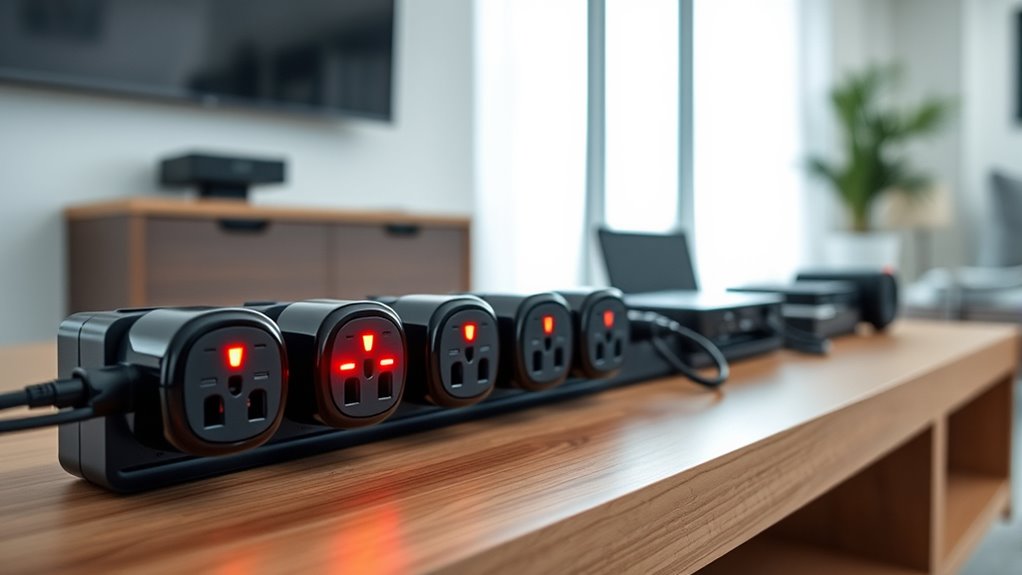

Smart plugs for energy saving do more than turn devices on and off — the best ones show you exactly where your electricity is going, so you can cut waste instead of guessing. The TP-Link Tapo P115 earns my top spot for its combination of accurate energy monitoring, a polished app with historical usage charts, and reliable scheduling that makes automation effortless. If you want future-proof smart home integration, the Tapo P110M adds Matter support, while the AiSeek 4-pack delivers solid energy tracking at a lower per-plug cost. The main tradeoff in this category is between plugs that only automate (cheaper, but you stay blind to consumption) and plugs that measure it (slightly pricier, but they pay for themselves by revealing energy-hungry devices). Continue reading for the full breakdown, including who each option suits and which ones to skip.

Get furniture and decor delivered free with Prime
- Fast, free delivery on millions of items
- Prime Video, Amazon Music and more included
- Member-only deals all year
Complete the kit


Key Takeaways
- Energy monitoring was the single biggest differentiator: only four of the eight plugs (Tapo P115, Tapo P110M, AiSeek, and Govee monitoring model) track consumption, which is the entire point of buying for energy savings rather than convenience.
- Matter support (Tapo P110M, Linkind) matters most for Apple Home users; everyone else gets a smoother experience from plug-and-play Wi-Fi models like the Tapo P115 and Kasa Mini.
- The Kasa Mini plugs are the cheapest way to automate standby-power cutoffs, but without monitoring you can’t verify savings — a real limitation if data drives your decisions.
- 4-pack pricing flips the value math: an individual premium plug can look expensive until you divide the bundle across multiple vampire-load devices like TVs, chargers, and coffee makers.
- App quality separated the two Tapo options from the field — historical charts, exportable data, and away modes make savings actionable rather than just visible.





| smart plugs for energy saving | Connectivity | Voice Assistants | Certification |
|---|---|---|---|
| AiSeek Smart Plug Outlet with | 2.4GHz Wi-Fi | Alexa, Google Assistant | FCC certified |
| TP-Link Tapo P115 Smart Plug W | Wi-Fi (2.4GHz) | Alexa, Google Assistant | — |
| Govee Smart Plug | Bluetooth and 2.4GHz Wi-Fi | Alexa, Google Assistant | — |
| Tapo P110M Matter Smart Plug w | — | Alexa, Google Assistant | — |
| Linkind Matter Smart Plug | — | — | FCC certified |
| Kasa Smart Wi-Fi Mini Plug | 2.4 GHz Wi-Fi | Alexa, Google Assistant, SmartThings | — |
| Kasa Smart Plug Mini 15A | 2.4 GHz Wi-Fi | — | UL Certified |
| Govee Smart Plug with Energy M | Wi-Fi and Bluetooth | Alexa, Google Assistant | ETL & FCC |
More Details on Our Top Picks
AiSeek Smart Plug Outlet with Energy Monitoring, 15A 2.4GHz Wi-Fi, 4-Pack
For buyers who want per-plug energy tracking without paying a premium, this AiSeek 4-pack covers the basics well. The real-time energy monitoring in the SmartLife app translates directly into savings: you can spot which appliances quietly drain power overnight and schedule them off. Compared with the TP-Link Tapo P115, the app experience is plainer — you get raw usage data rather than polished charts and bill estimates — but the core monitoring function is there. Setup skips the hub entirely, and voice control through Alexa and Google Assistant works once everything is routed through SmartLife. The tradeoffs are real, though: there’s no direct Alexa integration, so the plug depends entirely on a third-party app, and the 2.4GHz-only limitation plus occasional typos in the documentation hint at less rigorous quality control than TP-Link or Kasa.
Pros:- Real-time energy monitoring helps identify power-hungry appliances
- No hub required — setup goes straight through the SmartLife app
- FCC certified with fire-resistant materials and overload protection
- 1800W capacity handles most household appliances
Cons:- No direct Alexa connection; everything routes through the SmartLife app
- Only supports 2.4GHz Wi-Fi
- Typos in documentation suggest inconsistent quality control
Best for: Cost-conscious buyers who want four energy-monitoring plugs for the price of two brand-name units
Not ideal for: Buyers who want polished software — the SmartLife app lacks the charts and bill projections that make Tapo’s data actionable
- Pack Size:4
- Max Current:15A
- Max Power:1800W
- Connectivity:2.4GHz Wi-Fi
- Hub Required:No
- App:SmartLife
- Voice Assistants:Alexa, Google Assistant
- Certification:FCC certified
Our verdict“A sensible pick if you want energy data on a budget and don’t mind a less refined app.”
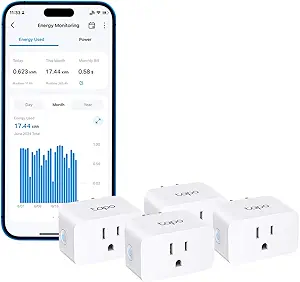
TP-Link Tapo P115 Smart Plug Wi-Fi with Energy Monitoring, 15A (4-Pack)
The Tapo P115 earns the top spot because it turns energy data into actual savings decisions. Its app displays usage charts and cost estimates, which makes it far easier to act on the numbers than the AiSeek plug’s raw readings. Two features stand out for cutting waste: smart charging stops device overcharging, and programmable scheduling lets you shift high-consumption appliances to off-peak hours — the exact behavior an energy-saving buyer wants. Compared with the Kasa Smart Wi-Fi Mini Plug elsewhere in this roundup, the P115 adds the monitoring layer Kasa omits, at the cost of a slightly larger housing. TP-Link’s software support is also more dependable than budget brands like AiSeek. The main gap: no Apple HomeKit support, so iPhone-centric households should look at the Tapo P110M instead.
Pros:- Detailed energy monitoring with charts and bill estimates
- Smart charging prevents device overcharging
- Auto-shutoff protects against overload
- Off-peak scheduling shifts high-consumption devices to cheaper hours
Cons:- Requires 2.4GHz Wi-Fi for setup
- No Apple HomeKit support
Best for: Homeowners who want detailed usage insights, bill estimates, and off-peak scheduling to genuinely lower electricity costs
Not ideal for: Apple Home users — there’s no HomeKit support, so they’ll need the P110M or the Linkind Matter plug
- Model:Tapo P115
- Pack Size:4
- Max Current:15A
- Connectivity:Wi-Fi (2.4GHz)
- Voice Assistants:Alexa, Google Assistant
- App:Tapo
- Energy Monitoring:Yes
Our verdict“The most complete energy-saving package here — buy it unless you live in an Apple Home household.”
Govee Smart Plug, Wi-Fi Outlet, 4-Pack
Not every energy-saving plan needs a spreadsheet. This Govee 4-pack takes the simpler route: schedules, timers, and group control that cut waste by automatically turning things off — no energy dashboards required. The Bluetooth setup is a genuine convenience compared with Wi-Fi-only rivals like the Tapo P115, making first-time pairing less fiddly. The compact housing also won’t crowd adjacent outlets the way some chunkier monitoring plugs do. The honest tradeoff: no energy monitoring at all, so you can’t see which devices cost you money — you’re saving on faith rather than data. And with a 10–11A rating versus the 15A of the Tapo and AiSeek plugs, it’s better suited to lamps, fans, and chargers than space heaters or large appliances. It’s the cheapest way to build good off-schedule habits.
Pros:- Schedules and group control automate devices off when unneeded
- Bluetooth pairing simplifies initial setup
- Compact design leaves adjacent outlets free
- ETL and FCC certified
Cons:- No energy monitoring — savings are schedule-based only
- 10–11A rating limits use with high-draw appliances
- No 5GHz Wi-Fi support
Best for: Buyers who mainly want schedules and timers to stop standby waste on lamps, fans, and chargers
Not ideal for: Anyone tracking actual consumption — there’s no energy monitoring, and the lower amperage rules out heavy appliances
- Quantity:4 plugs
- Connectivity:Bluetooth and 2.4GHz Wi-Fi
- Voice Assistants:Alexa, Google Assistant
- Maximum Voltage:120V
- Amperage:10A
- Hub Required:No
- Certifications:ETL, FCC
Our verdict“Pick this if schedules alone will fix your habits; skip it if you need to see the numbers.”
Tapo P110M Matter Smart Plug with Energy Monitoring, 15A, 4-Pack
This is the Tapo P115 rebuilt on Matter, and that single difference changes who should buy it. Because it’s Matter-certified, the P110M works natively with Apple HomeKit, Google Home, Samsung SmartThings, and Alexa — no juggling separate ecosystems, which the P115 simply can’t offer. The energy-saving toolkit matches its sibling: consumption tracking, scheduling, remote control, and user-set power thresholds that shut a device off before it runs up your bill — a genuinely useful guardrail for space heaters or older appliances. The Linkind Matter plug covers similar platforms for less, but the P110M pairs that compatibility with TP-Link’s more mature app and threshold automation. The tradeoff is that Matter’s connected features depend on having a compatible platform or controller set up properly, which adds friction for less technical households compared with the plug-and-play AiSeek option.
Pros:- Matter support across Apple HomeKit, Alexa, Google Home, and SmartThings
- Energy consumption tracking with usage statistics
- Custom power thresholds auto-shutoff devices
- Backed by TP-Link’s mature Tapo app
Cons:- Connected features require a compatible Matter platform or controller
- More expensive than non-Matter monitoring plugs
Best for: Multi-platform smart home owners, especially Apple Home users, who want energy data and automated shutoffs in one ecosystem
Not ideal for: First-time smart plug buyers — Matter setup assumes a working controller and some comfort with smart home configuration
- Model:P110M
- Pack Size:4
- Maximum Current:15A
- Connectivity Standard:Matter over Wi-Fi
- Energy Monitoring:Yes
- Voice Assistants:Alexa, Google Assistant
- Compatible Platforms:Apple HomeKit, Google Home, Samsung SmartThings
Our verdict“The choice for committed smart home households who want energy monitoring inside their existing ecosystem.”
Linkind Matter Smart Plug – Works with Apple Home, Alexa, Siri, Google Home & SmartThings
The Linkind delivers the biggest platform win of the roundup — Apple Home, Alexa, Google Home, SmartThings, and Siri from a single plug — at a friendlier price than the Tapo P110M. Its standout trick for reliability is offline LAN control: scheduled shutoffs keep working when your internet drops, so an energy-saving routine doesn’t fall apart mid-outage. Safety specs match the pricier options, with fire-resistant materials and short-circuit protection at a full 1800W/15A rating, and the compact body leaves neighboring outlets usable. Two caveats temper the value. Unlike the P110M, there’s no energy monitoring, so you can schedule savings but never measure them. And while the AiDot app works without a hub, tapping into Apple Home or SmartThings demands a Matter-certified controller — a hurdle the plug-and-play Govee option avoids entirely.
Pros:- Works across Apple Home, Alexa, Google Home, SmartThings, and Siri
- Offline LAN control keeps schedules running without internet
- Compact design doesn’t block adjacent outlets
- 1800W/15A rating with fire-resistant materials and overload protection
Cons:- No energy monitoring
- Most platforms require a Matter-certified hub or controller
- 2.4GHz Wi-Fi only
Best for: Ecosystem-hopping households who want one plug that works everywhere, with reliable offline scheduling
Not ideal for: Data-driven savers — without energy monitoring, you can’t see what each appliance actually costs you
- Protocol:Matter
- Compatibility:Apple Home, Alexa, Google Home, SmartThings, AiDot, Siri
- Max Power:1800W
- Max Current:15A
- Wi-Fi:2.4GHz only
- Network:IPv6 supported
- Hub Requirement:Matter hub needed for most platforms; AiDot app works without
- Certification:FCC certified
Our verdict“A smart buy for multi-platform homes that prioritize scheduling over consumption data.”
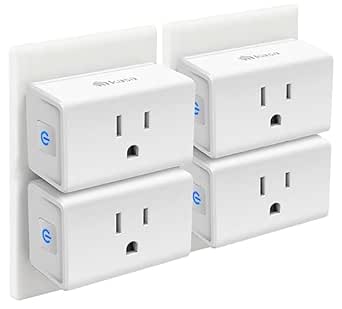
Kasa Smart Wi-Fi Mini Plug, 15A, 4-Pack (EP10P4)
Buying four plugs at once changes the math on energy savings: instead of automating one appliance, you can tackle phantom loads across an entire home — TV stands, coffee makers, chargers, and desk setups all at once. This option stands out for the polish of the Kasa/Tapo app ecosystem, which feels more stable and better organized than the Govee Smart Plug 4-Pack’s app, particularly when you’re juggling schedules for a dozen devices. Compared with the Govee Smart Plug with Energy Monitoring, though, it gives up real-time energy tracking entirely — you’ll save energy through schedules and Away Mode, but you won’t see the numbers proving it. The compact housing leaves the second outlet free, a real advantage over bulkier monitoring plugs like the Tapo P115.
Pros:- Four-plug pack covers multiple rooms for whole-home standby-power reduction
- Compact body leaves the adjacent wall outlet usable
- Mature Kasa/Tapo app with scheduling, timers, and Away Mode
- UL certified with a 2-year warranty for long-term peace of mind
Cons:- No energy monitoring, so you can’t quantify savings
- 2.4 GHz Wi-Fi only, which can complicate setup on mesh networks
Best for: Households outfitting multiple rooms at once who want reliable scheduling and timers to cut standby power without needing consumption data
Not ideal for: Buyers who want to measure actual wattage and cost per device — this plug has no energy monitoring, so the Govee or Tapo P115 are better fits
- Model:EP10P4
- Pack quantity:4 plugs
- Maximum load:15A
- Connectivity:2.4 GHz Wi-Fi
- Hub required:No
- Voice assistants:Alexa, Google Assistant, SmartThings
- Certifications:UL, RoHS, FCC, IC
- Warranty:2 years
Our verdict“The pick for blanketing a whole home in scheduled automation cheaply, as long as you don’t need to see the energy data behind your savings.”
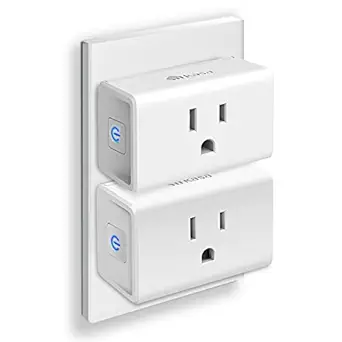
Kasa Smart Plug Mini 15A, Wi-Fi Outlet, UL Certified, 2 Pack
Sometimes you just want to dip a toe into energy-saving automation, and this two-pack is the low-commitment entry point. Setup is genuinely quick — the Kasa app walks you through pairing in minutes, which makes it a better first smart plug than feature-heavier options like the Tapo P110M Matter, whose Matter setup can frustrate newcomers. The ultra-compact housing won’t block the second outlet, matching the larger EP10P4 four-pack’s slim design. The tradeoff is clear: unlike the Govee Smart Plug with Energy Monitoring, there’s no consumption tracking whatsoever, and unlike the EP10P4, there’s no Away Mode for simulating occupancy. What you get instead is dependable scheduling and timers backed by UL certification — a safe, simple foundation you can expand later.
Pros:- Fast, beginner-friendly app setup with no hub required
- Slim design keeps the second wall outlet free
- Scheduling and timers reliably cut standby power on set-and-forget devices
- UL certified for safe daily operation
Cons:- No energy monitoring to track or verify savings
- Only two plugs, limiting whole-home coverage for the price
- Limited to 2.4 GHz Wi-Fi networks
Best for: First-time smart home users who want to automate two high-value devices, like a lamp and a entertainment center, with minimal setup friction
Not ideal for: Anyone planning a larger automation project — the two-plug count and lack of energy data make the EP10P4 four-pack or Govee monitoring plugs smarter buys
- Max load:15A
- Connectivity:2.4 GHz Wi-Fi
- Number of outlets:2
- Certification:UL Certified
- Compatibility:Alexa, Google Assistant, SmartThings
- Power supply:AC 100-240V
- Operating temperature:32°F to 104°F
Our verdict“A dependable, no-drama starter pair for automating your first two energy-wasting devices before committing to a bigger system.”
Govee Smart Plug with Energy Monitoring, WiFi & Bluetooth, 15A, 4 Pack
If the whole point of a smart plug is cutting your electric bill, this is where the Govee monitoring four-pack earns its place: real-time energy tracking shows exactly which devices are draining power, something neither Kasa plug in this lineup offers. That data turns vague good intentions into concrete decisions — you can see what a space heater or aging fridge actually costs you. The Bluetooth fallback for setup is a nice touch the Kasa Mini plugs lack, easing installation hiccups. Compared with the Tapo P115, the app experience is a bit busier and less refined, and Govee skips SmartThings support, so Samsung-centric households should look elsewhere. Build quality is solid with fire-resistant materials and ETL certification suitable for higher-draw appliances.
Pros:- Real-time energy monitoring reveals hidden power waste per device
- Bluetooth plus Wi-Fi makes initial setup more forgiving
- Four-plug pack supports group control across rooms
- Fire-resistant build with ETL certification handles high-power appliances
Cons:- No 5 GHz Wi-Fi support, which trips up some modern routers
- App is less refined than Kasa’s, with a steeper learning curve
- No SmartThings compatibility
Best for: Data-driven buyers who want to identify their biggest energy hogs and verify that automation actually lowers their bills
Not ideal for: SmartThings users and anyone who prioritizes a polished, streamlined app — the Kasa EP10P4 delivers a cleaner experience, just without the numbers
- Connectivity:Wi-Fi and Bluetooth
- Number of outlets:4-pack
- Max load:15A
- Certification:ETL & FCC
- Voice assistants:Alexa, Google Assistant
- Scheduling:Yes
- Energy monitoring:Real-time tracking
Our verdict“The choice for buyers who want proof, not guesses, of where their electricity is going — accept a clunkier app in exchange for the data.”

How We Picked
My ranking logic starts with one question: does this plug actually help you save energy, or just control it remotely? Models with built-in energy monitoring scored highest because they turn guesswork into measurable behavior — you can see which devices drain power and confirm your savings over time. Within that group, I weighed app quality heavily, since raw consumption data is useless if you can’t view trends, set consumption alerts, or build schedules easily. The Tapo app’s historical reporting gave both Tapo models an edge over competitors with similar hardware.
Next, I evaluated protocol and ecosystem compatibility — Matter support earns points for longevity, while reliable Alexa and Google Home integration is the baseline. Amperage rating mattered too: every plug here handles 15A, enough for most household loads, but build certifications like UL listing factored into reliability scores. Finally, I assessed per-plug value in multi-packs, because energy saving works best when you can deploy several plugs across your home’s worst standby offenders. Plugs without monitoring ranked lower but weren’t excluded — they serve buyers whose goal is automated schedules and timers rather than consumption data.
| smart plugs for energy saving | Voice Assistants | Certification |
|---|---|---|
| AiSeek Smart Plug Outlet with | Alexa, Google Assistant | FCC certified |
| TP-Link Tapo P115 Smart Plug W | Alexa, Google Assistant | — |
| Govee Smart Plug | Alexa, Google Assistant | — |
| Tapo P110M Matter Smart Plug w | Alexa, Google Assistant | — |
| Linkind Matter Smart Plug | — | FCC certified |
| Kasa Smart Wi-Fi Mini Plug | Alexa, Google Assistant, SmartThings | — |
| Kasa Smart Plug Mini 15A | — | UL Certified |
| Govee Smart Plug with Energy M | Alexa, Google Assistant | ETL & FCC |
Factors to Consider When Choosing Smart Plugs For Energy Saving
Before picking a specific plug, it helps to understand what actually drives energy savings and where buyers commonly go wrong. These are the factors that shaped my rankings and should shape your decision.Energy Monitoring: The Feature That Justifies the Purchase
Without monitoring, a smart plug can only cut power on a schedule — useful, but you’ll never know how much you actually saved or which devices were worth automating. Monitoring plugs measure real-time wattage and cumulative consumption, letting you identify vampire loads: devices that draw power even when off. A plasma TV, game console, or old cable box can each quietly consume 5–20 watts around the clock. The common mistake is buying the cheapest plugs, automating a few lamps, and concluding smart plugs don’t save money. If data-driven savings is your goal, pay the modest premium for a monitoring model — the Tapo P115 and P110M make this easy, while budget monitoring plugs like the AiSeek offer a lower-cost entry point into the same habit.
Matter vs. Standard Wi-Fi: Future-Proofing vs. Simplicity
Matter is the new interoperability standard that lets one plug work natively across Apple Home, Alexa, Google Home, and SmartThings without manufacturer apps in the middle. The Tapo P110M and Linkind support it, which matters if you’ve invested in Apple’s ecosystem — Apple Home has historically had the fewest smart plug options. The tradeoff is setup friction: Matter onboarding can involve QR codes, hub requirements, and occasional firmware hiccups that standard Wi-Fi plugs skip entirely. If you’re a single-ecosystem household with no plans to switch, a conventional Wi-Fi plug like the Kasa Mini or Tapo P115 will feel faster and simpler. Buy Matter for flexibility, not because it saves more energy — the power monitoring hardware is identical either way.
Where to Deploy Your Plugs for Real Savings
The biggest rookie mistake is putting smart plugs on devices that draw almost nothing when idle, like LED lamps or phone chargers. High-standby targets include entertainment centers, desktop computers, printers, coffee makers with always-on clocks, and anything warm to the touch when ‘off.’ A smart strategy is starting with one or two monitoring plugs as diagnostic tools — move them around your home for a week each, log the consumption, then leave them permanently on your worst offenders. This is where 4-packs shine: a bundle lets you audit and automate simultaneously. Also remember that a plug can’t improve efficiency; it only eliminates waste, so a fridge or HVAC unit (which runs constantly by design) is a poor candidate unless you’re purely after scheduling control.
App Ecosystem and Automation Depth
The plug is hardware; the app is where savings actually happen. Look for historical consumption charts (daily, weekly, monthly), consumption-based alerts that flag abnormal usage, and away or vacation modes that randomize lamp schedules. TP-Link’s Tapo and Kasa apps lead this category with clean reporting and dependable scheduling, while some budget brands bury data behind clunky menus or limit history to a few days. A useful test: check whether the app lets you export or view at least 30 days of data — enough to compare a billing cycle before and after automation. If the app can’t show trends, you’re buying a remote switch, not an energy tool.
Amperage, Safety Ratings, and Placement Limits
Every plug in this roundup is rated 15A, which covers roughly 1,800 watts — fine for electronics and small appliances, but not a license for high-draw devices. Space heaters, hair dryers, and air conditioners can exceed safe continuous load, and manufacturers explicitly exclude them. Check for UL or ETL certification before buying unknown brands; a plug sits inline with your home’s wiring, and cheap uncertified units are a genuine fire risk. Physical bulk matters too: mini designs like the Kasa EP10 leave the second outlet free, while chunkier monitoring plugs can block it. Finally, none of these work with 5GHz-only networks — all require a 2.4GHz Wi-Fi band, so confirm your router broadcasts it before setup.
Frequently Asked Questions
Do I need energy monitoring, or are regular smart plugs enough to save money?
Regular smart plugs like the Kasa Mini absolutely save money through scheduled cutoffs — killing standby power to an entertainment center overnight can recoup the plug’s cost within a year. The limitation is blindness: without monitoring, you can’t tell which devices are worth automating or verify the savings are real. Monitoring plugs like the Tapo P115 turn saving into a feedback loop — you see the numbers drop, which keeps the habit going. My suggestion: if you’re automating one or two obvious offenders, standard plugs are fine. If you want to audit your whole home and optimize systematically, monitoring pays for the difference quickly.
Is Matter support worth paying extra for in 2026?
It depends on your ecosystem. If you use Apple Home, Matter plugs like the Tapo P110M and Linkind are nearly mandatory — they’re the most reliable way to get energy data into Apple’s interface, which has historically lacked smart plug support. Alexa and Google users gain less, since both platforms already work well with standard Wi-Fi plugs through their native skills. Matter also means the plug will keep working if you switch ecosystems later, which adds resale and longevity value. The tradeoff is setup complexity: Matter onboarding occasionally requires firmware updates and patience that conventional plugs skip. If you’re a single-ecosystem household that’s happy, save the money.
How much electricity can a smart plug realistically save?
Standby power typically accounts for 5–10% of household electricity use, and smart plugs attack exactly that slice. A single entertainment center drawing 20 idle watts around the clock costs roughly $20–25 a year at average rates; cutting that with a schedule recovers a plug’s share of a 4-pack in months. Bigger wins come from behavior changes the monitoring data reveals — like discovering an old garage freezer costing far more than expected, which a plug can flag but not fix. Smart plugs won’t transform your bill on their own, but as a diagnostic and automation layer, the return is genuinely positive for most homes. Expect modest, compounding savings rather than dramatic cuts.
Should I buy a 4-pack or start with a single plug?
For energy-saving purposes, multi-packs almost always win because standby waste is spread across many devices — one plug can only fix one outlet. A 4-pack covers the typical starter set: TV area, computer desk, kitchen counter appliances, and a charger station. The exception is if you’re unsure about the brand’s app quality; buying one plug first to test the interface and monitoring accuracy is a reasonable hedge, especially with lesser-known brands. Every product in this lineup is available in both configurations, and the per-plug discount on bundles is substantial enough that waiting rarely saves money. If you already know your worst offenders, go straight to the 4-pack.
Can I use these smart plugs with a space heater or other high-power appliance?
No — and this is the most common safety mistake with smart plugs. Although these plugs are rated 15A on paper, manufacturers explicitly exclude space heaters, air conditioners, hair dryers, and kettles because their sustained draw stresses the plug’s internal relay, creating a fire hazard over time. Energy monitoring plugs can still help here indirectly: plug the heater in temporarily just to measure its consumption, then automate something safer. For genuine high-load control, you’d need a purpose-built heavy-duty smart relay, which is a different product category. Stick to electronics, lamps, and small kitchen appliances under around 1,500 watts, and check the manufacturer’s excluded-devices list before plugging anything that heats or cools.
Conclusion
The right choice comes down to whether you want to measure your energy use or just automate it. For most buyers, the TP-Link Tapo P115 is the best overall pick: accurate monitoring, an excellent app with historical charts, and dependable scheduling in one package. For best value, the AiSeek 4-pack delivers genuine energy tracking at a lower per-plug price, while the Kasa Mini EP10 is the cheapest legitimate option for buyers who only need timers and remote cutoffs.
On the premium side, the Tapo P110M is worth the extra spend for Apple Home users and future-proofers who need Matter, with the Linkind as a Matter alternative if it’s easier to find. For beginners, the Kasa Mini 2-pack is the gentlest entry point — dead-simple setup, no feature overload, and a safe way to learn whether smart plugs fit your routine. And if your goal is a whole-home energy audit on a budget, deploy the Govee monitoring 4-pack across your biggest suspects and let the data tell you where to go next. Whatever you choose, start with your worst standby offenders — that’s where the savings actually live.