
If your LEDs flicker with a dimmer switch, it’s usually due to incompatibility between the bulbs and dimmer type or poor wiring. Many LED bulbs aren’t designed for traditional dimmers, causing unstable performance. Using a dimmer made for LEDs and ensuring proper connections can fix this. Upgrading to an LED-compatible dimmer and high-quality bulbs often helps. To keep your lights steady and flicker-free, you’ll want to explore further solutions.
Key Takeaways
- Incompatibility between standard dimmers and LED bulbs often causes flickering; using LED-compatible dimmers can fix this.
- LED flickering may result from poor wiring connections or loose contacts disrupting consistent electrical flow.
- Certain LED colors and circuitry are more prone to flickering; choosing dimmer-rated, dimmer-compatible LED bulbs helps prevent it.
- Adjusting or upgrading dimmer switches to modern, LED-specific models improves voltage regulation and reduces flickering.
- Professional troubleshooting and proper calibration of dimmers ensure stable, flicker-free LED lighting.

Leviton SureSlide Dimmer Switch for Dimmable LED, Halogen and Incandescent Bulbs, 6674-P0W, White
CONVENIENT – an easy way to create a big impact for a minimal cost and customize the light…
As an affiliate, we earn on qualifying purchases.
As an affiliate, we earn on qualifying purchases.
Why Do LEDs Flicker When Using Dimmer Switches?

LEDs often flicker when you use a dimmer switch because they aren’t always compatible with traditional dimming technology. One common reason is that certain LED colors, like cool white or daylight, can be more prone to flickering due to their electronic components. Additionally, not all dimmer switches are designed to work with LED lighting, affecting dimmer compatibility. When the dimmer isn’t fully compatible, it may cause inconsistent voltage regulation, leading to flickering. You might notice that some LED colors flicker more than others, depending on their design and circuitry. An important factor is the electronic circuitry within the LED, which can influence flickering patterns. To fix this, you need to select a dimmer switch specifically rated for LEDs and ensure it matches your LED color. Proper pairing improves dimmer compatibility and reduces flickering issues considerably.

PHILIPS LED 60W A19 4-Pack Basic Soft White (2700K) 800 Lumen (10W = 60W) Frosted Flicker-Free Light Bulbs
Help Care for Your Eyes: Philips EyeComfort LED bulbs are designed to be comfortable on your eyes, with…
As an affiliate, we earn on qualifying purchases.
As an affiliate, we earn on qualifying purchases.
Do Different Dimmer Switch Types Affect LED Compatibility?
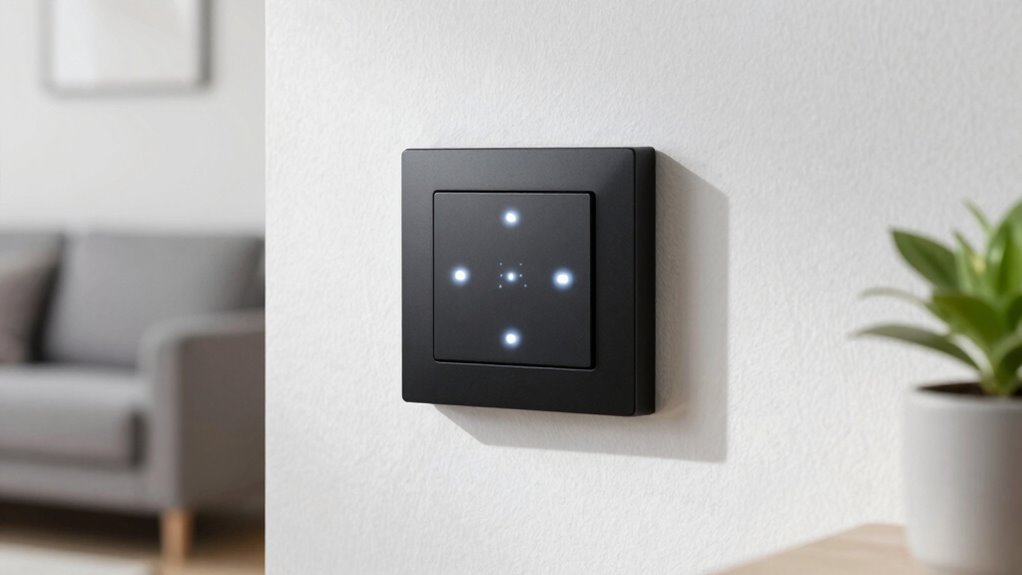
Different types of dimmer switches can considerably impact LED compatibility because not all dimmers are designed to work with energy-efficient lighting. Some dimmer switches are tailored for incandescent bulbs and may not support LED bulb compatibility, leading to flickering or non-dimming behavior. To guarantee proper dimmer compatibility, you need to choose a switch specifically labeled for LED bulbs or compatible with low-wattage loads. The type of dimmer switch—whether trailing edge, leading edge, or universal—also affects bulb compatibility. Using the wrong type can cause flickering or damage your LEDs. Always check the dimmer switch’s specifications to confirm it’s suitable for LED bulbs, and match it with compatible bulbs for ideal performance. Incorporating European cloud innovation into your smart home setup can also help optimize energy efficiency and performance. Additionally, selecting a compatible dimmer switch can help prevent flickering issues and extend the lifespan of your LEDs.
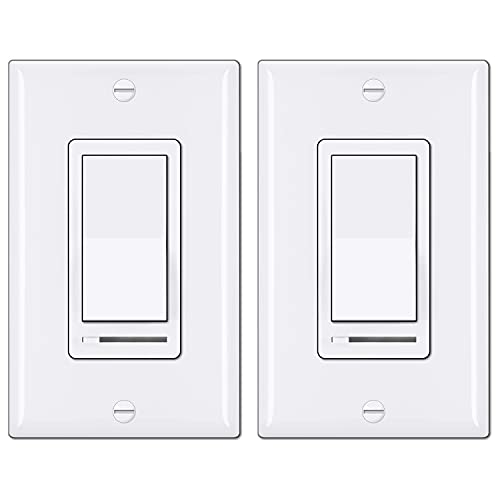
BESTTEN 2 Pack Dimmer Light Switch, Universal Lighting Control, Single Pole or 3 Way, Compatible with LED Dimmable Lamp, CFL, Incandescent, Halogen Bulb, Decorator Wallplate Included, UL Listed, White
Eliminate Flickering: NOTE: This dimmer has an adjustable dimming range. Please rotate the SIDE ADJUSTMENT WHEEL to eliminate…
As an affiliate, we earn on qualifying purchases.
As an affiliate, we earn on qualifying purchases.
What Causes LED Flickering on Dimmer Switches?
Flickering often occurs when LED bulbs and dimmer switches aren’t fully compatible, causing the electrical flow to fluctuate. This can happen due to poor dimmer compatibility, where the switch isn’t designed for LEDs, or wiring issues that disrupt consistent power delivery. When the wiring isn’t properly configured, it can lead to unstable current flow, resulting in flickering. Additionally, incompatible dimmer types may not regulate the LED’s brightness smoothly, amplifying flicker problems. To minimize flickering, ensure your dimmer switch is rated for LED bulbs and that wiring connections are secure and correct. Addressing these issues improves electrical flow stability, reducing flickering and ensuring your LEDs operate smoothly. Proper compatibility and wiring setup are essential for a flicker-free experience. Understanding electrical flow and how it affects LED performance can help you troubleshoot more effectively. Checking for dimmer switch compatibility before installation can save you time and prevent flickering issues. Additionally, selecting compatible dimmer switches designed specifically for LED bulbs can significantly reduce flickering problems.

PHILIPS LED 60W A19 4-Pack Ultra Definition Soft White LED Light Bulbs (2700K) 800 Lumen (8W = 60W) Dimmable Clear Flicker-Free Light Bulbs
Ultra Definition bulbs are equipped with a color rendering index of 95 (CRI95) bringing out the true colors…
As an affiliate, we earn on qualifying purchases.
As an affiliate, we earn on qualifying purchases.
How Can I Check If My LED Bulbs and Dimmer Are a Match?
To guarantee your LED bulbs work smoothly with your dimmer, you need to check their compatibility specifications. You can do this by reviewing the bulb and dimmer packaging or manufacturer details. Testing methods, like using a compatible dimmer or trying the bulbs in different fixtures, can also help confirm a good match. Additionally, verifying that your setup is free from scams or fraudulent products can ensure you’re investing in quality components. Ensuring the use of vetted products helps prevent issues like flickering and prolongs the lifespan of your LED bulbs. When selecting components, consider the best-rated models to achieve reliable performance and avoid compatibility problems. Properly matching these components based on pool safety and electrical codes is also crucial for safe operation. Being aware of the signs of incompatibility can help you troubleshoot issues early and avoid unnecessary replacements.
Compatibility Specifications Check
Checking if your LED bulbs and dimmer switch are compatible is essential for smooth operation. To do this, review the compatibility specifications provided by the manufacturer. Confirm that your LED bulbs are rated for dimming and match the wattage range of the dimmer. Proper LED dimmer matching ensures ideal performance and prevents flickering. Additionally, verifying that your setup adheres to affiliate disclosure guidelines helps maintain transparency and trust with consumers. Ensuring that the compatibility specifications are clearly communicated can help prevent issues like flickering or insufficient dimming performance. Being aware of dark psychology tactics used in marketing can also help consumers make more informed choices and avoid misleading product claims. Checking the user reviews and feedback can provide practical insights into real-world performance and compatibility issues.
Compatibility Testing Methods
Since the only way to guarantee your LED bulbs and dimmer switch work seamlessly together is through direct testing, it’s important to utilize practical methods to verify compatibility. Start with simple LED testing by installing one bulb and gradually dimming it to see if flickering occurs. Check the dimmer compatibility by reviewing the switch’s specifications for LED compatibility; some dimmers are designed specifically for LEDs. If flickering persists, try swapping the bulb for a different brand or model that’s labeled as dimmer-compatible. You can also use a dimmer compatibility tester, which helps identify whether your setup can handle LED loads properly. Conducting these tests ensures your LED bulbs and dimmer switch work harmoniously, preventing flickering and optimizing performance. Understanding load capacity is also essential to prevent overloading your dimmer and causing flickering issues. Additionally, consulting manufacturer guidelines can provide insights into specific compatibility requirements, including dimmer compatibility charts that detail which switches work best with various LED bulbs. Recognizing electrical load differences can further help in selecting the right components for a flicker-free experience, and considering the overall electrical system can help identify underlying issues affecting performance.
How to Fix Flickering LEDs on Dimmer Switches Easily
Flickering LEDs on dimmer switches can be frustrating, but luckily, fixing the issue is often straightforward. Start by adjusting the dimmer switch calibration, which ensures the switch properly communicates with your LED bulb. If the flickering persists, consider replacing the LED bulb to improve its lifespan and compatibility. You can also check for loose wiring or connections that may cause inconsistent power flow. Additionally, using LED bulbs rated explicitly for dimmer switches can significantly reduce flickering issues. To deepen your understanding, consider these steps: – Fine-tune the dimmer’s calibration settings for smoother operation – Use LED bulbs rated explicitly for dimmer switches – Ensure wiring connections are secure and free from corrosion to prevent electrical issues. Selecting compatible bulbs can also help mitigate issues related to electrical compatibility and improve overall performance. Being aware of compatibility issues can help you choose the right setup and prevent flickering problems. Taking these actions can eliminate flickering and extend your LED’s lifespan, providing stable, flicker-free lighting.
Upgrading Your Dimmer and LED Bulbs for Flicker-Free Lighting
Upgrading your dimmer switch and LED bulbs is often the most effective way to achieve flicker-free lighting. Modern dimming technology, such as LED-compatible dimmers, ensures smooth adjustments and prevents flickering caused by incompatible hardware. Pairing these with high-quality LED bulbs designed for dimming extends bulb lifespan and maintains consistent light output. When choosing new bulbs, look for ones labeled as dimmer-compatible, which are engineered to work seamlessly with advanced dimming systems. Upgrading minimizes compatibility issues and improves overall lighting stability. Although it might involve an initial investment, this approach delivers reliable, flicker-free illumination and enhances bulb longevity. By selecting the right dimmer and bulbs, you create a more comfortable, steady lighting environment that lasts longer and functions better.
Could Wiring or Electrical Issues Be Causing Your LED Flicker?
Even after upgrading your dimmer switch and LED bulbs, wiring or electrical issues can still cause flickering. Wiring faults, such as loose connections or damaged wiring, disrupt stable power flow, leading to flickering lights. Electrical interference from nearby appliances or faulty circuits can also cause fluctuations in voltage, making LEDs flicker unpredictably. To diagnose these problems, consider checking for loose wires or connections at the switch and fixture. Additionally, ensure your wiring complies with electrical codes to prevent faults. Keep in mind that poor grounding or outdated wiring can contribute to flickering issues. Addressing wiring faults and reducing electrical interference often resolves persistent flickering, providing consistent LED performance without the need for further upgrades.
When Should You Call a Professional for Flickering Problems?
While minor flickering can sometimes be resolved with simple troubleshooting, persistent or severe flickering signals a problem that requires professional attention. If your LED lights continue to flicker despite trying basic fixes, it’s time to seek a professional consultation. Ignoring persistent flicker can compromise electrical safety and may indicate underlying wiring issues or incompatible dimmers. Call a licensed electrician to diagnose the problem, especially if you notice flickering across multiple fixtures or during specific dimmer adjustments. Professional assessment ensures proper repair, reduces fire risk, and guarantees your home’s electrical system remains safe. Don’t compromise your safety or the longevity of your LED setup—trust a professional to handle complex flickering problems safely and effectively.
Tips to Maintain Smooth, Flicker-Free LED Dimming
To guarantee smooth, flicker-free LED dimming, you need to start with compatible dimmers designed for LEDs. Make sure to use LED-optimized bulbs, as they’re built to work well with these switches. Finally, adjusting the dimmer settings can fine-tune performance and eliminate flickering issues.
Choose Compatible Dimmers
Choosing the right dimmer switch is essential for guaranteeing smooth, flicker-free LED lighting. To do this, verify the dimming compatibility of the switch with your LEDs and ensure it matches your bulb selection. Not all dimmers work well with LED bulbs, so choosing a switch designed specifically for LEDs can prevent flickering.
Key tips include:
- Check the packaging or product specs for dimming compatibility with LED bulbs.
- Match the dimmer’s load rating to your total bulb wattage.
- Select dimmers labeled as “LED-compatible” for top performance.
Use LED-Optimized Bulbs
Using LED-optimized bulbs is essential for achieving smooth, flicker-free dimming. These bulbs are designed with better dimming compatibility, guaranteeing they work seamlessly with your dimmer switch without flickering or buzzing. When you choose bulbs labeled as LED-optimized, you improve the chances of maintaining consistent performance throughout the bulb’s lifespan. This not only enhances your lighting experience but also extends the bulb’s longevity, saving you money in the long run. Avoid generic or incompatible bulbs that may cause flickering or reduce dimmer efficiency. By investing in LED-optimized bulbs, you ensure your dimming system functions smoothly, providing a stable, flicker-free lighting environment that lasts longer and performs better.
Adjust Dimmer Settings
Adjusting your dimmer settings is essential for guaranteeing smooth, flicker-free LED lighting. Start by verifying dimmer compatibility with your LED bulbs, as incompatible switches cause flickering. Next, fine-tune the bulb brightness adjustment to find the most suitable dimming level that minimizes flicker. You can do this by gradually lowering or increasing the dimmer until the light remains steady. Keep in mind that some dimmers have fine-tuning controls or trim adjustments—use these features to improve performance. Additionally, ensure your dimmer switch supports LED bulbs specifically, as older dimmers may need replacing for better compatibility. Properly adjusting your dimmer settings helps maintain consistent illumination and prolongs your LED bulbs’ lifespan.
Frequently Asked Questions
Can LED Flickering Damage My Dimmer Switch or Bulbs?
LED flickering won’t damage your dimmer switch or bulbs directly, but it can affect bulb longevity and lead to premature failure. Continuous flickering indicates poor dimmer compatibility or electrical issues, which might stress the components over time. To prevent damage, make certain your bulbs are compatible with your dimmer switch and consider upgrading to a dimmer designed specifically for LEDs. Proper setup helps extend your bulbs’ lifespan and keeps everything functioning smoothly.
Are There Specific LED Bulb Brands That Work Best With Dimmers?
You should look for LED bulbs that specify brand compatibility with dimmers, as some brands are better suited for dimmer switches. High-quality bulbs generally have better circuitry, reducing flickering issues. Brands like LIFX, Philips Hue, and GE tend to work well with dimmers because they prioritize bulb quality and compatibility. Always check the packaging for dimmer compatibility to guarantee smooth dimming performance and avoid flickering.
How Does Ambient Temperature Affect LED Flickering?
Ambient temperature affects LED flickering because thermal effects impact the bulb’s internal components. When temperatures are too high or too low, temperature regulation becomes challenging, causing inconsistent electrical flow. This can lead to flickering, especially on dimmers. To prevent this, make certain of proper ventilation and avoid placing LEDs in areas with extreme temperatures. Maintaining a stable environment helps keep thermal effects in check and reduces flickering issues.
Is It Safe to Use Non-Dimmable LEDS With Dimmer Switches?
Using non-dimmable LEDs with dimmer switches is like fitting a square peg into a round hole. It’s not recommended because of compatibility concerns and installation challenges that can cause flickering or damage. These LEDs aren’t designed to handle dimmer controls, risking poor performance or safety issues. Always choose LEDs labeled as dimmable, ensuring a smooth, flicker-free experience and avoiding potential hazards.
Do LED Flickers Indicate a Wiring or Electrical Safety Issue?
LED flickering can sometimes signal wiring issues or safety concerns, so you should take it seriously. If your LEDs flicker, check for loose or faulty wiring connections, and verify your dimmer switch is compatible with LEDs. Ignoring flickering might lead to electrical hazards, so it’s best to have a professional inspect your wiring if you’re unsure. Addressing these issues promptly helps keep your home safe and your lights functioning properly.
Conclusion
Flickering LEDs can be frustrating, but understanding the causes helps you troubleshoot effectively. While upgrading your dimmer and bulbs offers a solution, sometimes the issue runs deeper, involving wiring or electrical problems. Addressing flicker requires a balance between simple fixes and knowing when to call a professional. Ultimately, smooth, flicker-free lighting isn’t just about technology—it’s about creating a comfortable, reliable environment where illumination feels natural, not unpredictable.