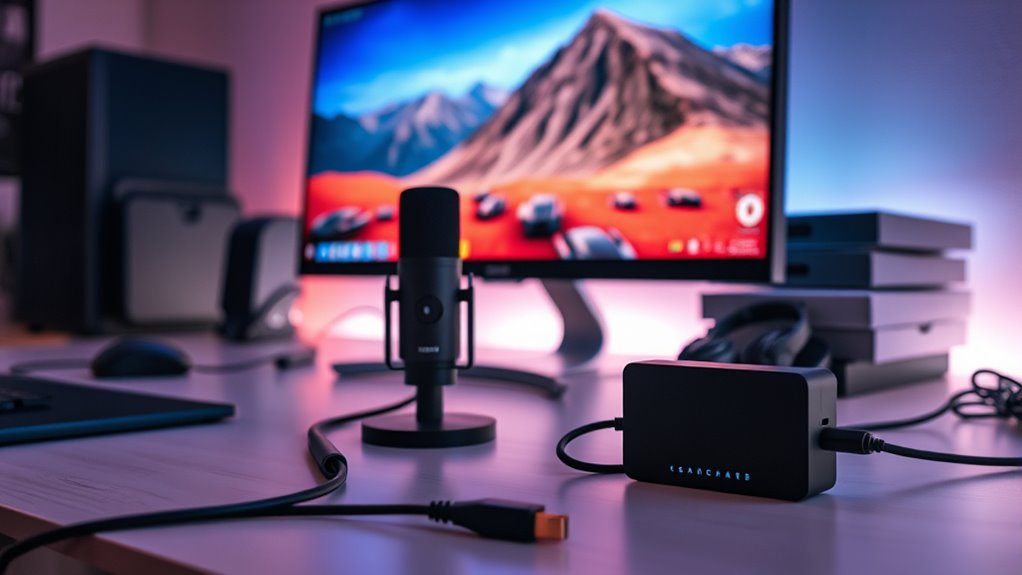

If you’re after the best 4K60 streaming capture cards, I recommend checking out options like the Elgato 4K S, AVerMedia GC311G2, and Elgato HD60 X, which combine high quality with low latency. For professional setups, the Elgato 4K Pro offers 8K passthrough and advanced features. Whether you’re a gamer or content creator, each of these tools can elevate your streams. Continue exploring to find the perfect match for your setup and needs.
Key Takeaways
- Look for models supporting 4K60 HDR passthrough with reliable low-latency streaming and recording.
- Consider compatibility with your devices, such as PCs, consoles, and smartphones, for seamless integration.
- Prioritize plug-and-play external options for ease of setup or internal PCIe cards for professional use.
- Check for features like HDMI 2.1 support, VRR, and 5.1 audio for immersive, high-quality visuals.
- Review user ratings and reliability to ensure the capture card meets your streaming and content creation needs.
AVerMedia Capture Card for Streaming (GC311G2)


If you’re looking for a reliable, plug-and-play capture card that delivers stunning 4K60 HDR passthrough, the AVerMedia StreamLine MINI+ GC311G2 is an excellent choice. It supports seamless gaming on Switch 2, Xbox, PS5, PC, Mac, and iPadOS devices, with no drivers needed. You can record 1080p60 videos while streaming in high resolution and enjoy ultra-low latency passthrough for real-time response. Its compact design makes it easy to set up and transport. Compatible with Windows 10/11, macOS 14/15, and iPadOS 17, it’s perfect for streamers who want high-quality performance without fuss.
Best For: streamers and gamers seeking high-quality 4K60 HDR passthrough and easy plug-and-play setup across multiple devices including consoles, PC, Mac, and iPadOS.
Pros:
- Supports 4K60 HDR passthrough with 1080p60 recording for versatile content creation
- Plug-and-play design with no drivers needed, compatible with Windows, macOS, and iPadOS
- Ultra-low latency passthrough ensures real-time response during gameplay and streaming
Cons:
- Limited to 1080p60 recording, which may not satisfy those needing higher resolution recordings
- No built-in streaming software, requiring users to use compatible platforms like OBS or Streaming Center
- Slightly higher price point compared to basic capture cards with fewer features
Elgato 4K S External Capture Card for PS5, Xbox Series X/S, Switch, PC, Mac, iPad

The Elgato 4K S External Capture Card stands out as an excellent choice for gamers and content creators who demand high-quality 4K60 recording with minimal latency. It supports resolutions up to 4K60, 1440p120, or 1080p240, with HDR10 and VRR passthrough, ensuring smooth gameplay and vivid visuals. Compatible with PS5, Xbox Series X/S, Switch, PC, Mac, and iPad, it offers a plug-and-play setup with a USB-C connection. Its compact size (112 x 72 x 18 mm) and near-zero latency make it perfect for streaming and recording across multiple platforms, delivering crisp, cinematic-quality content easily.
Best For: gamers and content creators seeking high-quality 4K60 recording with minimal latency across multiple platforms including PS5, Xbox Series X/S, Switch, PC, Mac, and iPad.
Pros:
- Supports 4K60, HDR10, and VRR passthrough for smooth, vivid gameplay
- Compact, portable design with plug-and-play USB-C connection
- Near-zero latency ensures seamless streaming and recording
Cons:
- Capture resolution limited to 1080p60 on Windows for recording (not 4K)
- Requires compatible CPU and GPU for optimal performance
- May be more expensive than lower-resolution capture options
Elgato HD60 X Game Capture Card

Looking for a reliable capture card that delivers stunning 4K30 HDR10 or smooth 1080p60 HDR10 streaming? The Elgato HD60 X is an excellent choice. It supports 4K60 HDR10 passthrough and captures gameplay in 4K30 or 1080p60 HDR10, ensuring vibrant colors and sharp detail. Its plug-and-play setup works seamlessly on Windows and Mac, with no drivers needed. Compatible with popular consoles like PS5, Xbox Series X/S, and Nintendo Switch 2, it also offers ultra-low latency under 100ms for smooth streaming. Whether you’re gaming or creating content, the HD60 X delivers high-quality performance with minimal hassle.
Best For: gamers, streamers, and content creators seeking high-quality, reliable 4K HDR capture and streaming with minimal latency.
Pros:
- Supports 4K30 HDR10 and 1080p60 HDR10 for vibrant, sharp visuals
- Plug-and-play setup compatible with Windows and Mac, no drivers needed
- Ultra-low latency under 100ms ensures smooth, synchronized streaming
Cons:
- Capture resolution currently limited to 4K30 HDR10 on Windows only, not on Mac
- Slightly higher price point compared to basic capture cards
- Requires compatible hardware specifications, such as a robust CPU and GPU, for optimal performance
AVerMedia 4K60 Capture Card with HDMI 2.1

Gamers and streamers seeking seamless 4K60 gameplay and streaming will find the AVerMedia GC553G2 Live Gamer Ultra with HDMI 2.1 to be an excellent choice. It captures and streams in 4K60, supporting popular consoles like PS5, Xbox Series X/S, Nintendo Switch, and PC or Mac. Its HDMI 2.1 pass-through offers 4K144 HDR/VRR for smooth gameplay, while low latency capture guarantees real-time recording. The compact design includes customizable RGB lighting and easy setup, with support for HDR, VRR, and 5.1 audio, including live party chat. Rated 4.1 stars, it’s a reliable, versatile option for serious gamers and content creators.
Best For: gamers and streamers seeking high-quality 4K60 gameplay capture and streaming with ultra-low latency and compatible with major consoles and streaming platforms.
Pros:
- Supports 4K60 HDR/VRR pass-through for smooth, high-quality gameplay
- Compact design with customizable RGB lighting for enhanced aesthetics
- Compatible with Windows 10/11, popular streaming platforms, and live party chat integration
Cons:
- Slightly higher price point compared to basic capture cards
- Requires a compatible system with sufficient hardware and software setup
- Rated 4.1/5 stars, indicating some users may experience minor issues or limitations
Elgato 4K Pro Internal Capture Card (8K60 Passthrough)

If you’re aiming for professional-quality streams with top-tier resolution and minimal latency, the Elgato 4K Pro Internal Capture Card (8K60 Passthrough) stands out as an ideal choice. It easily connects to apps like OBS, Streamlabs, and Zoom, and streams flawlessly across platforms such as YouTube, Twitch, and Facebook Gaming. You can capture gameplay in stunning 4K60 or enjoy immersive 8K60 passthrough for high-resolution gameplay. With HDMI 2.1 inputs and outputs, it supports devices like PS5 Pro and Xbox Series S. Its VRR passthrough delivers smooth visuals, while ultra-low latency guarantees your streams and gameplay stay perfectly synchronized.
Best For: content creators, professional streamers, and gamers seeking high-resolution, low-latency streaming and recording solutions with versatile device compatibility.
Pros:
- Supports up to 8K60 passthrough and 4K60 HDR10 for exceptional video quality.
- Compatible with a wide range of apps and platforms including OBS, Streamlabs, Twitch, YouTube, and more.
- Utilizes HDMI 2.1 for seamless connection with the latest gaming consoles like PS5 Pro and Xbox Series S.
Cons:
- May require a powerful PC setup to handle 8K and high frame rate streaming effectively.
- Installation and setup could be complex for beginners unfamiliar with internal PCIe devices.
- Premium price point might be a consideration for budget-conscious users.
Capture Card for Nintendo Switch and Consoles (4K HDMI to USB 3.0)

This capture card is an excellent choice for streamers and content creators who want smooth, high-quality gameplay from their Nintendo Switch and other HDMI devices. It supports 1080p at 60FPS, ensuring clear and fluid visuals, and features USB 3.0 for low-latency, real-time streaming. Its plug-and-play design means no drivers or external power are needed, making setup quick and easy. HDMI loop-out lets you play without lag, while optional audio and microphone inputs enhance your commentary. Compatible with Windows and Mac, it’s perfect for live streaming on platforms like Twitch, YouTube, and Facebook, whether you’re gaming, recording, or broadcasting.
Best For: streamers, content creators, and gamers seeking high-quality, low-latency gameplay capture from Nintendo Switch and other HDMI devices.
Pros:
- Supports 1080p at 60FPS for smooth, clear visuals.
- Plug-and-play design requires no drivers or external power, simplifying setup.
- HDMI loop-out allows gameplay without lag, enhancing streaming experience.
Cons:
- Limited to 1080p resolution; does not support 4K capture.
- May have compatibility issues with certain software or older operating systems.
- No built-in advanced editing or streaming features, requiring external software for customization.
AVerMedia 4K60 HDMI Capture Card for Live Streaming and Video Conferencing

The AVerMedia CamStream 4K BU113G2 stands out as an ideal choice for content creators and professionals who need high-quality, low-latency streaming solutions. It captures 4K60fps with true-to-life RGB24 colors, ensuring vibrant, detailed videos. Its zero-lag performance makes it perfect for live streaming, video conferencing, webinars, and e-sports. The plug-and-play setup requires no drivers, transforming DSLRs, mirrorless cameras, or GoPros into webcams instantly. Compatible with Windows, macOS, iPadOS, and Android, it supports popular platforms like OBS, Zoom, and Twitch. Its compact design and high-fidelity audio make it versatile for various professional and casual streaming environments.
Best For: content creators, streamers, and professionals seeking high-quality, low-latency 4K streaming and video conferencing solutions.
Pros:
- Captures 4K60fps video with vibrant RGB24 true-to-life colors for detailed visuals
- Zero-lag, ultra-low latency performance ideal for live streaming, gaming, and video calls
- Plug-and-play setup with no drivers needed, compatible with multiple operating systems and platforms
Cons:
- Limited to HDMI input; cannot be used with devices without HDMI output without additional adapters
- Slightly larger footprint may be less suitable for ultra-compact setups
- Requires a compatible device with sufficient USB-C or USB-A ports for optimal performance
AVerMedia HDMI 2.1 Internal PCIe Capture Card for 4K60 Streaming

Gamers and streamers demanding professional-quality 4K60 gameplay capture will find the AVerMedia HDMI 2.1 Internal PCIe Capture Card, model Live Gamer 4K 2.1 (GC575), to be an exceptional choice. It supports HDMI 2.1 for fast data transfer, enabling smooth streaming and recording at 4K60 resolution with ultra-low latency for seamless gameplay. Designed to work with modern consoles like PS5, Xbox Series X/S, and Nintendo Switch, it guarantees high-quality captures with minimal delay. Its compatibility and performance make it perfect for content creators who want professional-grade results straight from their PC.
Best For: professional gamers and content creators seeking high-resolution, low-latency 4K60 gameplay capture for streaming and recording on modern gaming consoles and PCs.
Pros:
- Supports HDMI 2.1 for high-speed data transfer and 4K60 resolution.
- Ultra-low latency ensures seamless gameplay and live streaming.
- Compatible with a wide range of gaming consoles like PS5, Xbox Series X/S, and Nintendo Switch.
Cons:
- Requires a PCIe slot in the PC, which may not be available in all systems.
- May involve a higher cost compared to lower-resolution capture cards.
- Setup and configuration might be complex for beginners unfamiliar with PCIe hardware.
AVerMedia GC573 Live Gamer 4K Internal Capture Card

If you’re looking for a high-performance internal capture card that delivers stunning 4K60 HDR10 pass-through, the AVerMedia GC573 Live Gamer 4K is an excellent choice. It’s an internal PCIe card designed for seamless gaming and content creation, compatible with consoles like PS5, Xbox Series X/S, and PC. It supports ultra-smooth gameplay at 4K60 HDR10, with capture capabilities of up to 240 FPS at 1080p or 120 FPS at 1440p. Installation is straightforward—just insert it into your PCIe slot—no drivers needed. Plus, it offers ultra-low latency, ensuring zero lag during live streams or recordings, making it perfect for professional and casual streamers alike.
Best For: streamers, content creators, and gamers seeking high-quality 4K HDR pass-through with ultra-low latency for professional or casual gameplay and streaming.
Pros:
- Supports 4K60 HDR10 pass-through for stunning visuals and vibrant colors
- Ultra-low latency with zero-lag pass-through ensures real-time gameplay and streaming
- Easy plug-and-play setup without the need for drivers or external power
Cons:
- Only compatible with PCIe slots, limiting installation options for some users
- May require a powerful PC system to handle high-resolution capture and streaming
- No included external accessories or additional features beyond core capture and pass-through capabilities
NearStream 4K HDMI Capture Card in USB 3.0 for Streaming and Recording

For streamers and content creators seeking high-quality video capture without complicated setup, the NearStream 4K HDMI Capture Card in USB 3.0 stands out. It supports HDMI input/output up to 4K@60fps, but captures at 1080P60 for smooth streaming and recording from devices like PS5, Switch, or cameras. Its plug-and-play design requires no drivers on Windows or Mac, ensuring easy setup. Ultra-low latency keeps audio and video perfectly synced, and the built-in 3.5mm audio interface lets me connect headsets or microphones. Compact and lightweight, it’s ideal for on-the-go streaming on popular platforms like YouTube and Facebook Gaming.
Best For: content creators and streamers seeking an easy-to-use, high-quality HDMI capture solution for live streaming and recording.
Pros:
- Supports HDMI input/output up to 4K@60fps, with 1080P60 recording for smooth video.
- Plug-and-play design requires no drivers on Windows or Mac, simplifying setup.
- Ultra-low latency ensures perfect audio-video sync, and built-in 3.5mm audio interface allows microphone or headset connection.
Cons:
- Captures at 1080P60 for recording, so it does not record in 4K resolution directly.
- Limited to USB 3.0 ports, which may require adapters for some devices.
- Small form factor may be less durable for rough handling or travel.
Elgato Game Capture Neo USB Portable Capture Card

The Elgato Game Capture Neo USB Portable Capture Card stands out for its compact design and plug-and-play setup, making it ideal for content creators and streamers who need a portable solution. Measuring just 123 x 65 x 20 mm and weighing only 90 grams, it easily fits into any setup or travel bag. Connecting via USB 3.0, it supports 4K60 HDR passthrough for high-quality gameplay without lag. Compatible with Windows, macOS, iPadOS, and various consoles like PS5, Xbox, and Switch, it delivers smooth 1080p60 recordings. Its user-friendly design and versatile compatibility make it perfect for on-the-go streaming, recording, and content creation.
Best For: content creators and streamers seeking a portable, high-quality capture device for on-the-go gaming and streaming across multiple platforms.
Pros:
- Compact and lightweight design for easy portability and travel
- Supports 4K60 HDR passthrough for high-quality, lag-free gameplay
- Compatible with Windows, macOS, iPadOS, and consoles like PS5, Xbox, and Switch
Cons:
- Recording is limited to 1080p60, not 4K recording
- Requires USB 3.0 port for optimal performance, which may not be available on older devices
- No built-in storage or advanced features, relying on third-party software for recording and streaming
AVerMedia HDMI Capture Card for Streaming and Gaming
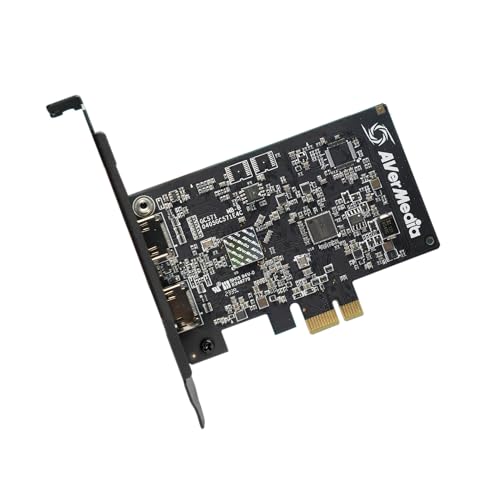
Gamers and streamers seeking ultra-responsive gameplay will appreciate the AVerMedia GC571 Live Streamer Ultra HD capture card, which offers 4K60 pass-through and 4K30 capture. It supports HDMI 2.0 sources, delivering immersive visuals with minimal latency, plus VRR for tear-free gameplay. The device also access 1080p120FPS high frame rate for smooth, detailed recordings. Easy to install, it’s compatible with various PCIe slots and Windows 11. Rated highly with a 4.6-star average, it’s a reliable choice for high-quality streaming and gaming. Whether upgrading your setup or building a new one, the GC571 guarantees stunning visuals and seamless performance.
Best For: gamers and streamers seeking high-quality, ultra-responsive gameplay with seamless streaming capabilities.
Pros:
- Supports 4K60 pass-through and 4K30 capture for stunning visuals
- VRR support ensures tear-free, smooth gameplay
- Plug-and-play compatibility with various PCIe slots and Windows 11
Cons:
- Slightly higher price point compared to basic capture cards
- Requires PCIe slot availability in the gaming PC
- Limited to HDMI 2.0 sources, not compatible with older HDMI versions
AVerMedia 4K HDMI Capture Card for Streaming and Recording

If you’re looking for a reliable capture card that delivers professional-quality 4K60 HDR streaming and recording, the AVerMedia GC553Pro Live Gamer Ultra S is an excellent choice. It captures gameplay in stunning 4K resolution and supports HDR and VRR pass-through for smooth visuals. Compatible with PS5, Xbox Series X/S, Nintendo Switch 2, PC, and Mac, it works seamlessly with OBS Studio and Streamlabs. Its plug-and-play design requires no drivers or external power, making setup quick and easy. With low latency, true-to-life colors, and support for ultra-wide resolutions, it’s perfect for streamers and content creators seeking high-quality, reliable performance.
Best For: streamers and content creators seeking professional-quality 4K60 HDR gameplay capture and streaming with seamless setup and ultra-wide support.
Pros:
- Supports 4K60 HDR/VRR pass-through for smooth, high-quality gameplay and streaming.
- Plug-and-play design requires no drivers or external power, ensuring quick setup.
- Compatible with a wide range of devices including PS5, Xbox Series X/S, Nintendo Switch 2, PC, and Mac, plus popular streaming platforms like OBS and Streamlabs.
Cons:
- Weighs nearly 15 ounces, which may be less portable for some users.
- Price may be higher compared to basic capture cards with lower resolution support.
- Limited information on included accessories or bundled software options.
AVerMedia Live Gamer Ultra 2.1 HDMI Capture Card

For streamers and content creators seeking professional-grade visuals, the AVerMedia Live Gamer Ultra 2.1 HDMI Capture Card stands out with its true 4K60 HDR10 capture and HDMI 2.1 pass-through. It delivers smooth, high-quality visuals with near-zero-lag, low latency streaming, making it ideal for real-time gameplay and tutorials. Compatible with PS5, Xbox Series X|S, Nintendo Switch 2, PC, Mac, and iPadOS 17, it supports HDMI 2.1, VRR, and customizable RGB lighting. Its plug-and-play setup via USB 3.2 Gen 2 Type-C ensures easy installation, while optimized software like OBS Studio and Streamlabs enhances your streaming experience.
Best For: streamers, content creators, and gamers seeking professional-quality 4K HDR gameplay capture with minimal latency and easy setup.
Pros:
- Captures true 4K60 HDR10 with HDMI 2.1 pass-through for high-quality visuals
- Near-zero-lag, low latency streaming ideal for live gameplay and tutorials
- Compatible with multiple platforms including PS5, Xbox Series X|S, Nintendo Switch 2, PC, Mac, and iPadOS 17
Cons:
- Weighs 4.1 ounces, which may be less portable for on-the-go use
- Limited detailed reviews as it is a newer product first available in late December 2023
- Requires USB 3.2 Gen 2 Type-C port, which may not be available on older devices
AVerMedia Elite Go USB-C Capture Card for Streaming

The AVerMedia Elite Go USB-C Capture Card stands out as an ideal choice for portable streamers and content creators who need a versatile, compact device. It captures 1080p at 60FPS, guaranteeing smooth, full HD streaming and recording. Its docking features support 4K60Hz HDMI output, making it compatible with TVs and external monitors, and it functions as a dock for devices like Nintendo Switch, Steam Deck, and PS Portal. Plus, it doubles as a multi-function USB-C hub, providing device charging, data transfer, and hardware expansion. Its lightweight design makes it perfect for travel, and the included fast charger ensures your setup stays powered during long streams.
Best For: streamers, gamers, and content creators who need a portable, versatile device for high-quality streaming, recording, and multi-device connectivity.
Pros:
- Supports 1080p 60FPS HD capture and 4K60Hz HDMI output for versatile streaming and display options
- Combines multiple functions as a capture card, dock, and USB-C hub, reducing the need for multiple devices
- Compact, lightweight design with included fast charger makes it ideal for travel and on-the-go setups
Cons:
- May require additional setup for optimal compatibility with certain devices or software
- Limited to 1080p 60FPS for capture, which may not meet the needs of all high-end streaming requirements
- The multi-function design could be complex for users unfamiliar with docking or hardware expansion features
Factors to Consider When Choosing 4K60 Streaming Capture Cards
When choosing a 4K60 streaming capture card, I focus on compatibility with my devices, ensuring it works seamlessly with my setup. I also consider resolution, frame rates, and latency to keep my streams smooth and responsive. Ultimately, I look at connection options and software support to make sure everything integrates smoothly and is easy to use.
Compatibility With Devices
Choosing the right 4K60 streaming capture card hinges on guaranteeing it’s compatible with your devices. First, check if it supports your gaming console, PC, or other devices like Mac or iPadOS, to prevent connection issues. Compatibility with your operating system—Windows, macOS, or iPadOS—is vital for smooth operation and driver support. Also, verify that the capture card supports HDMI standards such as HDMI 2.0 or HDMI 2.1, which are essential for handling 4K60 HDR passthrough and high frame rates. Additionally, consider the connection interface—USB 3.0, USB-C, or PCIe—matching your computer’s ports for peak performance. Finally, review manufacturer specs to guarantee compatibility with peripherals like microphones or headsets, so your entire setup works seamlessly without conflicts.
Resolution and Frame Rates
Ensuring your capture card can handle the right resolution and frame rates is vital for delivering smooth, high-quality streams. For true 4K60 streaming, the device must support 4K resolution at 60 frames per second, which captures crisp details and fluid motion. It’s also beneficial if the card can handle higher frame rates like 120 or 240 fps at lower resolutions such as 1080p, ensuring smooth gameplay footage. HDR support at 4K60 is another key feature, as it maintains vibrant colors and dynamic range during streaming. Additionally, a good capture card should pass through 4K60 HDR signals without lag or quality loss, preserving the integrity of your gameplay. Multi-resolution recording options also add versatility, allowing you to customize content for different platforms and audiences.
Latency and Response Time
Latency and response time are critical factors that directly impact your streaming experience and gameplay accuracy. Low latency capture cards typically have response times under 100 milliseconds, ensuring real-time synchronization of gameplay and streaming. Ultra-low latency devices support instant audio and video transmission, minimizing delays that can affect viewer engagement and your reactions. The latency response depends on both the hardware’s processing speed and the connection interface; USB 3.0 and HDMI 2.1 offer faster data transfer rates, reducing lag. Higher response times cause noticeable delays between your actions and on-screen display, degrading overall quality. When selecting a 4K60 capture card, prioritize models with verified low latency specifications to guarantee seamless, near-instantaneous performance during live streams and gameplay sessions.
Connection Ports and Types
When selecting a 4K60 streaming capture card, the connection ports and types play a crucial role in achieving smooth, high-quality streams. Look for HDMI 2.0 or higher ports to support 4K60 HDR passthrough and capture without compression issues. USB-C, USB 3.0, or PCIe connections provide the high data transfer rates necessary for real-time streaming, guaranteeing minimal latency and smooth playback. Multiple HDMI input and output ports are beneficial for pass-through and multi-source capture, offering flexibility during live sessions. Additionally, check for audio input/output options like 3.5mm jacks to manage sound seamlessly. Finally, verify that the device’s connection type is compatible with your computer or console’s ports to avoid setup complications and guarantee peak performance.
Software and Compatibility
Choosing a compatible capture card is vital for smooth streaming, so you’ll want to verify that it works seamlessly with your operating system, whether that’s Windows 10/11, macOS, or iPadOS. Make sure it supports popular streaming platforms like OBS Studio, Streamlabs, or XSplit to guarantee easy broadcasting. Look for devices with driverless, plug-and-play functionality to simplify setup and reduce potential issues. Additionally, confirm that the capture card supports the video formats and resolutions you need, such as HDR10, VRR, or 4K60 pass-through. Compatibility with your existing software and hardware ecosystem is also essential; it should work well with your preferred streaming tools and third-party apps. This ensures a hassle-free experience and high-quality streams without technical glitches.
Size and Portability
Since portability is key for on-the-go streaming, smaller capture cards are often the best choice. Compact designs typically measure less than 5 inches in length and width, making them easy to pack into bags or backpacks. Their lightweight build, often under a pound, minimizes strain during travel and is ideal for mobile content creators. The smaller size also helps guarantee compatibility with limited desk space, fitting seamlessly into various setups. Additionally, a compact device simplifies connecting cables and mounting options, making setup quicker and more convenient. When choosing a capture card, consider how its size will impact your mobility and workspace. A smaller, portable device can enhance your flexibility, whether you’re streaming from a coffee shop, event, or different gaming locations.
Power and Connectivity
Selecting a 4K60 capture card with the right power and connectivity options is essential for smooth, reliable streaming. Make sure it supports high-bandwidth interfaces like HDMI 2.0, HDMI 2.1, or USB 3.0/3.2 Gen 2, which are crucial for transmitting 4K60 HDR content without lag or frame drops. Check that your computer’s ports—whether PCIe, USB-C, or USB-A—are compatible with the device to ensure seamless setup. Low-latency pass-through features like VRR or HDR help maintain smooth gameplay during live streams. Also, verify the power requirements; some cards need external power sources or specific power delivery standards. Sufficient bandwidth and data transfer rates are vital to support 4K60 HDR streams, ensuring crisp visuals without artifacts.
Price and Value
When evaluating 4K60 capture cards, understanding their price and overall value helps guarantee you get the best performance for your budget. Higher-priced options often come with advanced features like HDR support, VRR, and ultra-low latency, which are valuable for professional streamers seeking top quality. However, budget models may lack features like HDR10, 4K passthrough, or multi-platform compatibility, which can impact their overall value. It’s important to compare the price-to-performance ratio; a more affordable card that reliably streams 4K60 can often be a smarter choice than a costly, underwhelming one. Additionally, some capture cards include bundled accessories or software upgrades that boost their perceived value. Regular price comparisons and discounts are key to maximizing your investment, especially if you don’t need every high-end feature.
Frequently Asked Questions
How Do Capture Cards Impact Overall Gaming Performance?
Capture cards can improve my gaming experience by offloading the video processing from my PC, reducing lag and ensuring smoother gameplay. They let me record or stream high-quality footage without impacting my game’s performance. However, choosing a good capture card matters because a poor-quality one can introduce latency or degrade video quality. Overall, a solid capture card enhances my gaming and streaming without sacrificing performance.
Are There Compatibility Issues With Certain Gaming Consoles?
Yes, there can be compatibility issues with certain gaming consoles. I’ve found that some capture cards work perfectly with Xbox but may have issues with PlayStation or Nintendo Switch, especially if firmware updates or specific ports are involved. It’s crucial to check the card’s compatibility list and make sure your console’s firmware is up-to-date. Doing this minimizes hiccups and guarantees smooth streaming and recording experiences.
What Is the Typical Latency Introduced by 4K60 Capture Cards?
Latency is the silent thief of seamless streaming, and with 4K60 capture cards, it typically ranges from 2 to 5 milliseconds. While it might seem tiny, it’s essential for real-time gameplay. I’ve found that high-quality cards with optimized drivers can keep latency low, ensuring your streams stay smooth and your gameplay remains responsive. Trust me, choosing the right card makes all the difference between lag and lagless perfection.
Can Capture Cards Be Used for Live Editing and Multi-Streaming?
Yes, I use capture cards for live editing and multi-streaming. They allow me to switch scenes, add overlays, and manage multiple streams smoothly in real-time. With a good capture card, I can record high-quality footage and broadcast to various platforms without noticeable lag. It’s a powerful tool that simplifies complex setups, making my live content more professional and engaging for viewers.
How Do Power Requirements Vary Among Different 4K60 Capture Cards?
Power requirements for 4K60 capture cards vary depending on the model and features. Some need only a USB connection, drawing minimal power, making them easy to set up. Others, especially internal PCIe cards, require more robust power supplies due to higher energy demands. I always check the specs before purchasing to guarantee my setup can support the card’s power needs, ensuring smooth performance without any hiccups.
Conclusion
Honestly, I never expected finding the perfect 4K60 capture card would be so seamless—like stumbling upon a hidden gem while exploring options. Whether you’re gaming on a console or streaming from your PC, there’s something here for everyone. The best part? These cards can turn your setup into a powerhouse, making seamless streaming feel almost like a happy coincidence. So, immerse yourself and discover which one aligns perfectly with your gaming and content creation dreams!