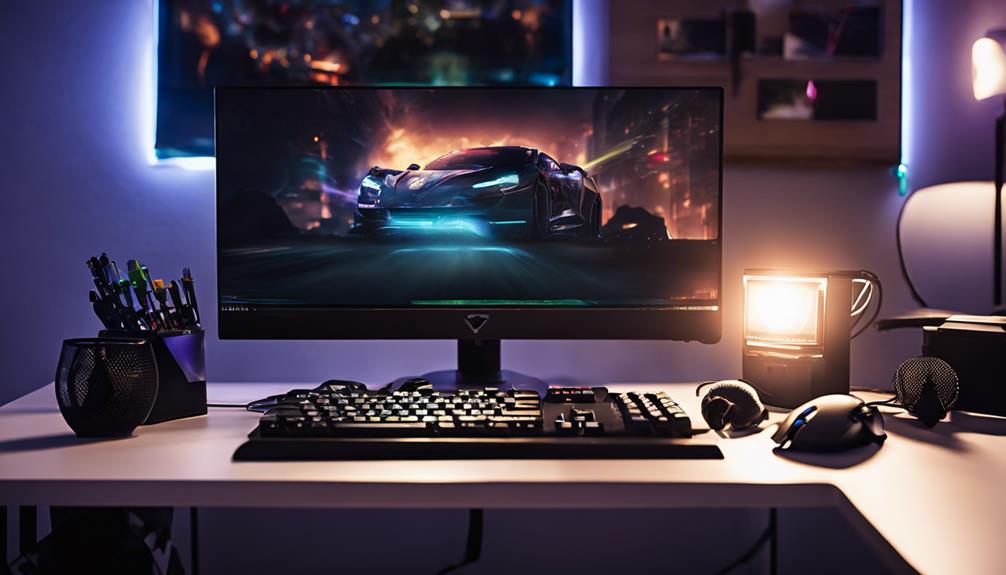

The best ambient lighting for gaming in this roundup is the Govee H6047 RGBIC Gaming Light Bars, a focused pick for adding color beside a gaming display without committing to a room-wide setup. For TV-based play, the Govee TV Backlight 3 Lite stands out for large screens, while the Govee RGBIC Smart TV LED Backlight Strip for 40–50-Inch TVs suits smaller displays. The main tradeoffs are screen-size fit, how much control you want through an app or remote, and whether you want light behind a display or around the room. Compare those choices with the lamps, wall lights, and other light bars in this guide. Continue reading for the full breakdown and help matching a pick to your gaming space.

Get furniture and decor delivered free with Prime
- Fast, free delivery on millions of items
- Prime Video, Amazon Music and more included
- Member-only deals all year
Complete the kit


Key Takeaways
- Screen size changes the shortlist: the 75–85-inch Govee TV Backlight 3 Lite, 40–50-inch Govee backlight, and 32–43-inch MATICOD strip target different TV dimensions, so a close size match matters more than choosing by brand alone.
- Light bars and TV strips solve different problems: the H6047 and other bars add localized light around a monitor or console, while backlight strips are designed to create a halo behind a TV.
- Room coverage favors lamps: the OIYN two-pack and Govee floor lamps spread light beyond the display, but take up more space than compact USB-powered bars.
- Control options vary across the lineup: app-connected models offer more ways to adjust a setup, while remote-controlled options can suit buyers who want simpler changes without relying on a phone.
- Extra color zones add flexibility, not automatic value: RGBIC and gradient designs can create more varied effects, but basic ambient glow may be better served by a simpler strip or bar.
| 12-Inch USB-Powered RGB Monitor Light Bar with Remote |  | Best for Simple Monitor Accents | Length: 12 inches | Power: USB, 5 volts DC | Wattage: 6 watt-hours | VIEW ON AMAZON | See Our Full Breakdown |
| Eastfine RGB LED Light Bars, 2-Pack, USB Powered with App Control and Music Sync |  | Best Value Two-Bar Setup | Set: 2 light bars | Dimensions: 1.18 × 1.18 × 12.59 inches each | Power: USB, 5 V DC | VIEW ON AMAZON | See Our Full Breakdown |
| OIYN Smart RGBICW LED Corner Floor Lamps, 2-Pack |  | Best for Lighting a Gaming Room | Quantity: 2 lamps | Colors: 16 million | Scene modes: 68 | VIEW ON AMAZON | See Our Full Breakdown |
| Govee TV Backlight 3 Lite LED Strip Lights for 75–85-Inch TVs |  | Best for Large-Screen Color Matching | TV compatibility: 75–85 inches | Strip length: 16.4 feet | Lighting technology: RGBICW LED | VIEW ON AMAZON | See Our Full Breakdown |
| Govee H6047 RGBIC Gaming Light Bars with Smart Controller |  | Best for PC Gaming Integration | Model: H6047 | Lighting technology: RGBIC LED | Colors: 16.8 million | VIEW ON AMAZON | See Our Full Breakdown |
| Govee Glide RGBIC Smart Wall Lights, 2 Panels |  | Best for Custom Wall Ambience | Model: H610A | Lighting: RGBIC LED, multicolor | Set contents: 2 panels, 6 sections total | VIEW ON AMAZON | See Our Full Breakdown |
| Velted RGB Music-Sync LED Light Bar with Remote |  | Best Simple Desk Accent | Model: DX21005-1 | Light source: LED | Lighting modes: 8 dynamic modes | VIEW ON AMAZON | See Our Full Breakdown |
| OIYN Smart RGBICW LED Corner Floor Lamp with App and Remote Control |  | Best for Tool-Free Setup | Lamp type: Floor lamp | Lighting technology: RGBICW LED | Colors: 16 million | VIEW ON AMAZON | See Our Full Breakdown |
| RGB+IC Corner Floor Lamp with App and Remote, Obsidian Black |  | Best for Flexible Manual Control | Dimensions: 7.87 × 7.87 × 59 in | Base diameter: 20 cm | Lighting: RGB+IC LED | VIEW ON AMAZON | See Our Full Breakdown |
| Govee RGBIC Smart TV LED Backlight Strip for 40–50-Inch TVs | 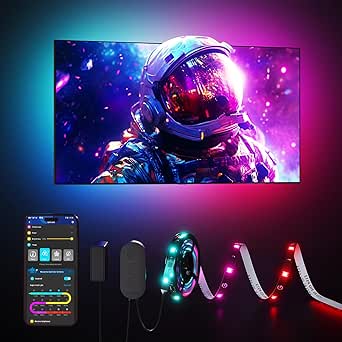 | Best for Compact TV Backlighting | Model: H6167 | TV compatibility: 40–50 inches | Strip length: 7.8 ft | VIEW ON AMAZON | See Our Full Breakdown |
| Govee Lantern Floor Lamp with Halo Gradient RGBIC Smart Lighting |  | Best for Flexible Room Ambience | Brightness: 1400 lumens | Color temperature: 1000K–10000K | Power: 24 W | VIEW ON AMAZON | See Our Full Breakdown |
| Govee Tree Floor Lamp with 3 Rotatable Lights and Matter Compatibility |  | Best for Directional Room Lighting | Number of lights: 3 independently adjustable | Brightness: Up to 1500 lumens total | Rotation: 350° horizontal and 90° vertical | VIEW ON AMAZON | See Our Full Breakdown |
| Govee RGBICWW Smart Light Bar |  | Best for Compact Gaming Desks | Set contents: 2 RGBICWW lights | Recommended monitor size: Under 45 inches | Dimensions: 4.8 × 3.9 × 11.3 inches | VIEW ON AMAZON | See Our Full Breakdown |
| Govee Smart RGBWIC Light Bars for 45–70-Inch TVs |  | Best for Large Gaming TVs | Compatible TV size: 45–70 inches | Light bar length: 15 inches | Lighting type: RGBWIC LED | VIEW ON AMAZON | See Our Full Breakdown |
| MATICOD RGB LED TV Backlight Strip, 9.84 ft, for 32–43-Inch TVs | 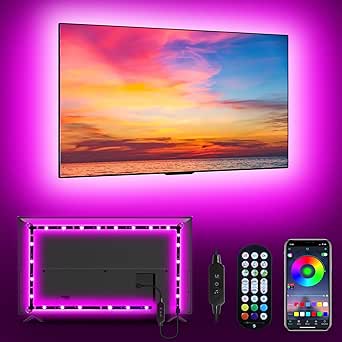 | Best Simple Pick for Smaller TVs | Length: 9.84 ft | TV compatibility: 32–43 inches | Light type: RGB 5050 LED | VIEW ON AMAZON | See Our Full Breakdown |
| ambient lighting for gaming | Power | Controls |
|---|---|---|
| 12-Inch USB-Powered RGB Monito | USB, 5 volts DC | Wireless remote and cable switch |
| Eastfine RGB LED Light Bars | USB, 5 V DC | App, remote, and button |
| OIYN Smart RGBICW LED Corner F | Corded electric | Bluetooth app, remote, and touch |
| Govee TV Backlight 3 Lite LED | AC | Govee Home app, Alexa, and Google Assistant |
| Govee H6047 RGBIC Gaming Light | — | Desktop dial, app, touch, and voice |
| Govee Glide RGBIC Smart Wall L | Corded electric, 36 W, 24 V | — |
| Velted RGB Music-Sync LED Ligh | USB, corded electric, 5 V | IR remote and built-in button |
| OIYN Smart RGBICW LED Corner F | Corded electric, 120 V | Bluetooth app and remote |
| RGB+IC Corner Floor Lamp with | Corded electric | Bluetooth app, remote, and built-in buttons |
| Govee RGBIC Smart TV LED Backl | AC/DC, 24 V DC, 12 W | — |
| Govee Lantern Floor Lamp with | 24 W | App, touch, and voice |
| Govee Tree Floor Lamp with 3 R | 48 W, corded electric | — |
| Govee RGBICWW Smart Light Bar | 18 W, corded electric | — |
| Govee Smart RGBWIC Light Bars | 10 W, corded electric | — |
| MATICOD RGB LED TV Backlight S | USB, 5 V | Bluetooth app, 21-key remote, and 3-key inline controller |
More Details on Our Top Picks
12-Inch USB-Powered RGB Monitor Light Bar with Remote
This compact bar suits gamers who want color near the monitor or keyboard without adding floor lamps or a screen camera. Its 353 dynamic modes and 12 static colors give it plenty of preset variety, while the wireless remote and cable switch make quick adjustments possible without opening an app. Compared with the Eastfine RGB LED Light Bars, it is a single, adhesive-mounted bar rather than a two-light setup with app and music-sync control; that makes placement straightforward but limits how broadly it can light a desk. The USB power also keeps the setup flexible if a suitable port or adapter is nearby. Its meaningful compromises are the lack of sound reactivity, dependence on adhesive mounting, and no water resistance, so it is best kept in a dry indoor gaming area.
Pros:- 353 dynamic modes and 12 static colors provide varied ambient effects
- Wireless remote and cable switch offer two ways to change settings
- Memory function recalls the last lighting setting
- USB power and adhesive pads allow a compact installation
Cons:- A single 12-inch bar offers less coverage than the Eastfine two-bar set
- Adhesive mounting gives fewer placement options than freestanding lights
- No music sync or water resistance
Best for: Desk gamers who want an inexpensive-to-set-up accent along a monitor or keyboard and prefer physical controls over app features.
Not ideal for: Gamers seeking audio-reactive lighting, broad room illumination, or a system that matches colors from on-screen content.
- Length:12 inches
- Power:USB, 5 volts DC
- Wattage:6 watt-hours
- Lighting modes:353 dynamic modes and 12 static colors
- Controls:Wireless remote and cable switch
- Mounting:Adhesive pads
- Material:Black aluminum outer case
- Water resistance:Not water resistant
Our verdict“Choose this bar for simple, remotely controlled monitor or keyboard accents, but pick the Eastfine pair for wider coverage and music-reactive effects.”
Eastfine RGB LED Light Bars, 2-Pack, USB Powered with App Control and Music Sync
The Eastfine set gives a gaming desk two independently placed light sources, making it easier to spread color around a monitor or across a shelf than with the single 12-Inch USB-Powered RGB Monitor Light Bar. App, remote, and button controls also suit households where more than one person may adjust the lighting. Its music-sync modes add a reactive element for games and entertainment, while USB power keeps the setup compatible with common powered ports or adapters. The tradeoff is a plastic, table-mounted design rather than the more integrated screen-matching approach of the Govee TV Backlight 3 Lite; these bars react to sound, not colors at the screen edge. The listing also gives inconsistent warranty durations, so I would not choose it on the basis of a specific warranty term.
Pros:- Two bars offer more flexible placement than a single light bar
- App, remote, and button controls provide convenient adjustment options
- Music sync adds sound-reactive effects for gaming and media
- USB power suits desks and other entertainment spaces
Cons:- Sound reactivity does not match colors from the screen
- Plastic table-mount design may not suit buyers seeking a more integrated installation
- Warranty duration is inconsistent in the listing
Best for: Gamers building a flexible desk or small entertainment setup who want two USB-powered lights, multiple control methods, and sound-reactive effects.
Not ideal for: Players who want lighting matched to screen colors, a fixed wall-mounted installation, or clearly stated warranty coverage.
- Set:2 light bars
- Dimensions:1.18 × 1.18 × 12.59 inches each
- Power:USB, 5 V DC
- Wattage:5 W
- Controls:App, remote, and button
- Lighting:Over 16 million colors and dynamic modes
- Beam angle:270 degrees
- Mounting:Table mount
Our verdict“Pick the Eastfine pair for adaptable, sound-reactive desk lighting; choose the Govee TV Backlight 3 Lite if screen-color matching matters more.”
OIYN Smart RGBICW LED Corner Floor Lamps, 2-Pack
Rather than concentrating light at the monitor, this pair of corner floor lamps can add color to two parts of a gaming room, making it a better fit for players who want ambient lighting beyond the desk. The 68 scenes, adjustable color and brightness, and music sync provide plenty of ways to shift the room’s mood, with app, remote, and touch controls for different situations. Compared with the Govee H6047 RGBIC Gaming Light Bars, the OIYN pair favors portable, room-scale placement over desktop controls and Razer Synapse 3 integration. That wider-room role brings a tradeoff: it does not provide camera-based screen matching like the Govee TV Backlight 3 Lite. Bluetooth control may also be limiting at a distance, and these are indoor-only corded lamps rather than a water-resistant lighting option.
Pros:- Two floor lamps can spread ambient color around a gaming room
- 68 scene modes and adjustable color and brightness support varied setups
- Music sync adds reactive lighting for audio and entertainment
- App, remote, and touch controls offer several adjustment methods
Cons:- Bluetooth may limit control range compared with Wi-Fi-connected lighting
- Floor placement takes more space than the Govee H6047 desk bars
- Indoor-only design is not waterproof
Best for: Gamers who want coordinated color in multiple room corners and value scene presets, music sync, and flexible controls over screen-matching effects.
Not ideal for: Desk-focused players with little floor space, or anyone who wants Wi-Fi, Razer Synapse integration, or camera-based screen color matching.
- Quantity:2 lamps
- Colors:16 million
- Scene modes:68
- Controls:Bluetooth app, remote, and touch
- Power:Corded electric
- Features:Color changing, dimmable, adjustable color temperature, music sync, and timer
- Materials:Aluminum and plastic
- Mounting:Floor
Our verdict“Choose the OIYN two-pack for room-wide corner lighting; choose the Govee H6047 for a more desk-centered setup with Razer Synapse support.”
Govee TV Backlight 3 Lite LED Strip Lights for 75–85-Inch TVs
For gaming on a large TV, this strip’s camera reads screen content and adjusts the backlight to echo its colors, creating a closer connection between the image and the surrounding room than sound-reactive bars can offer. Its fish-eye correction is intended to improve color accuracy near the edges, while RGBICW adds a warm-white channel alongside color effects. Compared with the Govee H6047 RGBIC Gaming Light Bars, the H6099 prioritizes screen-matched TV immersion over desktop audio sync and Razer Synapse control. It can also sync with up to seven compatible Govee devices, which may help build a coordinated setup. The fit is specific: this 16.4-foot strip is for 75–85-inch TVs, and the camera requires installation and setup. Buyers who want a quick, screen-free light-bar setup should choose a simpler option.
Pros:- Camera-based lighting follows colors from TV content
- Fish-eye correction targets more consistent color near screen edges
- RGBICW includes a warm-white chip as well as color effects
- App and voice controls support syncing with compatible Govee devices
Cons:- Designed specifically for 75–85-inch TVs
- Camera installation adds setup work and visible hardware
- AC-powered strip is less flexible to reposition than USB light bars
Best for: Console gamers with a 75–85-inch TV who want backlighting that responds to screen colors and can coordinate with compatible Govee lights.
Not ideal for: PC gamers using a monitor, owners of TVs outside the stated size range, or anyone unwilling to mount and configure a camera.
- TV compatibility:75–85 inches
- Strip length:16.4 feet
- Lighting technology:RGBICW LED
- Power:AC
- Voltage:12 volts
- Wattage:36 watts
- Controls:Govee Home app, Alexa, and Google Assistant
- Special features:Camera color matching, fish-eye correction, and syncing with up to seven compatible Govee devices
Our verdict“Choose this strip for immersive, screen-matched lighting on a compatible large TV, but select the Govee H6047 for a desk setup without a camera.”
Govee H6047 RGBIC Gaming Light Bars with Smart Controller
The H6047 is the most gaming-specific desk option here: its RGBIC effects can react to game, video, speaker, and headphone audio, and Razer Synapse 3 compatibility gives PC players another route to coordinate lighting with their setup. A desktop dial, app, touch control, and voice support make it easier to adjust effects without relying on one interface. Compared with the Eastfine RGB LED Light Bars, the Govee adds Wi-Fi, broader gaming integrations, and more than 60 scene modes, but it is not simply a screen-color system. It has no camera and no screen color picking, unlike the Govee TV Backlight 3 Lite, so it cannot match TV edges to on-screen colors in that way. Its corded, indoor-only design also limits where it can go.
Pros:- RGBIC effects offer multicolor lighting with more than 60 scenes
- Audio sync can respond to games, video, speakers, and headphones
- Razer Synapse 3 support suits compatible PC gaming setups
- Desktop dial, app, touch, and voice controls provide flexible adjustment
Cons:- No camera or screen color-picking feature
- Corded electric power offers less placement flexibility than USB bars
- Indoor-only and not water resistant
Best for: PC gamers who want configurable desk lighting that reacts to audio and can work with Razer Synapse 3, app, or voice controls.
Not ideal for: TV viewers seeking camera-based screen color matching, players who need water resistance, or buyers who want USB-powered bars.
- Model:H6047
- Lighting technology:RGBIC LED
- Colors:16.8 million
- Scene modes:More than 60
- Controls:Desktop dial, app, touch, and voice
- Connectivity:Wi-Fi and Bluetooth
- Compatibility:Razer Synapse 3, Alexa, and Google Assistant
- Power and wattage:Corded electric; 3 watts
Our verdict“Choose the H6047 for PC gaming integrations and audio-reactive desk lighting, but choose the Govee TV Backlight 3 Lite for camera-based screen color matching.”
Govee Glide RGBIC Smart Wall Lights, 2 Panels
For a gaming setup that needs color on the wall rather than light tucked behind a screen, the Govee Glide is the most configurable wall-mounted option in this group. Its two panels provide six RGBIC sections, so effects can move across the bars instead of showing only one color at a time. The app’s 64+ scenes, DIY effects, voice controls, and 11 music modes give it more ways to shape a room than the simpler Velted light bar. That flexibility comes with a more involved installation: the rigid panels need careful placement on a smooth surface, and the adhesive setup is less forgiving than a tabletop lamp. Choose it for decorative wall lighting, not TV color matching; unlike the Govee TV Backlight Strip, it does not sit behind the display to create screen-adjacent glow.
Pros:- Six RGBIC sections allow multicolor effects across two wall panels.
- 64+ scene modes and DIY effects offer broad app customization.
- Wi-Fi, Bluetooth, Alexa, and Google Assistant controls.
- Eleven music modes add sound-reactive ambience.
Cons:- Rigid panels cannot bend around corners or fit every wall layout.
- Adhesive mounting takes planning and works best on smooth surfaces.
- Not water resistant.
Best for: PC gamers who want customizable, music-reactive color on a clear wall beside or above their gaming station.
Not ideal for: Renters unwilling to use adhesive mounting, players who need flexible bars or TV color matching, and anyone placing lights in damp areas.
- Model:H610A
- Lighting:RGBIC LED, multicolor
- Set contents:2 panels, 6 sections total
- Section dimensions:37.6 × 3.2 × 2.6 cm
- Connectivity:Wi-Fi and Bluetooth
- Voice assistants:Alexa and Google Assistant
- Modes:64+ scene modes; 11 music modes
- Power:Corded electric, 36 W, 24 V
- Mounting:Wall mount with included adhesive and hook-and-loop fasteners
Our verdict“Pick the Govee Glide if you want feature-rich, music-reactive wall color and are comfortable planning a permanent-looking adhesive layout.”
Velted RGB Music-Sync LED Light Bar with Remote
The Velted light bar is the straightforward choice for adding color near a monitor or console without setting up a smart-home app. It runs on USB power, sits on a tabletop, and switches between eight dynamic modes and three music-sync modes using its remote or built-in button. That simplicity is a useful contrast with the Govee Glide, which offers deeper app customization and voice control but needs wall mounting. Velted’s tradeoff is equally clear: it does not produce white light, and its listed controls do not include app or voice access. Its compact, single-bar format also creates a smaller lighting accent than the two-panel Govee Glide or a corner floor lamp. I’d choose it for a modest desk glow, not as the main source of room ambience.
Pros:- USB power suits desks and setups with an available USB connection.
- Eight dynamic color modes provide simple ambient variety.
- Three music-sync modes respond to surrounding sound.
- Remote and built-in button control avoid app setup.
Cons:- Does not produce white light.
- Single tabletop bar offers less coverage than wall panels or a floor lamp.
- No app, Wi-Fi, or voice control is listed.
Best for: Gamers who want a compact, USB-powered color accent for a desk, monitor, TV, or console and prefer remote controls over app setup.
Not ideal for: Buyers who need white light, smart-home integration, broad room coverage, or a water-resistant fixture.
- Model:DX21005-1
- Light source:LED
- Lighting modes:8 dynamic modes
- Music sync:3 modes
- Controls:IR remote and built-in button
- Dimensions:3.54 × 1.22 × 12.76 in (D × W × H)
- Power:USB, corded electric, 5 V
- Materials:Aluminum base and polycarbonate shade
- Mounting:Tabletop
Our verdict“Choose the Velted if you want an uncomplicated USB color accent, but skip it if you need smart controls or useful white illumination.”
OIYN Smart RGBICW LED Corner Floor Lamp with App and Remote Control
The OIYN corner floor lamp makes sense for gamers who want room-level color without attaching lights to a wall or TV. It combines RGBICW color effects, 68 scenes, adjustable brightness, and music synchronization in a freestanding design with tool-free setup. Compared with the compact Velted light bar, it can serve as a more prominent corner accent; unlike the Govee Glide, it does not require adhesive placement. Control is limited to Bluetooth app and remote, though, so this is less convenient for someone who wants Alexa or Google Assistant routines. The product lists three light sources and adjustable color temperature, giving it more flexibility than a color-only bar, but it remains an indoor, corded lamp rather than a portable, battery-powered fixture. Its main compromise is the lack of Wi-Fi and voice control.
Pros:- RGBICW lighting offers color effects and adjustable color temperature.
- 68 scenes, adjustable brightness, and music synchronization support varied gaming moods.
- App and remote controls provide two direct control options.
- Tool-free setup and portable design make placement simpler than adhesive wall panels.
Cons:- Bluetooth-only connectivity limits control range and smart-home integration.
- Does not support Alexa or Google Assistant.
- Not waterproof.
Best for: Gamers who want a freestanding corner light with scene variety and a quick, tool-free setup, controlled by app or remote.
Not ideal for: Smart-home users who rely on Alexa or Google Assistant, or buyers who need Wi-Fi control or lighting for damp spaces.
- Lamp type:Floor lamp
- Lighting technology:RGBICW LED
- Colors:16 million
- Scene modes:68
- Controls:Bluetooth app and remote
- Light sources:3
- Features:Dimmable, adjustable color temperature, timer, music synchronization
- Power:Corded electric, 120 V
- Materials:Aluminum and plastic
Our verdict“Choose the OIYN lamp for quick, freestanding room ambience with app or remote control, not for voice-controlled smart lighting.”
RGB+IC Corner Floor Lamp with App and Remote, Obsidian Black
This 59-inch corner lamp is a good fit when a gaming room needs a vertical color accent that can be controlled without reaching for a phone. It supports Bluetooth app, remote, and built-in button controls, with music sync, dimming, and dynamic modes. That extra physical control distinguishes it from the OIYN floor lamp, which also offers app and remote operation but does not list built-in buttons. The foldable base and tool-free assembly make setup easier to manage, while the freestanding format avoids the adhesive work required by the Govee Glide. Its limits are important: there is no Wi-Fi or Alexa support, and the lamp is not suitable for damp environments. It is a room accent, not a TV backlight or a color-matching system.
Pros:- Three control methods include app, remote, and built-in buttons.
- RGB+IC color options and dynamic modes create varied ambient effects.
- Music sync and dimming let users adjust the room mood.
- Foldable base and tool-free assembly simplify setup.
Cons:- Bluetooth-only control excludes Wi-Fi and Alexa compatibility.
- Freestanding vertical lamp does not provide TV color matching.
- Not water resistant and should not be used in damp areas.
Best for: Gamers seeking a tall corner accent with app, remote, and on-lamp controls, especially those who want to avoid wall mounting.
Not ideal for: Buyers who want Wi-Fi, Alexa integration, TV-synced colors, or a lamp for a damp room.
- Dimensions:7.87 × 7.87 × 59 in
- Base diameter:20 cm
- Lighting:RGB+IC LED
- Light sources:3
- Controls:Bluetooth app, remote, and built-in buttons
- Features:Color changing, dimming, timer, music sync
- Mounting:Freestanding floor lamp
- Power:Corded electric
- Assembly:Tool-free; foldable base
Our verdict“Pick this lamp if you want a tall gaming-room accent with convenient physical controls, and skip it if Wi-Fi or voice integration is a must.”
Govee RGBIC Smart TV LED Backlight Strip for 40–50-Inch TVs
For a compatible smaller TV, this 7.8-foot RGBIC strip is the most directly screen-focused choice in the group. It covers the four sides of 40–50-inch TVs and can show multiple colors along the strip, while 77 scenes and 11 music modes add ambient effects beyond a static backglow. App control over Bluetooth or 2.4 GHz Wi-Fi, plus Alexa and Google Assistant support, gives it broader control options than the Velted tabletop bar. The key limitation is that it does not capture or match on-screen colors, so it creates mood lighting rather than synchronized bias lighting. Compared with the Govee Glide, it stays behind the TV instead of decorating a wall, making it a better fit for a screen-centered setup but less useful for lighting the wider room.
Pros:- Designed to fit all four sides of compatible 40–50-inch TVs.
- RGBIC effects can show multiple colors at once.
- 77 scene modes and 11 music modes add variety.
- App, Alexa, and Google Assistant controls are supported.
Cons:- Does not capture or match colors from the TV.
- Wi-Fi support is limited to 2.4 GHz.
- Not water resistant and intended for indoor use.
Best for: Owners of 40–50-inch TVs who want app- or voice-controlled color behind the screen and music-reactive effects.
Not ideal for: Buyers who need colors matched to on-screen content, own a TV outside the supported size range, or need outdoor-rated lighting.
- Model:H6167
- TV compatibility:40–50 inches
- Strip length:7.8 ft
- Lighting:RGBIC multicolor
- Modes:77 preset scenes; 11 music modes
- Connectivity:Bluetooth and 2.4 GHz Wi-Fi
- Voice assistants:Alexa and Google Assistant
- Power:AC/DC, 24 V DC, 12 W
- Use:Indoor; not water resistant
Our verdict“Choose this strip for controllable ambient light behind a 40–50-inch TV, but not if you expect the LEDs to mirror the screen.”
Govee Lantern Floor Lamp with Halo Gradient RGBIC Smart Lighting
The Lantern Floor Lamp is my pick for gamers who want a room-level glow that can shift from relaxed warm light to colorful play-session effects. Its 1000K–10000K color range gives it more white-light flexibility than the Govee Tree Floor Lamp, whose range is 2700K–6500K, while the halo design creates a different, more unified effect than that model’s three directional lights. Matter compatibility, app, touch, and voice control make it easier to fit into a mixed smart-home setup, and more than 100 scenes plus music sync add options for changing the room’s mood. The tradeoff is placement: this is a corded floor lamp, not a light built to react directly around a monitor or TV. Its silicone shade and metal poles also make it a dedicated piece of furniture rather than a discreet strip or bar.
Pros:- Wide 1000K–10000K color-temperature range supports both warm room light and cooler gaming setups.
- Matter, app, touch, and voice controls offer flexible ways to adjust lighting.
- More than 100 scenes and 16 music-sync modes provide varied ambient effects.
- Detachable metal poles and a touch-sensitive silicone shade add flexibility to the floor-lamp design.
Cons:- A floor lamp creates room ambience rather than precise lighting behind a monitor or TV.
- Corded electric power limits placement to locations near an outlet.
- Not water resistant, so it is intended for indoor dry spaces.
Best for: Gamers who want adjustable ambient light for an entire gaming room and use Matter, Alexa, or Google Assistant.
Not ideal for: Players seeking monitor-matched backlighting, a portable light, or lighting for damp spaces; this lamp is corded and not water resistant.
- Brightness:1400 lumens
- Color temperature:1000K–10000K
- Power:24 W
- Controls:App, touch, and voice
- Connectivity:Matter
- Materials:Metal and silicone rubber
- Lighting coverage:Up to 330 sq. ft.
Our verdict“Choose this lamp for adaptable, smart-controlled room ambience; choose the Govee Tree Floor Lamp instead if you want three independently aimed light sources.”
Govee Tree Floor Lamp with 3 Rotatable Lights and Matter Compatibility
When a gaming space needs light in several directions, the Tree Floor Lamp has a practical advantage over the Govee Lantern Floor Lamp: its three independently adjustable heads can aim color or white light toward different parts of the room. Each rotates horizontally by up to 350° and vertically by 90°, making it easier to light a wall, a corner, or the area beside a desk without repositioning the whole lamp. It delivers up to 1500 lumens total, with 64 scenes, music sync, and Matter control for smart-home use. The narrower 2700K–6500K white range is less expansive than the Lantern’s, and its three-head look is more functional than subtle. This is still a corded floor lamp, so it cannot provide the close-to-screen effect of the Govee RGBICWW Smart Light Bar.
Pros:- Three independently adjustable lights allow different parts of a gaming room to be lit at once.
- Up to 1500 lumens provide more listed output than the Govee Lantern Floor Lamp.
- Matter, app, touch, and voice control support flexible operation.
- 64 scene modes and music sync add color effects without requiring separate light bars.
Cons:- The 2700K–6500K range is less extensive than the Lantern Floor Lamp’s range.
- A freestanding floor lamp takes more space than a monitor light bar.
- Corded power and no water resistance limit where it can be used.
Best for: Gamers who want one freestanding lamp to aim light at a desk, wall, and nearby seating area.
Not ideal for: Buyers who prefer a compact, low-profile monitor light or need a lamp with a broad warm-to-very-cool white range.
- Number of lights:3 independently adjustable
- Brightness:Up to 1500 lumens total
- Rotation:350° horizontal and 90° vertical
- Color temperature:2700K–6500K
- Scene modes:64
- Connectivity:Matter
- Power:48 W, corded electric
Our verdict“Pick this model for directional, multi-area room lighting; choose the Govee Lantern Floor Lamp for a more unified halo effect and a wider color-temperature range.”
Govee RGBICWW Smart Light Bar
For a gaming desk where floor space is limited, this two-light set brings the effects closer to the screen than either Govee floor lamp. The segmented RGBIC colors can show more than one color at a time, while tunable white lighting gives the bars a useful role beyond game-night effects. They can stand vertically, lie flat, or mount near a monitor, so placement can follow the desk layout rather than dictate it. The built-in microphone enables music-synced effects, and app or compatible voice control keeps adjustments off the keyboard. The main fit limit is explicit: Govee recommends these for monitors under 45 inches. Unlike the 45–70-inch Govee Smart RGBWIC Light Bars, these are aimed at smaller screens, and they do not provide the room-wide coverage of a floor lamp.
Pros:- Two RGBICWW bars provide segmented color effects and tunable white light.
- Multiple placement options suit different monitor and desk layouts.
- Built-in microphone supports music-synced lighting.
- App and voice control are available without a hub.
Cons:- Recommended for monitors under 45 inches, limiting its fit for larger displays.
- Corded power adds cables to a gaming desk.
- Its localized output is less suited to lighting an entire gaming room than a floor lamp.
Best for: PC gamers with monitors under 45 inches who want adjustable, screen-adjacent lighting without using desk space for a floor lamp.
Not ideal for: Owners of larger monitors or gamers seeking broad room illumination instead of lighting near the screen.
- Set contents:2 RGBICWW lights
- Recommended monitor size:Under 45 inches
- Dimensions:4.8 × 3.9 × 11.3 inches
- Power:18 W, corded electric
- Voltage:12 V
- Smart-home compatibility:Matter, Alexa, and Google Home
- Placement:Table mount; can stand, lie flat, or be mounted
Our verdict“Choose these bars for flexible lighting around a smaller gaming monitor; choose the 45–70-inch Govee bars for a larger TV setup.”
Govee Smart RGBWIC Light Bars for 45–70-Inch TVs
These bars are the more suitable Govee option for a large-screen gaming setup: their 15-inch length and 45–70-inch TV fit target displays too large for the RGBICWW Smart Light Bar, which is recommended for monitors under 45 inches. RGBWIC lighting pairs color effects with dedicated white LEDs, giving the setup more than saturated color alone, while 60-plus scenes and eight music modes cover different moods. The bars can sit beside a TV or mount behind it, which makes placement more adaptable than a strip that must follow the screen’s edges. One key omission separates them from TV backlights designed to match on-screen colors: there is no color-matching function. They add ambience around a display, but do not reproduce its picture colors in real time.
Pros:- Designed for 45–70-inch TVs, covering larger screens than the Govee RGBICWW Smart Light Bar.
- RGBWIC LEDs offer colored effects as well as dedicated white lighting.
- Can be mounted behind a TV or placed beside it.
- Matter, Alexa, Google Home, and SmartThings compatibility support smart-home control.
Cons:- No color-matching function for following the colors displayed on screen.
- The bars need separate placement and do not form a continuous strip around the TV.
- Corded electric power and plastic construction may not suit every room setup.
Best for: Console gamers with 45–70-inch TVs who want smart ambient color from bars placed beside or behind the screen.
Not ideal for: Buyers who want lighting that matches game or video colors on screen, or who need a solution for a monitor smaller than 45 inches.
- Compatible TV size:45–70 inches
- Light bar length:15 inches
- Lighting type:RGBWIC LED
- Preset scenes:60+
- Music modes:8
- Power:10 W, corded electric
- Smart-home compatibility:Matter, Alexa, Google Home, and SmartThings
Our verdict“Choose these for smart ambient lighting around a large gaming TV, but skip them if syncing light colors to on-screen action is a priority.”
MATICOD RGB LED TV Backlight Strip, 9.84 ft, for 32–43-Inch TVs
For a smaller gaming TV, this strip offers a straightforward way to add color around the screen without setting up freestanding bars. Its 9.84-foot adhesive-backed strip is sized for 32–43-inch TVs, while USB power can draw from a compatible port rather than requiring a separate smart-light ecosystem. Color changes are available through a Bluetooth app, the included remote, or an inline controller, so there are alternatives if a phone is not at hand. Music sync, microphone mode, a timer, and 21-plus dynamic modes add basic variety. Compared with the Govee Smart RGBWIC Light Bars for 45–70-inch TVs, this is aimed at smaller screens and offers a continuous strip rather than two bars. The tradeoff is less smart-home integration: its listed connectivity is Bluetooth, not Matter or voice-assistant support.
Pros:- 9.84-foot strip is sized for 32–43-inch TVs and follows the screen edge.
- App, remote, and inline controller provide multiple ways to adjust lighting.
- USB power can use a compatible USB power source.
- Music sync, microphone mode, timer, and 21-plus dynamic modes offer varied effects.
Cons:- Bluetooth connectivity does not offer the listed Matter or voice-assistant support found on the Govee TV bars.
- Not water resistant and intended for indoor use.
- USB power is required, which may limit placement depending on available ports.
Best for: Gamers with 32–43-inch TVs who want adhesive-backed ambient lighting with USB power and several control options.
Not ideal for: Owners of larger TVs or buyers who want Matter, voice-assistant integration, or on-screen color matching.
- Length:9.84 ft
- TV compatibility:32–43 inches
- Light type:RGB 5050 LED
- Power:USB, 5 V
- Controls:Bluetooth app, 21-key remote, and 3-key inline controller
- Lighting modes:21+ dynamic modes
- Connectivity:Bluetooth
Our verdict“Choose this strip for uncomplicated ambient lighting on a smaller TV; choose Govee’s larger TV bars for Matter and voice-assistant support.”

How We Picked
I ranked these 15 options by how well they address distinct gaming setups: monitor lighting, TV backlighting, and broader room illumination. My main criteria were fit for the intended screen or space, flexibility of placement, control method, lighting format, and the practical effort of adding the product to a setup. I gave priority to options whose stated form and sizing make their intended use clear, since a feature-rich light is a poor match if it does not suit the display or room.
The ranking separates products by their role rather than treating every lamp, strip, and bar as interchangeable. Screen-specific strips are judged on size fit, while freestanding lamps are weighed for room coverage and placement demands; compact USB bars are judged on localized convenience. Smart controls and multicolor effects count as advantages only when they add useful flexibility, not as a substitute for a clear use case. Since the supplied product information does not establish measured brightness, sync accuracy, or long-term durability, I do not claim performance results that cannot be verified.
Factors to Consider When Choosing Ambient Lighting For Gaming
Choosing ambient lighting is less about picking the most colorful device and more about matching the light source to your display, room, and habits. These broader checks can help you avoid buying an impressive-looking format that does not suit your setup.
Match the lighting format to your screen
Start by deciding whether you want light behind the display or light placed beside it. A backlight strip is intended to sit behind a TV, while light bars can work beside a monitor or screen without wrapping the display in LEDs. Floor lamps and wall panels affect a larger part of the room, so they make more sense when you want the gaming area itself to feel lit. A common mistake is choosing based on a product image without checking where the light must be mounted or placed. Think about wall clearance, monitor arms, shelves, and cable access before choosing a format. If the display is the only area you want to accent, a room lamp may take up space without solving a need you have.
Check screen dimensions and mounting space
For TV strips, compare the product’s stated screen range with your television’s actual size before buying. A strip meant for a larger screen may not create an even-looking border on a smaller one, and a short strip may leave parts of a large display without backlighting. Measure the rear perimeter and note obstructions such as wall mounts, ports, or recessed panels. Some displays have little clearance for adhesive strips, so check that the installation path is accessible. Monitor buyers should also check whether bars can sit securely around the stand and whether their cables can reach a USB port or power source. Matching dimensions first can prevent a setup from looking uneven or requiring awkward placement.
Decide how much control you will actually use
App control can make color adjustments and lighting changes more flexible, but it also adds a phone-based setup and another interface to manage. A remote may be easier for quick changes during a gaming session, especially if you do not want to open an app. Music-sync features are aimed at reactive effects; they are not necessary if you mainly want a steady background glow. Before choosing, ask whether you want to tune scenes often or set a color once and leave it alone. Extra control options are most useful when they match a habit you already have, not simply because they appear on a feature list. If several people use the setup, choose controls that everyone can operate comfortably.
Choose room coverage without overlighting the space
A display backlight, a pair of bars, and a floor lamp can produce very different coverage even when all offer multicolor effects. A focused glow behind a screen can keep attention on the game, while corner lamps spread color across more of the room. More fixtures also mean more placement decisions, visible cables, and occupied floor or wall space. Consider whether ambient light should complement existing ceiling or task lighting rather than compete with it. Buyers often add multiple lighting types before checking how they will look together, which can make a setup visually busy. Plan the desired coverage first, then add fixtures only where the room still feels dark or flat.
Treat smart features as a compatibility choice
Smart lighting features can make it easier to group devices or control them with a preferred system, but the word “smart” alone does not tell you whether a product fits your setup. Check the product details for the control methods and platforms you already use, including whether a controller, app, or compatible hub is required. Matter compatibility can be useful for buyers building a connected home, but it may not matter to someone who wants a single lamp operated with a remote. Avoid assuming that multiple lights from one brand automatically behave as a coordinated system. Confirm the specific integrations and setup requirements before buying several fixtures. If simple manual control is enough, paying for connectivity you will not use may add friction rather than convenience.
Balance visual effects against setup effort
More lighting zones and color effects can create a more varied backdrop, but they can also make setup and adjustment more involved. Consider how much time you want to spend arranging lights, routing cables, and tuning scenes. A compact USB-powered bar may be appealing for a desk where outlets are limited, while a floor lamp needs open space and a stable position. Adhesive strips call for a suitable surface and careful placement, and moving them later may take extra work. If you rent, rearrange your room often, or share a gaming space, favor options whose mounting and storage demands match that reality. The right choice is the one you can place and control without making the rest of the setup harder to use.
Frequently Asked Questions
Should I choose a TV backlight strip or light bars for gaming?
Choose a TV strip if you want a halo positioned around the rear edge of the screen and can match the strip to your TV size. Light bars are a better fit when you want separate fixtures beside a monitor or screen, or prefer not to attach lighting around the display. Bars can also be easier to reposition, while strips depend on a suitable surface behind the TV. Consider wall clearance and the location of your TV ports before deciding. If you want both screen-focused and room-wide light, you may need a separate lamp rather than expecting one format to do both jobs.
How do I choose the right backlight size for my TV?
Use the TV’s screen size as a starting point, then check the lighting product’s stated size range and dimensions. A product listed for 32–43-inch TVs, for example, is not automatically interchangeable with one intended for a 75–85-inch screen. Measure the path around the back of your set, including the areas blocked by a wall mount or ports. Check whether the strip is intended to cover the full perimeter or only part of it. A close match helps avoid an uneven border or excess strip that is difficult to place neatly.
Are music-sync lights a good choice if I mostly play games?
Music-sync effects can suit players who enjoy reactive lighting for music, parties, or visually expressive sessions. They are less important if your main goal is a consistent glow behind the screen while playing. Check how the synchronization works and whether it relies on a microphone, an app, or another controller, since those details affect setup and behavior. A reactive effect may also feel distracting if you prefer a calm backdrop during long sessions. For steady lighting, prioritize placement, color adjustment, and convenient control over music-sync features.
Will one lamp light my whole gaming room?
A single floor lamp can add color beyond the display, but room coverage depends on its position, the room layout, and how much existing light you have. A lamp tucked behind furniture may create a visible accent without reaching the rest of the space. Two lamps can offer more flexible placement, though they take up more room and may add cable clutter. Decide whether you want a focal point in a corner or more balanced illumination across the gaming area. If the room is large or divided by furniture, a single fixture may not create the broad effect you expect.
Do I need app control or Matter compatibility for gaming lights?
No: these features are useful only if they fit the way you already control your setup. An app can offer more adjustment options, while a remote may be simpler for quick color changes. Matter compatibility matters most to buyers who want their lighting to work within a compatible smart-home setup; it adds little for someone operating a single lamp manually. Check the stated compatibility and any setup requirements before relying on voice or unified controls. If you want a straightforward gaming accent, choosing based on screen fit and placement may matter more than smart-home support.
Conclusion
For most gaming setups, I would start with the Govee H6047 RGBIC Gaming Light Bars as the best overall pick for localized display lighting. The Govee RGBIC Smart TV LED Backlight Strip for 40–50-Inch TVs is a practical best-value direction for a smaller TV, while the Govee TV Backlight 3 Lite is the premium-style choice among these screen-focused options for larger TVs. Beginners who want a simple accent can look at the 12-Inch USB-Powered RGB Monitor Light Bar and its remote rather than starting with room-wide fixtures. For a broader room effect, consider the OIYN two-pack corner lamps; for a connected smart-home setup, the Govee Tree Floor Lamp is the specific pick with Matter compatibility. Match screen-size products to your display, and choose lamps or bars only if their placement suits your available space.