If you’re looking to take your photo editing to the next level, I recommend checking out the 14 best color‑accurate displays that meet professional standards. These monitors offer factory calibration, wide color gamuts, and features like HDR, high resolution, and ergonomic design—all essential for precise and vibrant edits. They also include versatile connectivity options and calibration tools. Continue exploring these options, and you’ll find the perfect display to elevate your creative work.
Key Takeaways
- Professional monitors like ASUS ProArt series offer factory calibration, wide color gamuts, and verified color accuracy for precise photo editing.
- Features such as HDR support, extensive connectivity options, and ergonomic adjustments enhance workflow and display versatility.
- High-resolution screens with broad color coverage (e.g., 95-100% sRGB, DCI-P3) ensure vibrant, detailed images.
- Calibration tools and verification processes maintain consistent, reliable color fidelity over time.
- Additional accessories like shading hoods and color pattern charts optimize viewing conditions and calibration accuracy.
ASUS ProArt Display PA248QV 24.1-Inch Monitor


If you’re serious about photo editing, the ASUS ProArt Display PA248QV is an excellent choice thanks to its exceptional color accuracy. Its 24.1-inch IPS panel offers wide viewing angles, ensuring consistent colors from any perspective. With 100% sRGB and Rec.709 coverage, it reproduces colors vividly and accurately, with a DeltaE below 2 for precision. The monitor is Calman verified, guaranteeing true-to-life hues right out of the box. Plus, its adjustable stand allows for ergonomic comfort, making long editing sessions easier. Whether you’re working on detailed retouching or color grading, this monitor provides the reliability and sharpness needed for professional creative work.
Best For: creative professionals and photographers who need precise color accuracy and a reliable display for editing and retouching work.
Pros:
- Exceptional color accuracy with 100% sRGB and Rec.709 coverage
- Wide viewing angles thanks to IPS panel technology
- Ergonomic adjustments for comfortable long-term use
Cons:
- Limited to standard connectivity options (DisplayPort, HDMI, D-Sub) without USB-C
- May be more expensive than basic monitors without professional features
- Slightly larger footprint due to adjustable stand and design
ASUS ProArt 27″ Monitor PA278CV

The ASUS ProArt 27″ Monitor PA278CV stands out as an excellent choice for photographers and graphic professionals who demand precise color accuracy. Its 27-inch WQHD IPS panel delivers wide 178° viewing angles and factory calibration with a ΔE less than 2, ensuring accurate color reproduction out of the box. Supporting full sRGB and Rec. 709 coverage, it meets professional standards. Connectivity is versatile, featuring USB-C with 65W Power Delivery, DisplayPort, HDMI, and a USB 3.1 hub. The 75Hz refresh rate and Adaptive-Sync technology provide smooth motion, while ergonomic features and eye care tools make long editing sessions comfortable.
Best For: creative professionals, photographers, and graphic designers seeking a high-accuracy, versatile monitor for detailed color work and multi-display setups.
Pros:
- Factory calibrated with ΔE < 2 for precise color accuracy out of the box
- Extensive connectivity options including USB-C with 65W Power Delivery, DisplayPort, HDMI, and USB 3.1 hub
- Supports multi-monitor setups via DisplayPort daisy-chaining and features ergonomic adjustments
Cons:
- 75Hz refresh rate may be less ideal for high-end gaming compared to 144Hz or higher monitors
- Limited adaptive sync range (48-75Hz) might not suit all gaming or video editing needs
- No built-in speakers, requiring external audio solutions
ASUS ProArt 27” 1440P Professional Monitor (PA278CFRV)

For professional photo editors demanding precise color reproduction, the ASUS ProArt 27” 1440P monitor stands out with its factory pre-calibrated display achieving a Delta E < 2. Its 27-inch IPS panel delivers sharp QHD resolution (2560 x 1440) and wide 178° viewing angles, ensuring consistent color across the screen. Supporting 95% DCI-P3 and 100% sRGB, it covers essential color gamuts for accurate editing. HDR400 support enhances dynamic range, while the 100Hz VRR offers smooth visuals during fast-paced tasks. With versatile connectivity options like USB-C, DisplayPort, and HDMI, plus a 3-year warranty, it’s a reliable choice for creative professionals.
Best For: creative professionals such as photo editors, video editors, and graphic designers who require accurate color reproduction and a high-quality display.
Pros:
- Factory pre-calibrated with Delta E < 2 for exceptional color accuracy
- Supports extensive color gamuts including 95% DCI-P3 and 100% sRGB
- HDR400 support and 100Hz VRR for enhanced dynamic range and smooth visuals
Cons:
- No integrated processing unit, requiring external hardware for color management
- Limited to 27-inch size, which may not suit those needing larger displays
- Relatively higher price point typical of professional-grade monitors
ASUS ProArt 32” 4K HDR Monitor (PA329CV)

With its factory calibration and support for 10-bit color, the ASUS ProArt 32” 4K HDR Monitor (PA329CV) stands out as an ideal choice for professional photo editors who demand true-to-life color accuracy. Its 3840 x 2160 UHD resolution and IPS panel provide crisp details and wide 178° viewing angles, ensuring consistent visuals from any position. Supporting international standards like 100% sRGB and Rec. 709, along with Calman verification and Delta E < 2, it delivers minimal color deviation. Features like HDR-10 and a bright 400 cd/m² screen enhance dynamic range. Connectivity options, including USB-C with Power Delivery, make it versatile for creative workflows.
Best For: professional content creators and photo editors who require precise color accuracy and high-resolution visuals for their work.
Pros:
- Factory calibrated with Delta E < 2 ensures excellent color accuracy.
- Supports 10-bit color, 100% sRGB and Rec. 709 for vibrant, true-to-life visuals.
- Versatile connectivity options including USB-C with Power Delivery for seamless workflow integration.
Cons:
- Relatively heavy at 27.8 pounds, which may affect portability.
- Higher price point typical for professional-grade monitors.
- Limited to a 16:9 aspect ratio, which may not suit all creative projects.
Datacolor Spyder Checkr Video – Video Color Tool with Color Pattern Card

Designed for videographers and content creators who need precise color calibration, Datacolor Spyder Checkr Video offers a thorough solution to guarantee accurate colors across different cameras and lenses. Its patent-pending Color Pattern Card provides quick, detailed color information, making exposure and color adjustments straightforward from shoot to post-production. The kit includes high-gloss target cards—color patches, a gradient greyscale, a neutral grey for white balance, and a focus star—supporting a wide gamut and flare detection. Compatible with vector scopes and interchangeable with Spyder Checkr Photo cards, it streamlines hybrid workflows. At just over three ounces, it’s portable and easy to use, ensuring consistent, professional-quality video color.
Best For: videographers and content creators seeking precise color calibration across multiple cameras and lenses to ensure consistent, professional-quality video.
Pros:
- Provides comprehensive color and exposure information with a patent-pending Color Pattern Card for accurate adjustments.
- Compatible with vector scopes and interchangeable with Spyder Checkr Photo cards, supporting hybrid workflows.
- Portable and easy to handle, weighing just over three ounces for on-the-go use.
Cons:
- May require some technical knowledge to fully utilize advanced calibration features.
- Higher price point compared to basic color calibration tools.
- Limited to video workflows, so not ideal for purely photographic applications.
ZZA 24.5″ PC Monitor for Gaming

The ZZA 24.5″ PC Monitor for Gaming stands out with its 120% sRGB color gamut coverage, making it an excellent choice for photo editors who need vibrant, true-to-life visuals. Its 24.5-inch VA panel with 1920×1080 resolution delivers rich contrast, deep blacks, and crisp images. The 240Hz refresh rate ensures ultra-smooth motion, perfect for fast-paced gaming and multitasking. With AMD FreeSync, screen tearing and stuttering are minimized, boosting responsiveness. Its high contrast ratio and brightness make images pop, while Low Blue Mode reduces eye strain during long sessions. Versatile connectivity options and VESA support give you flexible setup options for any workspace.
Best For: gamers, photo editors, and anyone seeking a high-performance monitor with vibrant visuals and smooth motion.
Pros:
- 240Hz refresh rate for ultra-smooth and responsive gaming experience
- 120% sRGB color coverage providing vibrant, true-to-life visuals ideal for photo editing and media consumption
- Versatile connectivity options including HDMI 2.0 and DisplayPort 1.4, plus VESA mount support for flexible setup
Cons:
- Full HD resolution may be less ideal for professional graphic work requiring higher resolutions
- Limited to 75x75mm VESA mount compatibility, which may restrict some mounting options
- The 24.5-inch size might be small for users seeking a larger display for detailed work or immersive gaming
Planar Helium PCT2435 997-9363-00 24-inch LED Monitor, Black

If you’re looking for a reliable monitor that supports precise color work, the Planar Helium PCT2435 is an excellent choice thanks to its sharp 1920×1080 resolution and multi-touch capabilities. Its 24-inch screen uses TFT active matrix technology, providing clear, detailed visuals vital for photo editing. The monitor offers broad device compatibility with VGA and HDMI inputs, including HDCP support for secure content playback. Its projected capacitive touch technology registers up to 10 simultaneous touches, making it perfect for interactive tasks. Weighing around 11.73 pounds, it’s designed for active use and works seamlessly with Windows 10, making it versatile for creative workflows.
Best For: creative professionals and interactive users seeking a reliable, high-resolution touchscreen monitor for photo editing, graphic design, and multimedia tasks.
Pros:
- Supports 1920×1080 full HD resolution for sharp, detailed visuals
- Multi-touch technology registers up to 10 simultaneous touches for interactive use
- Broad device compatibility with VGA, HDMI, and HDCP support
Cons:
- Weighs approximately 11.73 pounds, which may be less portable for some users
- Limited to 24-inch screen size, which may not suit those needing larger displays
- No mention of built-in speakers or additional features beyond touch and display technology
Planar Helium 997-8286-00 22-inch LED Monitor, Black

Are you searching for a reliable monitor that balances affordability with decent color accuracy for photo editing? The Planar Helium 997-8286-00 22-inch LED Monitor is a solid choice. It features a 1920 x 1080 resolution with edge-lit LED technology, delivering clear, detailed visuals. Its broad connectivity options—HDMI, VGA, and DisplayPort—make it versatile for various devices. While it’s mainly designed for home theater and office use, its crisp display and reliable performance can support basic photo editing tasks. If you’re looking for a budget-friendly monitor that offers decent image quality without breaking the bank, this model is worth considering.
Best For: budget-conscious home users or professionals seeking a reliable, versatile monitor for general productivity, entertainment, and basic photo editing.
Pros:
- Affordable price point with decent visual clarity
- Supports multiple connectivity options (HDMI, VGA, DisplayPort) for versatile device compatibility
- Large 22-inch screen enhances viewing experience for movies, work, and casual use
Cons:
- Limited color accuracy may not satisfy high-end photo editing needs
- Basic display technology without advanced features like wide color gamut or high refresh rates
- No built-in speakers or additional ergonomic features for prolonged use
ViewSonic VX2370SMH-LED 23″ IPS 1080p Frameless LED Monitor HDMI, DVI, VGA
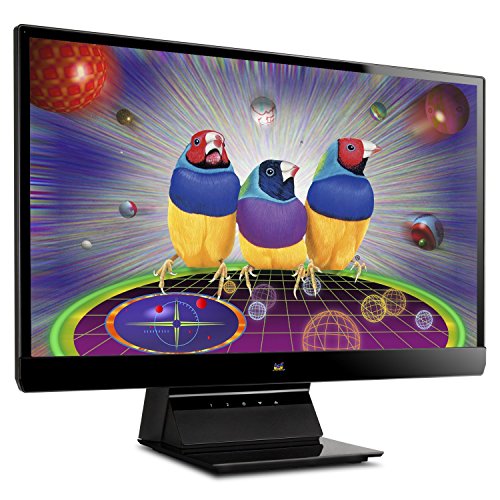
For photo editors seeking reliable color accuracy, the ViewSonic VX2370SMH-LED 23″ IPS monitor offers an excellent choice, especially with its sRGB color correction technology. Its 23-inch Full HD IPS panel ensures sharp, vibrant images with wide 178/178-degree viewing angles, so colors remain consistent from any position. The monitor’s 30 million:1 dynamic contrast ratio enhances image depth, while the anti-glare surface minimizes reflections. Connectivity is versatile, including HDMI, DVI-D, and VGA ports, compatible with various devices. Its sleek frameless design and adjustable tilt make it a stylish, functional addition to any workspace, perfect for detailed photo editing.
Best For: photo editors and creative professionals seeking reliable color accuracy and vibrant visuals for detailed editing work.
Pros:
- Accurate sRGB color correction for true-to-life colors
- Wide 178/178-degree viewing angles ensure consistent image quality from any position
- Frameless design and adjustable tilt enhance workspace aesthetics and comfort
Cons:
- Limited to Full HD resolution, which may be less ideal for ultra-detailed editing
- Lacks built-in USB or additional multimedia ports for expanded connectivity
- No height adjustment feature, which could affect ergonomic setup
15x2m Non-Woven Fabric Green Screen Backdrop for Photography and Video Editing
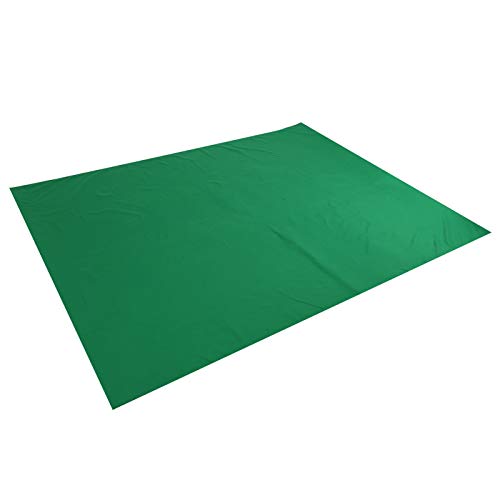
The 15x2m nonwoven fabric green screen backdrop is an essential tool for photographers and videographers aiming for seamless chroma key editing. Its vibrant green color provides excellent contrast, making background removal quick and accurate. Made from high-quality, wrinkle-resistant nonwoven fabric, it’s durable and maintains color fastness over time. The reinforced edges prevent tearing, ensuring long-term use, while its lightweight design makes it portable and easy to set up in various locations. Although folding may cause creases, steaming or dry-ironing can smooth the surface. This backdrop simplifies postproduction, enhances efficiency, and supports diverse photography styles, from portraits to product shoots.
Best For: photographers and videographers seeking an easy-to-use, durable green screen backdrop for professional chroma key editing in studio or location settings.
Pros:
- Made from high-quality, wrinkle-resistant nonwoven fabric that maintains color fastness over time
- Reinforced edges prevent tearing, ensuring long-term durability
- Lightweight and portable, convenient for location shoots and easy to store
Cons:
- Folding can cause creases, requiring steaming or dry-ironing to smooth
- Nonreflective surface may still pick up ambient light if not properly managed
- Manual measurement may have slight errors, and color may vary slightly due to monitor calibration
BenQ HB27 Shading Hood for 27″ SW Monitors

Photographers and designers who require precise color accuracy will find the BenQ HB27 Shading Hood essential for their multi-monitor setups. This bridge connects multiple 27″ SW monitors, reducing glare and reflections that can distort color perception. Its customizable design offers comfortable viewing angles, perfect for delicate tasks like photo retouching and editing. Supporting resolutions up to 3840 x 2160, it maintains professional calibration and color fidelity. Weighing just 2.4 pounds, it’s lightweight yet sturdy, fitting BenQ 27″ SW monitors seamlessly. Overall, this shading hood enhances visual clarity, making it a valuable accessory for anyone serious about accurate, reflection-free color work.
Best For: professionals such as photographers and designers who need precise color accuracy and glare reduction in multi-monitor setups.
Pros:
- Connects multiple 27″ SW monitors for seamless multi-monitor configurations
- Reduces glare and reflections, enhancing color fidelity and visual clarity
- Customizable design offers comfortable viewing angles for delicate tasks
Cons:
- Only compatible with BenQ 27″ SW monitors, limiting versatility
- Slightly bulky dimensions may require adequate desk space
- May increase setup complexity for users unfamiliar with multi-monitor arrangements
Computer Sunshade, Anti-Reflective Display Shield, Foldable Privacy Screen for Office

If you need a reliable way to protect your screen from glare and external light, this foldable privacy screen is an excellent choice. It’s designed for monitors between 17-28 inches, easily adjustable by opening side panels, and folds away when not needed. The small, portable design includes spring-connected panels for a secure fit and a strap for stability. Made with light-absorbing materials, it reduces reflections and enhances color accuracy, ideal for photo editing. Plus, the privacy feature blocks three sides to prevent peeping, creating a distraction-free workspace. It’s simple to install, remove, and transport, giving you consistent, glare-free viewing anywhere.
Best For: professionals and creatives who need a portable, glare-free, and privacy-enhanced monitor environment for photo editing, color-sensitive work, or secure office use.
Pros:
- Adjustable width easily fits monitors from 17 to 28 inches without tools.
- Foldable and portable design allows for quick setup, removal, and storage.
- Light-absorbing interior reduces reflections, improving image clarity and color accuracy.
Cons:
- May not provide complete coverage for ultra-wide or unusually shaped monitors.
- Requires manual opening and closing of panels, which might be less convenient for frequent adjustments.
- Limited to monitors within the specified size range; incompatible with larger or smaller screens.
INNOCN 32″ 4K 144Hz Gaming Monitor with HDMI 2.1 and USB-C

For anyone seeking a versatile monitor that combines high refresh rates with exceptional color accuracy, the INNOCN 32″ 4K 144Hz Gaming Monitor is an excellent choice. Its 32-inch Mini-LED IPS panel with HDR1000 support and 1152 zones delivers vibrant, detailed visuals, perfect for photo editing. Factory-calibrated with 99% DCI-P3 and Adobe RGB coverage, it guarantees color precision. With a 144Hz refresh rate and 1ms response time, it’s also great for smooth gaming and multimedia. Connectivity options like HDMI 2.1, USB-C, and DisplayPort make it compatible with various devices. Its ergonomic design and built-in speakers add to its versatility for creative and entertainment use.
Best For: creative professionals, gamers, and multimedia enthusiasts seeking a high-performance 4K monitor with accurate colors and fast refresh rates.
Pros:
- Exceptional color accuracy with 99% DCI-P3 and Adobe RGB coverage, factory-calibrated for consistency
- Versatile connectivity including HDMI 2.1, USB-C with 90W Power Delivery, and DisplayPort 1.4 for broad device compatibility
- High performance with 144Hz refresh rate and 1ms response time, ideal for smooth gaming and multimedia experiences
Cons:
- Premium price point may be a consideration for budget-conscious users
- Larger size and adjustable stand require ample desk space and ergonomic setup
- Mini-LED technology, while enhancing contrast, can be complex to repair or replace if needed
HP 2025 27sw Monitor 2 Pack (94F46AA#ABA)

The HP 2025 27sw Monitor 2 Pack is an excellent choice for anyone who needs consistent, accurate colors across multiple screens. With a 27-inch Full HD IPS display, it offers vibrant, true-to-life visuals thanks to its 99% sRGB color gamut. The IPS technology guarantees consistent image quality from wide viewing angles, making it perfect for multitasking or color-sensitive work. Its flicker-free tech and anti-glare coating reduce eye strain during long sessions. Connectivity includes two HDMI ports and a VGA, while tilt adjustment allows for comfortable viewing angles. This dual-pack provides great value for professionals seeking reliable, color-accurate monitors for photo editing or creative tasks.
Best For: professionals and creatives needing accurate color reproduction and reliable multi-monitor setups for photo editing, design, or extended work sessions.
Pros:
- 99% sRGB color gamut ensures vibrant and precise colors.
- Wide 178-degree viewing angles maintain consistent image quality from different positions.
- Flicker-Free technology and anti-glare coating reduce eye strain during long use.
Cons:
- Limited connectivity options with only two HDMI ports and one VGA port.
- Tilt adjustment range is modest, from -5 to +25 degrees, without height adjustment.
- 27-inch screen size may be too large for small or cluttered workspaces.
Factors to Consider When Choosing Color‑Accurate Displays for Photo Editing
When selecting a color‑accurate display for photo editing, I consider several key factors to guarantee ideal performance. These include color coverage, calibration quality, screen size, resolution, viewing angles, brightness, and ergonomic features. Understanding these points helps me choose a monitor that meets my editing needs precisely.
Accurate Color Coverage
Choosing a display with accurate color coverage is vital for producing true-to-life images in photo editing. I look for monitors that cover 100% of key color spaces like sRGB, Adobe RGB, or DCI-P3, ensuring my work reflects real-world hues. Factory calibration with Delta E values below 2 is indispensable; it guarantees minimal color deviation right out of the box. I also prioritize displays certified as Calman Verified or with similar professional calibration endorsements for reliable color fidelity. Supporting wide color gamuts and high color depth—preferably 10-bit—allows for smooth, seamless color gradations. Additionally, features like color space coverage indicators or built-in calibration tools help me maintain accuracy over time, making sure my edits stay consistent and true to life.
Calibration and Factory Tests
Factory calibration plays a key role in ensuring a display delivers consistent, accurate colors right out of the box. This process uses calibration tools like Calman or X-Rite to verify the display’s color fidelity, often resulting in low DeltaE values—ideally below 2 for professional-grade monitors. Such calibration confirms the panel’s colors are true to industry standards from the start. Additionally, manufacturers often provide calibration reports or certificates that document the testing process and results, giving you confidence in the display’s quality. However, even factory-calibrated displays benefit from regular recalibration to maintain accuracy over time. When choosing a monitor, check for these factory tests and calibration documentation, as they indicate a high-quality display ready for precise photo editing without immediate adjustments.
Screen Size and Resolution
A larger screen, such as 27 inches or more, offers more workspace for detailed photo editing, but to keep images sharp and clear, it’s important to pair it with a high resolution like 4K. Higher resolutions, like 3840 x 2160, provide greater pixel density, resulting in more precise color representation and finer detail. This is especially valuable when working on intricate edits. Your workflow determines the ideal resolution; for most photo editing, at least 1920 x 1200 or higher is recommended. Aspect ratio also matters, as it affects how images are displayed and evaluated. While a basic display supports 1080p, opting for higher resolutions enhances overall visual fidelity, giving you the accuracy and clarity needed for professional photo editing.
Viewing Angles and Brightness
When selecting a display for photo editing, paying attention to viewing angles and brightness is vital because they directly impact how accurately colors appear across the screen. Wide viewing angles, typically 178° horizontally and vertically, guarantee consistent color and image quality from different perspectives. IPS panels are ideal here, offering superior color consistency and minimal color shift when viewed off-center. Brightness levels of at least 300 cd/m² are necessary for clear visibility and accurate color perception in various lighting conditions. High contrast ratios also help distinguish subtle color gradations, which are essential for detailed editing. Properly calibrated brightness and viewing angles guarantee that colors stay true-to-life across the entire display, allowing for precise, reliable edits without distortions or color inconsistencies.
Ergonomic Adjustments
Choosing a display with adjustable ergonomic features is key to maintaining color accuracy during long photo editing sessions. Being able to tilt, pivot, swivel, and adjust the height means I can position my monitor for maximum viewing comfort, reducing strain on my eyes and neck. Proper ergonomic setup also helps keep my color perception consistent by minimizing unnecessary head and eye movements that cause fatigue and potential inaccuracies. Monitors with adjustable stands allow me to align the screen precisely, reducing glare and reflections that can distort colors and contrast. These features promote a healthier workspace, encouraging better posture and decreasing the risk of discomfort over extended periods. Customizable positioning ensures I maintain stable viewing angles, preserving color fidelity regardless of lighting conditions or working posture.
Connectivity Options
To guarantee seamless workflow and maintain color accuracy, I pay close attention to the monitor’s connectivity options. I look for models with multiple ports like HDMI, DisplayPort, and USB-C, ensuring compatibility with various devices and workflows. USB-C with Power Delivery is especially important, as it allows data transfer and charging through a single cable, reducing clutter. I also verify that the display supports industry-standard color calibration tools via USB or HDMI ports for precise color adjustments. Daisy-chaining through DisplayPort is a plus, enabling me to connect multiple monitors easily. Most importantly, I confirm that the connectivity options align with my existing hardware setup, so I can work efficiently without unnecessary adapters or disruptions. This guarantees a smooth, reliable connection for color-critical editing.
Frequently Asked Questions
How Important Is Factory Calibration for Photo Editing Displays?
Factory calibration is essential for photo editing displays because it guarantees accurate color representation right out of the box. I’ve learned that a well-calibrated screen minimizes the need for constant adjustments, saving me time and guaranteeing my edits look consistent across devices. Without proper calibration, I risk misjudging colors, which can compromise my work quality. So, I always prioritize a monitor with factory calibration for professional, reliable results.
What Is the Typical Lifespan of Color Accuracy in Professional Monitors?
The typical lifespan of color accuracy in professional monitors is around 3 to 5 years, but it can feel like forever if you don’t maintain it properly. I’ve found that regular calibration and careful handling can extend this window markedly. Over time, displays may drift, so I recommend recalibrating at least every six months to keep your work consistently true to life and avoid costly reworks.
Can Inexpensive Displays Provide Reliable Color Accuracy for Beginners?
Inexpensive displays can offer decent color accuracy for beginners, but they often lack the calibration features and precision of higher-end models. I’ve found that while some budget monitors can be suitable for learning and basic editing, they may not deliver consistent results over time. If you’re serious about photo editing, investing a bit more in a monitor with good color calibration options will pay off in the long run.
How Do Ambient Lighting Conditions Affect Color Perception on These Monitors?
Ambient lighting drastically impacts how I perceive colors on my monitor. Bright or colored lights can wash out or distort colors, making it harder to judge accuracy. I prefer working in a neutral, dimly lit environment to see true colors. Using a monitor hood or adjusting my workspace lighting helps me maintain consistent color perception, ensuring my edits stay true regardless of changing ambient conditions.
What Maintenance Routines Ensure Sustained Color Accuracy Over Time?
I regularly calibrate my monitor using a high-quality colorimeter to maintain accuracy. I also keep my display’s firmware updated and perform calibration checks every few weeks. Dust and fingerprints can affect color perception, so I clean my screen gently with a microfiber cloth. Additionally, I avoid changing ambient lighting during editing sessions. These routines help me guarantee consistent, precise colors over time.
Conclusion
When it comes to choosing the perfect color‑accurate display, think of it as finding the right canvas for your creative masterpiece. These monitors are like trusty brushes, ready to bring your visions to life with precision and vibrancy. Trust me, investing in the right screen is like planting a seed for brilliance—watch your photo editing flourish into stunning art that truly pops. Your perfect palette awaits; all that’s left is to pick your masterpiece.