If you’re looking for the best curved monitors in 2025 for immersive viewing, you’ll find options ranging from 24-inch to 34-inch screens with features like high refresh rates, wide resolutions, and stunning VA panels for vibrant colors and deep blacks. Whether you’re gaming, working, or enjoying multimedia, curved displays with smooth performance and eye comfort tech make a difference. Keep going to explore the top choices and discover what suits your needs perfectly.
Key Takeaways
- Curved monitors with larger screens (24-34 inches) and radii like 1000R create immersive viewing experiences.
- High refresh rates (120Hz to 240Hz) and fast response times ensure smooth gameplay and multimedia.
- Features like HDR support, vibrant color coverage, and high resolutions enhance visual clarity and realism.
- Connectivity options such as HDMI, DisplayPort, and USB-C allow versatile device compatibility.
- Eye comfort technologies like Flicker-Free, Blue Light Filters, and adjustable ergonomics reduce strain during long use.
Samsung 27 Essential Curved Computer Monitor (LS27D366GANXZA)


If you’re looking for an affordable yet immersive curved monitor, the Samsung 27 Essential Curved Computer Monitor (LS27D366GANXZA) is a great choice. Its 27-inch FHD display with an 1800R curvature wraps around your field of vision, making everything feel more engaging and natural. The 100Hz refresh rate ensures smooth visuals for gaming, videos, or creative work, while the Game Mode optimizes colors and contrast for better visibility in dark scenes. Plus, TÜV-certified eye comfort technology diminishes blue light and flicker, so you can enjoy long sessions without strain. Multiple ports, including HDMI, add flexibility, making this monitor both practical and immersive.
Best For: budget-conscious users seeking an immersive and versatile curved monitor for gaming, entertainment, and everyday computing.
Pros:
- Curved 27-inch FHD display enhances immersion and natural viewing experience
- 100Hz refresh rate provides smooth visuals for gaming and multimedia
- TÜV-certified eye comfort technology reduces eye strain during long use
Cons:
- Limited to FHD resolution, which may not satisfy users seeking higher detail
- Basic connectivity options with only HDMI and D-sub ports
- Curvature may not suit users preferring flat screens or minimalistic designs
Dell 34 Plus USB-C Curved Monitor (S3425DW)

The Dell 34 Plus USB-C Curved Monitor (S3425DW) stands out as an excellent choice for professionals and content creators who need a wide, immersive workspace. Its 34-inch curved display with 3440×1440 resolution and 21:9 aspect ratio delivers sharp, detailed visuals with vivid colors thanks to 99% sRGB and 95% DCI-P3 coverage. The support for 120Hz refresh rate and 0.03ms response time ensures smooth motion, ideal for multitasking and casual gaming. Connectivity is streamlined with a single USB-C cable that handles display, data, and power up to 65W. Its sleek design, adjustable stand, and excellent user feedback make it a versatile, value-packed monitor for any workspace.
Best For: professionals, content creators, and casual gamers seeking a wide, immersive display with vivid colors and versatile connectivity.
Pros:
- Vibrant color coverage with 99% sRGB and 95% DCI-P3 ensures true-to-life visuals.
- Single USB-C cable simplifies setup by handling display, data, and up to 65W power delivery.
- Wide 34-inch curved screen with 3440×1440 resolution and 120Hz refresh rate offers sharp, smooth visuals ideal for multitasking and media consumption.
Cons:
- Matte coating may produce some grain in dark environments, potentially affecting dark scene viewing.
- Stand lacks a locking mechanism, requiring wall mount or arm for added stability.
- Slight ghosting in fast-paced gaming titles due to response times, though generally responsive for productivity use.
Sceptre 34-Inch Curved Ultrawide WQHD Monitor (C345B-QUT168)

Those seeking an immersive gaming and productivity experience will find the Sceptre 34-Inch Curved Ultrawide WQHD Monitor (C345B-QUT168) an excellent choice. Its 3440 x 1440 resolution and 21:9 aspect ratio deliver 30% more screen space, perfect for multitasking. The 1500R curvature enhances immersion, while up to 180Hz refresh rate and AMD FreeSync Premium ensure smooth gameplay. With a 1ms response time, visuals stay crisp during fast scenes. Vibrant colors, 99% sRGB coverage, and LED backlights boost visual quality. Additional features like built-in speakers, multiple input options, and a sleek design make this monitor versatile for gaming, work, and entertainment.
Best For: gamers, multitaskers, and creative professionals seeking an immersive ultrawide display with vibrant visuals and smooth performance.
Pros:
- Large 34-inch curved ultrawide screen offers expansive viewing area ideal for multitasking and immersion
- High refresh rate up to 180Hz with AMD FreeSync Premium provides smooth gameplay and reduces screen tearing
- Vibrant color coverage with 99% sRGB and quick 1ms response time ensures crisp visuals during fast-paced scenes
Cons:
- Some users report minor wobbliness and stability issues with the stand
- Black levels and mirrored text may appear slightly softer or less defined for some users
- Not officially VESA compatible, although many users find VESA mounts fit with adapters or modifications
Samsung Viewfinity S65UA Ultrawide QHD Curved Monitor

For gamers, designers, and multitaskers seeking an expansive, immersive display, the Samsung Viewfinity S65UA Ultrawide QHD Curved Monitor stands out. Its 34-inch ultrawide curved screen with a 21:9 aspect ratio and Ultra WQHD resolution makes multitasking seamless and visuals vibrant. The 1000R curvature matches the human eye, providing enhanced comfort during long sessions. With HDR10 and a billion colors, it delivers true-to-life images, while features like 100Hz refresh rate and AMD FreeSync ensure smooth, tear-free gameplay. The near borderless design minimizes distractions, and the USB-C port with 90W charging keeps your setup clean. It’s a perfect blend of performance and comfort.
Best For: professionals, gamers, and multitaskers seeking an expansive, immersive ultrawide curved monitor with vibrant visuals and smooth performance.
Pros:
- Immersive 34-inch ultrawide curved display with 21:9 aspect ratio for enhanced viewing experience
- HDR10 support with 1 billion colors for vibrant, true-to-life images
- Features like 100Hz refresh rate and AMD FreeSync ensure smooth, tear-free gaming and fast responsiveness
Cons:
- May be more expensive than standard monitors due to advanced features and large size
- Curved design might not be suitable for all workspace setups or preferences
- Limited information on built-in speakers or additional multimedia features
Sceptre Curved 27 FHD 1080p 75Hz LED Monitor

If you’re looking for an affordable, reliable curved monitor that delivers immersive visuals, the Sceptre Curved 27 FHD 1080p 75Hz LED Monitor is a great choice. Its 27-inch curved screen with 1500R and 1800R curvature surrounds your field of view, enhancing gaming, movies, or work. The Full HD resolution ensures sharp, vibrant images, while the 75Hz refresh rate provides smooth motion. Multiple connectivity options, including HDMI and VGA, make it versatile for various devices. The sleek, edge-less design with a modern finish looks fantastic on any desk. Overall, it’s a solid, budget-friendly option that combines good performance with a mesmerizing curved display.
Best For: casual gamers, multimedia enthusiasts, and professionals seeking an affordable, immersive curved display for work or entertainment.
Pros:
- Curved 27-inch screen enhances immersion and viewing experience
- Vibrant Full HD 1080p resolution with 98% sRGB color gamut for vivid visuals
- Multiple connectivity options including HDMI, VGA, and built-in speakers for versatility
Cons:
- Minor wobbliness reported in the base for some users
- Limited to a 75Hz refresh rate, which might be less ideal for competitive gaming
- Blue light reduction feature may slightly affect color accuracy during extended use
ViewSonic VA2416C 24 Inch Full HD Monitor with HDMI and DisplayPort
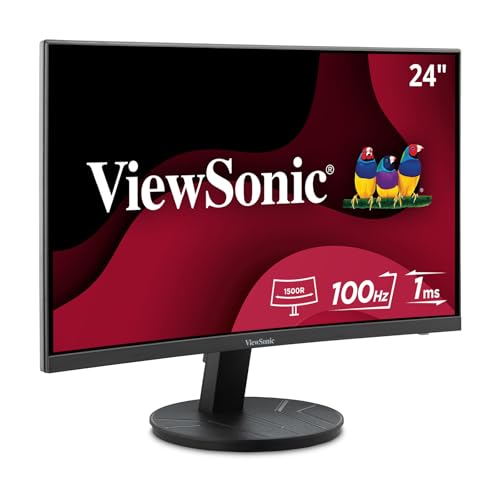
The ViewSonic VA2416C stands out as an excellent option for users seeking an immersive viewing experience without breaking the bank. Its 24-inch curved LED display with a 1500R radius enhances depth and engagement, perfect for work or media. The frameless design offers a sleek look and easy multi-screen setups. With full HD resolution and a 100Hz refresh rate, it delivers sharp images and smooth performance. Features like Flicker-Free technology and Blue Light Filter reduce eye fatigue during long hours. Plus, its flexible HDMI and DisplayPort inputs ensure compatibility with various devices, making it a reliable, budget-friendly choice for immersive viewing in any environment.
Best For: users who want an immersive, budget-friendly monitor for office work, media consumption, and casual gaming with eye comfort features.
Pros:
- Curved 24-inch Full HD display enhances immersion and depth perception
- Frameless design facilitates seamless multi-screen setups
- Supports multiple connectivity options with HDMI and DisplayPort
Cons:
- 1080p resolution may be limiting for detailed professional tasks
- 100Hz refresh rate is moderate for competitive gaming needs
- Basic built-in speakers may not deliver high-quality audio
ViewSonic VX3218-PC-MHD 32-Inch Curved Gaming Monitor

Gamers seeking an immersive experience will appreciate the ViewSonic VX3218-PC-MHD’s expansive 32-inch curved display, designed to draw you into the action with its 1500R curvature and slim bezels. The Full HD resolution guarantees sharp visuals, while the 180Hz refresh rate and 1ms MPRT response time deliver ultra-smooth gameplay. Supporting FreeSync Premium, it eliminates tearing for fluid visuals. Multiple customizable visual modes cater to FPS, RTS, and MOBA games, enhancing versatility. Plus, Flicker-Free tech and Blue Light Filter reduce eye fatigue during long sessions. Connectivity options include HDMI and DisplayPort, making it compatible with laptops, PCs, and Macs.
Best For: gamers seeking an immersive, smooth, and customizable gaming experience with eye comfort features.
Pros:
- 32-inch curved display with 1500R curvature for immersive viewing
- 180Hz refresh rate and 1ms MPRT for ultra-smooth gameplay
- Supports FreeSync Premium for tear-free visuals and customizable gaming modes
Cons:
- Full HD resolution may be less sharp compared to higher-resolution monitors
- Limited to HDMI and DisplayPort inputs, lacking other connectivity options
- No built-in speakers, requiring external audio solutions
Samsung Odyssey G55C Series QHD Curved Gaming Monitor

For anyone seeking an immersive gaming experience, the Samsung Odyssey G55C Series QHD Curved Gaming Monitor stands out with its 1000R curved display that wraps visuals around your peripheral vision. Its QHD resolution is 1.7 times sharper than Full HD, revealing incredible detail and clarity. HDR10 boosts colors with vivid shades, deep blacks, and bright whites, making scenes pop. The 165Hz refresh rate and 1ms response time ensure smooth, lag-free gameplay, while AMD FreeSync keeps tearing at bay. Designed for gamers, it also excels in movies and multimedia, offering vibrant visuals and eye care features like blue light reduction and flicker-free technology for long, comfortable viewing sessions.
Best For: gamers and multimedia enthusiasts seeking an immersive, high-resolution curved display with smooth visuals and eye comfort features.
Pros:
- Ultra-sharp QHD resolution with vivid HDR10 support for detailed and vibrant visuals
- 165Hz refresh rate and 1ms response time for lag-free, smooth gameplay
- Curved 1000R display enhances immersion and wraps visuals around the peripheral vision
Cons:
- May be more expensive compared to standard flat monitors
- Curved design might not suit all desk setups or preferences
- Limited to gaming and multimedia use, less ideal for professional tasks requiring color accuracy
Sceptre 27-inch Curved Gaming Monitor (2026)

If you’re seeking a monitor that combines immersive visuals with versatile connectivity, the Sceptre 27-inch Curved Gaming Monitor (2026) is an excellent choice. Its 1500R curvature creates a truly engaging viewing experience, while the VA panel with 100% sRGB delivers vibrant, accurate colors perfect for both gaming and creative work. With support for up to 240Hz, it ensures smooth, tear-free visuals. Multiple connection options—two HDMI and two DisplayPort ports—make setup easy. Built-in speakers and an audio out jack keep your desk clutter-free, and Blue-Light Shift technology shields your eyes during extended use. It’s a sleek, modern monitor with impressive features for 2026.
Best For: gamers and creative professionals seeking a versatile, high-performance curved monitor with vibrant visuals and seamless connectivity.
Pros:
- 1500R curvature provides an immersive viewing experience.
- Supports up to 240Hz for ultra-smooth gameplay and visuals.
- Multiple input options (two HDMI, two DisplayPort) for flexible device connections.
Cons:
- VA panels may have slower response times compared to TN or IPS panels.
- Built-in speakers might not deliver audiophile-quality sound.
- Compact design might limit certain ergonomic adjustments for some users.
Samsung 32-inch Curved FHD Monitor with HDMI and Speakers

The Samsung 32-inch Curved FHD Monitor with HDMI and Speakers stands out as an excellent choice for users seeking an immersive viewing experience without breaking the bank. Its 1800R curvature enhances depth perception and minimizes distractions, making it perfect for gaming, videos, or work. The full HD resolution provides sharp clarity on a large screen, while built-in speakers reduce desk clutter. With adjustable tilt, multiple connectivity options, and VESA support, setup is straightforward. Although viewing angles and contrast have limitations, the monitor’s eye comfort features and energy efficiency make it suitable for long sessions. It’s a reliable, budget-friendly option that delivers immersive visuals.
Best For: casual gamers, home office users, and multimedia enthusiasts seeking an affordable, immersive curved monitor for everyday tasks and entertainment.
Pros:
- Curved 1800R design enhances immersion and depth perception
- Built-in speakers reduce desk clutter and simplify setup
- Energy-efficient with eye comfort features for extended use
Cons:
- Limited 1920×1080 resolution on a 32-inch screen can restrict multitasking and sharpness
- Poor viewing angles and backlight unevenness may affect visual consistency
- Some features like Game Mode and Eye Saver Mode may feel gimmicky or intrusive
KTC 32 Inch 240Hz Curved Gaming Monitor

Gamers seeking ultra-smooth visuals and immersive experiences will find the KTC 32 Inch 240Hz Curved Gaming Monitor an excellent choice. Its 1500R curvature wraps around your field of view, creating a truly immersive gaming environment. The 1920×1080 Full HD resolution combined with HDR technology delivers vibrant, bright images with a 125% sRGB color gamut and a 3500:1 contrast ratio. With a 240Hz refresh rate and 1ms response time, motion remains smooth and responsive. Compatibility with FreeSync and G-Sync minimizes tearing and ghosting. Plus, versatile connectivity options and adjustable tilt make setup and comfort effortless.
Best For: gamers seeking ultra-smooth, immersive visuals with vibrant colors and minimal motion blur in their gaming setup.
Pros:
- 240Hz high refresh rate for ultra-smooth gameplay
- 1ms response time reduces input lag and motion artifacts
- Wide 178° viewing angle and 1500R curvature for immersive experience
Cons:
- Full HD resolution may not satisfy those looking for 4K clarity
- Limited to tilt adjustment with no height or swivel options
- May require compatible graphics hardware for optimal FreeSync and G-Sync performance
LG 34 Curved WQHD VA Monitor with Built-in Speaker

Designed for those who want an immersive viewing experience without sacrificing convenience, the LG 34 Curved WQHD VA Monitor with built-in speakers offers a sleek ultrawide display that enhances multitasking and entertainment. Its 34-inch, 21:9 aspect ratio and 3440×1440 resolution provide ample screen space and sharp visuals. The 1800R curvature creates a cinematic feel while reducing eye strain. With a 100Hz refresh rate and 5ms response time, it handles fast-paced scenes smoothly. Powered by WebOS23, streaming is effortless through popular services. The included Magic Remote makes navigation easy, though some users note issues with product condition and setup. Overall, it’s a versatile, immersive monitor at a competitive price.
Best For: users seeking an immersive ultrawide display for multitasking, streaming, and casual gaming at an affordable price.
Pros:
- Large 34-inch ultrawide screen with high-resolution WQHD display for extensive workspace and sharp visuals
- Built-in smart features with WebOS23 and Magic Remote for easy streaming and control of popular services
- Curved 1800R design enhances immersion and reduces eye strain during extended use
Cons:
- Renewed condition may include scratches, packaging issues, or signs of previous use
- Setup can be challenging for some users, especially with aspect ratio adjustments and software limitations
- Limited warranty and repair options due to the product’s renewed status
CRUA 30-Inch Ultrawide Curved Monitor (2560x1080P, 120Hz, FreeSync, Wall-Mountable)

If you’re seeking an expansive, immersive viewing experience that enhances multitasking and content creation, the CRUA 30-Inch Ultrawide Curved Monitor is an excellent choice. Its 29.5-inch display with a 21:9 aspect ratio and 1500R curvature offers a wide field of view, making it perfect for multitasking, gaming, or editing. The VA panel delivers vibrant visuals with 120% sRGB color, deep contrast, and smooth gradients. With a 120Hz refresh rate and FreeSync support, motion stays fluid and tear-free. The monitor’s wall-mount compatibility and ergonomic tilt add flexibility, while low blue light mode keeps my eyes comfortable during long sessions.
Best For: users seeking an immersive, wide-screen monitor ideal for multitasking, gaming, video editing, and content creation with vibrant visuals and smooth performance.
Pros:
- Ultra-wide 29.5-inch curved display enhances immersion and multitasking efficiency
- Vibrant VA panel with 120% sRGB color gamut delivers vivid, accurate visuals
- Supports 120Hz refresh rate and FreeSync for smooth, tear-free motion
Cons:
- 1080p resolution may be less sharp compared to higher-resolution monitors
- Limited to tilt adjustment (-5° to 15°), lacking height or swivel adjustments
- May require wall-mounting setup for optimal space-saving configuration
LG 32MR50C-B Curved Monitor 32-Inch FHD 100Hz AMD FreeSync
The LG 32MR50C-B is an excellent choice for anyone seeking a large, immersive display for multitasking, entertainment, or casual gaming. Its 32-inch curved Full HD screen delivers vibrant, crisp images with accurate colors, enhancing immersion. The 100Hz refresh rate and AMD FreeSync ensure smooth motion and reduce tearing during fast-paced content. The sleek, borderless design minimizes distractions, while the tilt-adjustable stand offers comfortable viewing angles. Perfect for home setups, it easily connects to PCs and consoles. Although it lacks built-in audio and height adjustment, its eye-care features and versatile performance make it a solid, value-packed option for immersive viewing experiences.
Best For: users seeking a large, immersive curved monitor for multitasking, entertainment, and casual gaming with vibrant visuals and smooth motion.
Pros:
- Large 32-inch curved Full HD display enhances immersion and viewing comfort
- 100Hz refresh rate with AMD FreeSync provides smooth, tear-free visuals during fast-paced content
- Sleek, borderless design and tilt-adjustable stand improve aesthetics and ergonomic viewing angles
Cons:
- Lacks built-in speakers, requiring external audio solutions
- No height adjustment feature, limiting ergonomic customization
- Color accuracy and panel quality may vary, with some users experiencing discrepancies
Factors to Consider When Choosing Curved Monitors for Immersive Viewing

When selecting a curved monitor, I focus on key factors like screen size and curvature to guarantee an immersive experience. I also pay attention to resolution, refresh rate, and response time for smooth, clear visuals, along with connectivity options to match my devices. Finally, eye comfort features are essential to prevent fatigue during long viewing sessions.
Screen Size and Curvature
Have you ever wondered how screen size and curvature work together to create a more immersive viewing experience? Larger screens, like 27 inches or more, naturally draw you in by filling more of your peripheral vision. When combined with the right curvature—measured in millimeters, such as 1000R or 1500R—the effect intensifies. A more pronounced curve (smaller radius) provides a wraparound feel, reducing edge distortions and making images appear more consistent across the display. But too aggressive a curve can cause discomfort or distortions over time. Finding the right balance depends on your workspace and intended use. When size and curvature complement each other, you get a truly immersive experience that’s comfortable for long sessions.
Resolution and Clarity
Choosing the right resolution and clarity is essential for maximizing the immersive potential of a curved monitor. A higher resolution, like QHD or 4K, delivers sharper images and more detailed visuals that pull you into the experience. Resolution directly affects clarity; for example, a 1920×1080 display is clear but limited, while a 3440×1440 ultrawide enhances detail across a broader view. Pixel density (PPI) also matters—higher PPI means crisper text and images. Additionally, monitors with HDR support boost color range and contrast, adding depth and realism. The combination of resolution and panel technology, such as IPS or VA, influences overall sharpness and color accuracy. Prioritizing these factors ensures a stunning, immersive viewing experience that truly stands out.
Refresh Rate and Response Time
A high refresh rate and quick response time are essential for creating smooth, fluid visuals that fully immerse you in your content. When the refresh rate is 120Hz or higher, motion appears smoother, reducing blur during fast-paced scenes like gaming or video editing. Response time, measured in milliseconds, indicates how quickly a pixel can change color; lower response times, such as 1ms or 2ms, minimize ghosting and trailing effects that can distract and break immersion. Additionally, a refresh rate synchronized with your graphics card, using technologies like AMD FreeSync or NVIDIA G-Sync, prevents tearing and stuttering, enhancing fluidity. Monitors with high response times can cause motion artifacts, making fast scenes appear blurry or smeared. For ideal immersion, aim for a monitor that combines a high refresh rate with a low response time.
Connectivity Options and Compatibility
When selecting a curved monitor for immersive viewing, examining its connectivity options is key to guaranteeing smooth integration with your devices. Look for multiple input ports like HDMI, DisplayPort, and USB-C to support various gadgets and future-proof your setup. Make sure the monitor’s connectivity matches your existing equipment, whether it’s gaming consoles, laptops, or desktops, so you can connect effortlessly. Check if the USB-C port can deliver power (65W or more) to charge your devices while connected, which helps reduce cable clutter. Also, verify if there’s an audio output—like a headphone jack or built-in speakers—to handle multimedia and gaming audio needs. Finally, ensure the monitor’s connectivity features are compatible with your operating system and hardware to guarantee plug-and-play convenience.
Eye Comfort Technologies
Since extended screen time can cause eye strain, it’s essential to take into account eye comfort technologies when selecting a curved monitor for immersive viewing. Features like Flicker-Free and Blue Light Filters notably reduce eye fatigue by minimizing flickering and blocking harmful blue light, especially during long sessions. TÜV-certified eye care features guarantee blue light emissions stay below safety thresholds, making prolonged use safer. Adjustable brightness and automatic color temperature settings help tailor the display to ambient lighting, easing eye strain. Anti-glare coatings and matte finishes reduce reflections, enhancing comfort in various environments. Technologies like Eye Saver Mode and flicker reduction are especially beneficial during extended gaming, work, or multimedia sessions, ensuring that your eyes stay comfortable and protected over time.
Frequently Asked Questions
How Does Curvature Radius Affect Viewing Comfort and Immersion?
A smaller curvature radius creates a more pronounced curve, enhancing immersion by wrapping the display around your field of view. This makes visuals feel more natural and reduces eye strain, especially during long sessions. Conversely, a larger radius offers a gentler curve, which can be more comfortable for extended viewing without feeling overwhelming. Ultimately, finding the right curvature depends on your workspace and personal preference for immersion versus comfort.
Are Curved Monitors Suitable for Professional Color Accuracy Tasks?
Curved monitors can be suitable for professional color accuracy tasks, but it depends on the specific model and its calibration capabilities. I’ve found that high-end curved displays with wide color gamuts and precise calibration options work well for my work, offering immersive visuals without compromising accuracy. However, for critical color work, I recommend choosing monitors designed specifically for professional use, as some curved models might introduce slight distortions affecting color fidelity.
What Connectivity Options Are Typically Available on Curved Monitors?
Curved monitors usually offer a range of connectivity options like HDMI, DisplayPort, and USB-C, making it easy to connect to various devices. Some models even include multiple ports, allowing me to connect my laptop, gaming console, or external drives simultaneously. I find USB-C especially convenient for quick, single-cable setups with my compatible devices. Overall, these options guarantee seamless integration into my workspace or gaming setup.
Do Curved Monitors Have Higher Power Consumption Than Flat Ones?
Think of a curved monitor like a cozy, inviting campfire — it uses a bit more fuel than a flat one. Yes, they tend to have higher power consumption because of their larger, more complex screens and backlighting. But, the difference usually isn’t huge. I’ve found that the immersive experience is worth a slight increase in energy use, especially when you’re gaming or working on detailed projects.
How Does Screen Size Influence the Immersive Experience?
Screen size plays a huge role in creating an immersive experience. When I opt for larger screens, I feel more engaged and surrounded by visuals, almost like being in the scene. Bigger monitors, especially curved ones, enhance peripheral vision and make details pop. However, I also consider desk space and resolution to guarantee I get the best balance between size and clarity for my needs.
Conclusion
Choosing the right curved monitor is like finding the perfect window into another world—one that pulls you in and keeps you captivated. Whether it’s the expansive ultrawide or the sleek, budget-friendly option, each monitor offers a different portal to immersive viewing. So, pick the one that speaks to your needs, and let your screen become a gateway where every pixel paints a vivid adventure. plunge in and experience the difference today!