
If you’re looking for the best external hard drives in 2025, I’ve found some great options to help you secure your data. The SanDisk 4TB Extreme Portable SSD boasts high speeds and durability, while the Seagate Portable 2TB HDD offers affordability for gamers. Don’t overlook the Toshiba Canvio Basics for reliable storage. From compact designs to vast storage solutions, I’ve compiled a list that covers a range of preferences and needs. Keep exploring to discover the perfect fit for you!
Key Takeaways
- The SanDisk 4TB Extreme Portable SSD offers high-speed performance with read speeds up to 1050MB/s and robust durability features like drop protection and water resistance.
- For affordable storage, the Seagate Portable 2TB HDD provides reliable performance and is ideal for gamers or individuals needing budget-friendly options.
- The Western Digital 6TB Elements HDD balances competitive pricing with high capacity, making it suitable for users with extensive data collections.
- Toshiba Canvio Basics 2TB is a lightweight and compact option that offers great value but lacks built-in encryption for security.
- The SanDisk 1TB Extreme Portable SSD combines premium pricing with high-speed performance and durability, perfect for users seeking portable storage solutions.
SanDisk 4TB Extreme Portable SSD


If you’re looking for a reliable and high-speed storage solution, the SanDisk 4TB Extreme Portable SSD is a top contender. With impressive read speeds of up to 1050MB/s and write speeds reaching 1000MB/s, it handles large files effortlessly. Its compact design makes it easy to carry, and the robust durability, featuring 3-meter drop protection and an IP65 rating, means it can withstand tough conditions. I appreciate the 256-bit AES encryption for added security, too. Plus, it’s compatible with both PC and Mac. Overall, this SSD delivers exceptional performance and portability for anyone needing dependable data storage.
Best For: Professionals and creatives who require high-speed, portable, and durable storage solutions for large files and data on the go.
Pros:
- High performance: Up to 1050MB/s read speed and 1000MB/s write speed for efficient data transfer.
- Durability: 3-meter drop protection and IP65 rating for water and dust resistance ensure it can withstand tough environments.
- Security features: 256-bit AES hardware encryption provides robust data protection.
Cons:
- Intermittent issues: Some users reported problems during heavy data transfers.
- Software requirement: Mac users need to download software for compatibility.
- Higher price point: Compared to traditional external hard drives, SSDs can be more expensive.
Seagate Portable 2TB External Hard Drive HDD (STGX2000400)

The Seagate Portable 2TB External Hard Drive HDD (STGX2000400) stands out as an ideal choice for anyone needing reliable and efficient data storage. Its plug-and-play setup makes it incredibly user-friendly, automatically recognized upon connection. With USB 3.0 compatibility, I enjoy fast read/write speeds, perfect for storing large files and backups. Weighing just 6.7 ounces and compact at 4.6 x 3.15 x 0.58 inches, it’s easy to carry around. Customer reviews highlight its performance and portability, earning an impressive 4.6-star rating. Plus, the included 1-Year Rescue Service offers peace of mind for data recovery.
Best For: Individuals and gamers looking for a reliable, portable storage solution to back up files and media effortlessly.
Pros:
- Plug-and-play functionality allows for easy setup without the need for additional software.
- Fast read/write speeds via USB 3.0 make it ideal for transferring large files quickly.
- Compact and lightweight design makes it convenient for on-the-go use.
Cons:
- Limited to 2TB of storage, which may not be sufficient for users with extensive data needs.
- The 18-inch USB cable may be short for some users’ setups.
- Potential 15% fee on returns for misrepresented conditions could be a drawback for some buyers.
Toshiba Canvio Basics 2TB Portable External Hard Drive

For anyone in need of reliable and portable data storage, the Toshiba Canvio Basics 2TB Portable External Hard Drive stands out with its sleek design and impressive storage capacity. Its lightweight, compact profile makes it easy to carry around, while the durable build guarantees me of its longevity. With 2TB of space, I can store large files, videos, and backups effortlessly. The USB 3.0 connectivity guarantees fast data transfers, and the plug-and-play functionality means I’m up and running in seconds. For anyone struggling with limited storage, this affordable option is a game-changer for professionals and casual users alike.
Best For: Professionals and casual users seeking reliable, portable storage solutions for large files and backups.
Pros:
- Plug-and-play functionality allows for quick and easy setup without software installation.
- Lightweight and compact design makes it highly portable, perfect for on-the-go use.
- Affordable price offers great value for the amount of storage and reliable performance.
Cons:
- Pre-formatted NTFS means Mac users will need to reformat the drive for compatibility.
- Limited advanced features compared to other higher-end external drives.
- No built-in encryption for added data security.
SanDisk 1TB Extreme Portable SSD
Offering up to 1050MB/s read and 1000MB/s write speeds, the SanDisk 1TB Extreme Portable SSD is perfect for anyone who needs speedy and reliable data storage on the go. Its compact design and lightweight build make it easy to carry, while the IP65 rating guarantees water and dust resistance. Plus, the 3-meter drop protection gives me peace of mind. With 256-bit AES hardware encryption, my files stay secure. I love using the SanDisk Memory Zone app for effortless file management. Overall, it’s a fantastic choice for fast, durable, and portable storage, ideal for both Windows and macOS users.
Best For: Anyone seeking fast, reliable, and portable storage for their data, especially on the go.
Pros:
- Fast transfer speeds of up to 1050MB/s read and 1000MB/s write.
- Durable design with IP65 water and dust resistance and 3-meter drop protection.
- Compact and lightweight for easy portability, with versatile connectivity options.
Cons:
- Short USB cable may limit connectivity options for some users.
- Some users reported intermittent issues under heavy load.
- Requires software download for macOS compatibility.
Western Digital 6TB Elements Desktop USB 3.0 External Hard Drive

With its impressive 6TB capacity, the Western Digital 6TB Elements Desktop USB 3.0 External Hard Drive stands out as a top choice for content creators and gamers alike. I love how its plug-and-play compatibility makes it easy to use with both Windows PCs and Macs. The fast data transfer rates via USB 3.0 guarantee I can quickly back up large media files without delays. Weighing just 2.1 pounds, it’s portable yet spacious. Plus, with a customer rating of 4.5 stars, I feel confident in its reliability and performance for all my storage needs.
Best For: Content creators, gamers, and professionals needing reliable and spacious external storage solutions.
Pros:
- Fast data transfer rates with USB 3.0 ensure quick backups of large files.
- Plug-and-play compatibility with both Windows PCs and Macs for easy setup.
- High customer rating of 4.5 stars reflects its reliability and performance.
Cons:
- May experience compatibility issues with utility software.
- Not compatible with powered USB 3.0 hubs, limiting connection options.
- Some users may require higher capacity models for extensive storage needs.
Seagate Portable 2TB External Hard Drive (STGX2000400)
The Seagate Portable 2TB External Hard Drive (STGX2000400) stands out as the ideal choice for anyone needing a reliable and spacious storage solution. With its USB 3.0 compatibility, it works seamlessly with PCs, Macs, PlayStation, and Xbox. I love the plug-and-play setup; just connect it, and it’s recognized instantly. Its compact design makes it easy to carry, weighing only 6.7 ounces. The performance is impressive, offering fast read/write speeds for large files. Plus, with an average rating of 4.6 stars from over 264,000 users, it’s clear that many appreciate its portability, ease of use, and reliability.
Best For: Individuals and gamers seeking a portable and reliable external storage solution for their files and media.
Pros:
- Plug-and-play functionality makes setup effortless with automatic recognition on connection.
- Compact and lightweight design allows for easy transport, perfect for on-the-go users.
- Fast read/write speeds enable efficient data transfers, ideal for large files and backups.
Cons:
- Limited to USB 3.0, which may not be optimal for users needing faster transfer speeds with USB 3.1 or higher.
- The included 18-inch USB cable may be too short for some setups, requiring additional extension cables.
- Potential for a 15% fee on returns for misrepresented conditions, which may complicate the return process.
Toshiba Canvio Flex 2TB Portable External Hard Drive

If you’re looking for a portable storage solution that seamlessly works across devices, the Toshiba Canvio Flex 2TB Portable External Hard Drive is a fantastic choice. It’s compact and lightweight, making it easy to carry around. With USB-C and USB-A cables included, I can connect it to my PC, Mac, or tablet without a hitch. The performance is impressive, thanks to USB 3.0, ensuring rapid data transfers. Plus, with 2TB of storage, I’ve got plenty of space for all my files. Toshiba’s reputation for reliability makes it a smart investment for anyone needing versatile and dependable storage.
Best For: Individuals seeking a reliable and portable storage solution compatible with multiple devices.
Pros:
- Versatile Compatibility: Works seamlessly with PC, Mac, and tablets.
- High Storage Capacity: 2TB of space suitable for large files and backups.
- Easy Setup: Plug-and-play functionality with no complicated installation required.
Cons:
- Potential Speed Limitations: While USB 3.0 is fast, users with USB 3.1 devices may experience slower transfer rates.
- Limited Color Options: Available primarily in silver, which may not appeal to all users.
- Durability Concerns: Although generally reliable, portable drives can be susceptible to physical damage if not handled carefully.
WD 2TB Elements Portable External Hard Drive for Windows

For anyone needing a portable solution for their data storage needs, the WD 2TB Elements Portable External Hard Drive stands out as an excellent choice. It offers a generous 2TB capacity in a compact design, weighing just 4.6 ounces. The USB 3.0 interface guarantees fast data transfers, reaching speeds up to 5Gbps. I appreciate its plug-and-play functionality, making it easy to use with both Windows and Mac systems. While it’s generally reliable, I’ve found that replacing the supplied cable can enhance performance. Overall, this hard drive delivers great value for anyone looking to store large data collections without external power requirements.
Best For: Users seeking a reliable and portable external storage solution for large data collections at an affordable price.
Pros:
- Compact and lightweight design, making it highly portable.
- Fast data transfer rates with USB 3.0, reaching speeds up to 5Gbps.
- Plug-and-play functionality for easy use with Windows and Mac systems.
Cons:
- Potential issues with “click of death” if used with overloaded unpowered USB hubs.
- Requires reformatting for optimal use on Mac systems, which may be inconvenient for some users.
- Users may experience performance issues with the supplied cable, necessitating a replacement for better reliability.
UnionSine 500GB Ultra Slim Portable External Hard Drive
Seeking a reliable and portable storage solution? The UnionSine 500GB Ultra Slim Portable External Hard Drive might be just what you need. Weighing only 4.8 ounces and measuring just 0.5 inches thick, it easily fits in your pocket. With USB 3.0 compatibility, I enjoy impressive read speeds up to 133MB/s and write speeds around 103MB/s. It’s great for both gaming consoles and computers, making it versatile. The noise-free operation and durability give me peace of mind. Plus, with a solid 4.5-star rating from thousands of users, I feel confident in its performance and reliability for my data storage needs.
Best For: Individuals seeking a portable and reliable external storage solution for gaming, file management, and data backup.
Pros:
- Ultra-slim and lightweight design makes it easy to carry in pockets or bags.
- High transfer speeds of up to 133MB/s for reading and 103MB/s for writing enhance data access and storage efficiency.
- Wide compatibility with various devices, including PCs, Macs, and gaming consoles, ensures versatility.
Cons:
- Some users reported initial connection issues with Apple devices, requiring a USB hub for resolution.
- 5400 RPM rotational speed may not be as fast as higher RPM options available in the market.
- Limited storage capacity of 500GB may not meet the needs of users with extensive data requirements.
LaCie Rugged Mini 2TB External Hard Drive

The LaCie Rugged Mini 2TB External Hard Drive stands out as the ideal choice for creative professionals who need reliable and portable data storage. With a compact design and weighing just 9.9 ounces, it easily fits in my bag. Its durability is impressive, offering shock, dust, and water resistance—perfect for all-terrain use. I love the fast transfer speeds of up to 130MB/s, making it a breeze to handle large files. Plus, it’s compatible with both Mac and PC. The included month of Adobe Creative Cloud is a nice bonus for my creative projects. Highly recommended for anyone in need of robust storage!
Best For: Creative professionals and travelers who require reliable, portable, and durable data storage.
Pros:
- Compact and lightweight design, making it easy to carry.
- Offers impressive durability with shock, dust, and water resistance.
- Fast transfer speeds of up to 130MB/s for efficient handling of large files.
Cons:
- Requires reformatting for Mac compatibility, which may be inconvenient for some users.
- The rotational speed of 5400 RPM may not be as fast as some higher-end SSD alternatives.
- Limited storage capacity of 2TB may not be sufficient for users with extensive data needs.
Avolusion M5 Series 14TB USB 3.0 External Hard Drive (Renewed)

Looking for a reliable storage solution that packs a punch? The Avolusion M5 Series 14TB USB 3.0 External Hard Drive (Renewed) is a solid choice! With a generous 14TB capacity—approximately 12TB usable after formatting—it’s perfect for backing up games, music, and photos. The plug-and-play USB 3.0 interface means instant expansion, while the silent, fan-less design guarantees quiet operation. Plus, this drive has zero power hours and passed rigorous quality tests, assuring its reliability. Just keep in mind, it’s best suited for Windows systems, so Mac users will need to reformat. Overall, it’s a great value for massive storage.
Best For: Users seeking a high-capacity external hard drive for backup storage, particularly those using Windows systems.
Pros:
- Plug-and-play USB 3.0 interface for easy setup and instant storage expansion.
- Silent, fan-less design ensures quiet operation during use.
- 14TB capacity (approx. 12TB usable) ideal for storing large files like games, music, and videos.
Cons:
- Compatibility issues with non-Windows systems; Mac users need to reformat the drive.
- Mixed customer feedback regarding durability and long-term performance.
- Average rating of 3.6 out of 5 stars suggests variable user experiences.
Portable External Hard Drive 1TB Storage Expansion HDD

For anyone in need of reliable and versatile data storage, the YOTUO Portable External Hard Drive with 1TB of storage stands out as an excellent choice. Its compact design, measuring just 4.84 x 3.07 x 0.67 inches, makes it easy to carry. With USB 3.0 and USB-C interfaces, it’s compatible with a wide range of devices, including PCs, Macs, and gaming consoles. I appreciate the plug-and-play functionality that simplifies setup. Plus, the silicone sleeve provides added protection against shocks. With transfer speeds up to 5.0 Gbit/s, it’s a solid option for quick data access and efficient storage expansion.
Best For: Individuals seeking a portable and versatile storage solution for gaming, office, and personal use across various devices.
Pros:
- Compact and lightweight design makes it easy to carry and store.
- Wide compatibility with multiple devices, including PCs, Macs, and gaming consoles.
- Fast transfer speeds of up to 5.0 Gbit/s ensure efficient data access.
Cons:
- Requires formatting for Mac users before initial use, which may be inconvenient.
- Data transfer limitations between different gaming device brands can be restrictive.
- Some users have reported issues with heat generation during extended use.
Western Digital 6TB My Book Desktop External Hard Drive

If you need reliable data storage, the Western Digital 6TB My Book Desktop External Hard Drive stands out with its impressive capacity and security features. With a 6TB storage option, it’s perfect for backing up important files. I appreciate the 256-bit AES hardware encryption and password protection, ensuring my data remains secure. The USB 3.0 interface allows for fast transfers, while it’s also compatible with USB 2.0. Weighing just 2.31 pounds, it’s easy to manage. Plus, the backup software simplifies the process. Overall, it’s a solid choice for anyone seeking high-performance data storage.
Best For: Those seeking reliable and secure external storage solutions for backing up essential files.
Pros:
- Large capacity of 6TB allows for extensive data storage, making it ideal for backups and large files.
- 256-bit AES hardware encryption and password protection enhance data security, ensuring sensitive information is kept safe.
- Fast data transfer speeds with USB 3.0 compatibility, while also being usable with older USB 2.0 connections.
Cons:
- Some users have reported issues with data loss, emphasizing the need for additional backup solutions.
- Weight of 2.31 pounds may be less portable compared to smaller external drives.
- Limited warranty information may cause concern for potential buyers regarding long-term reliability.
Seagate Expansion 14TB External Hard Drive HDD
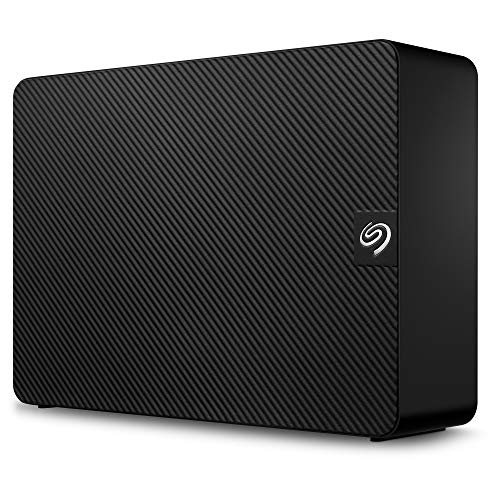
The Seagate Expansion 14TB External Hard Drive HDD stands out as an excellent choice for anyone needing substantial storage space for their digital files. With its USB 3.0 connection, I found file transfers fast and straightforward—just plug it in and start dragging files. It runs quietly and remains cool, perfect for 24/7 operation. I appreciate the generous 14TB capacity, which easily accommodates all my backups. While some users reported issues, my experience has been positive, and I’d recommend avoiding USB hubs to prevent disconnects. Overall, it offers great value for its size, and I’d happily repurchase it if needed.
Best For: Those needing extensive and reliable storage for backups and archival data.
Pros:
- Fast file transfers with USB 3.0 for efficient data management.
- Large 14TB capacity suitable for extensive file storage needs.
- Quiet operation with good reliability for 24/7 use.
Cons:
- Some users report issues with noise and slow performance.
- Potential for drive failure after short usage periods.
- Not recommended for use with USB hubs due to disconnect risks.
Factors to Consider When Choosing External Hard Drives for Data Storage

When I’m choosing an external hard drive for data storage, there are a few key factors I always consider. I think about storage capacity, transfer speed, and how portable the design is, along with compatibility with my devices. Plus, durability is essential to protect my data from potential damage.
Storage Capacity Requirements
Understanding your storage capacity requirements is essential for selecting the right external hard drive. I recommend starting by evaluating the size of your current data, including files, media, and backups. This way, you can verify the drive you choose has enough capacity. External hard drives typically range from 500GB to over 14TB, so you have plenty of options. Just remember that the actual usable space might be less than advertised due to formatting. If you anticipate future growth in your data needs, opting for a larger capacity drive could be a wise investment. Finally, pick a drive that suits your primary use case, whether it’s for casual storage, extensive media libraries, or professional data management.
Transfer Speed Performance
How much does transfer speed matter when choosing an external hard drive? It matters a lot! I’ve found that SSDs can deliver impressive read speeds up to 1050MB/s, while traditional HDDs often lag with speeds around 5400 RPM. When I’m transferring large files, the difference is clear—SSDs handle heavy loads efficiently without overheating, unlike some HDDs that slow down. Plus, using USB 3.0 can boost transfer rates to 5 Gbps, and newer standards like USB 3.2 Gen 2 take it even higher. However, keep in mind that real-world performance can vary based on file size and the drive’s health. For backups and media storage, choosing a drive with high-speed transfer is essential to save time and frustration.
Portability and Design
Portability and design are essential factors I consider when choosing an external hard drive for data storage. I love compact and lightweight drives that easily fit in my bag or pocket, making them perfect for on-the-go use. Many portable models boast impressive durability, offering up to 3-meter drop protection and IP65 ratings for water and dust resistance, so I don’t worry about them getting damaged. I also appreciate designs that include a carabiner loop, allowing me to secure the drive to my backpack or belt. The sleek, minimalistic aesthetics often resist fingerprints, keeping the drive looking clean. Plus, the plug-and-play functionality means I can quickly connect and use the drive without fussing with extra software.
Compatibility With Devices
Compatibility is a key factor when I choose an external hard drive for data storage. I always guarantee the drive works seamlessly with my devices’ operating systems, whether it’s Windows or macOS. Some drives might need reformatting for different systems, which can be a hassle. I also look for drives that support multiple interfaces like USB 3.0 and USB-C, as this maximizes compatibility with various devices, including gaming consoles and tablets. Checking if the drive is pre-formatted is vital; I prefer exFAT for cross-platform compatibility. Additionally, I consider the physical size and design since compact models are easier to carry. Finally, I verify that included cables match my devices to avoid connectivity issues.
Durability and Protection
When I’m looking for an external hard drive, durability and protection are at the top of my list. I always check for drop protection ratings—some models can withstand falls of up to 3 meters. It’s vital to find drives with water and dust resistance, like those rated IP65, which help guarantee longevity. A robust build quality is important; I prefer shock-resistant designs to prevent data loss from impacts or vibrations. For outdoor adventures, I look for rugged drives that handle extreme temperatures and moisture. Finally, I appreciate materials that resist fingerprints and smudges, keeping the drive looking good while maintaining functionality. Prioritizing these factors helps me safeguard my precious data effectively.
Price and Value
Finding the right external hard drive isn’t just about storage; it’s also about getting the best bang for your buck. When I evaluate drives, I always consider the storage capacity relative to the price. Higher capacity drives usually offer better value per gigabyte. Performance specs, like read and write speeds, also matter—faster drives can be worth the extra cost due to improved efficiency. I look for added features like encryption and backup software, which enhance both value and security. Don’t forget about warranty length and customer support; longer warranties can save you money if something goes wrong. Finally, keep an eye on seasonal sales, as monitoring prices can help you snag the best deals on your external hard drive.
Frequently Asked Questions
What Are the Best Brands for External Hard Drives in 2025?
I’ve been exploring external hard drives lately, and I’ve found that some brands consistently stand out. For reliability and performance, I’d recommend looking into brands like Western Digital and Seagate. They’ve always delivered quality products that I trust. Additionally, Samsung and LaCie offer fantastic options, especially if you need something portable. I think these brands will be top choices for anyone seeking external storage solutions in the near future.
How Do I Format an External Hard Drive for Different Operating Systems?
So, you want to format an external hard drive? It’s not like we’re sending a rocket to Mars! First, connect your drive, then on Windows, use Disk Management; for Mac, go to Disk Utility. Choose the format—NTFS for Windows, exFAT for both, and APFS for Mac. Just click ‘Erase’ and voilà! You’ve got a drive ready to make your data feel at home, no astronaut training required!
What Is the Lifespan of an External Hard Drive?
I’ve often wondered about the lifespan of external hard drives. Generally, they last around three to five years with regular use, but it can vary based on brands and how well you treat them. I’ve noticed that keeping them cool and avoiding physical shocks can extend their life. Regular backups are essential too, just in case. So, while they can serve you well, planning for replacement is wise!
Can External Hard Drives Be Used for Gaming Consoles?
Isn’t it ironic that we’ve got these powerful gaming consoles, yet we often run out of space? I’ve found that external hard drives can be a lifesaver for gamers like me. They easily connect via USB, letting me expand my storage without breaking the bank. I’ve stored countless games, DLCs, and updates on mine, and it’s worked flawlessly. So, yes, if you’re running low on space, an external drive’s a great option!
What Is the Difference Between SSD and HDD for External Storage?
When I compare SSDs and HDDs for external storage, I notice some key differences. SSDs are faster, offering quicker load times and data transfers, which I really appreciate for gaming or large files. On the other hand, HDDs provide more storage at a lower cost, making them great for backups. I often choose SSDs for performance and speed, but I still keep an HDD for extra space when I need it.
Conclusion
To sum up, choosing the right external hard drive is like finding the perfect companion for your digital journey. With options like the SanDisk Extreme SSD or the Seagate Expansion HDD, you’re bound to discover something that fits your needs. Remember to weigh factors like storage capacity and speed, because the right drive will not only safeguard your data but also enhance your workflow. So, which one will you take on your next adventure?