For a high-end Fire TV setup, I’d start with the Amazon Fire TV Cube (3rd Gen) for hands-free Alexa, Wi-Fi 6E, and a more capable home-theater hub. The Fire TV Stick 4K Max (2nd Gen) is a strong fit when you want a compact 4K streamer, while the 4K Plus bundle with Alexa Voice Remote Pro adds a more capable remote to the package. The main tradeoffs are stick versus cube design, gaming extras, remote features, and whether refurbished or international models suit your needs. A higher-end device is most useful when its features match your TV, network, and viewing habits. Read on for the full comparison and recommendations by buyer type.

Get furniture and decor delivered free with Prime
- Fast, free delivery on millions of items
- Prime Video, Amazon Music and more included
- Member-only deals all year
Complete the kit


Key Takeaways
- The 3rd Gen amazon.com/dp/B0CJL9XJVY?tag=perfectfitliving-20&ascsubtag=dc-685478″ target=”_blank” rel=”nofollow sponsored noopener”>amazon.com/dp/B0BP9SNVH9?tag=perfectfitliving-20&ascsubtag=dc-685478″ target=”_blank” rel=”nofollow sponsored noopener”>amazon.com/dp/B0BXLZHDNC?tag=perfectfitliving-20&ascsubtag=dc-685478″ target=”_blank” rel=”nofollow sponsored noopener”>amazon.com/dp/B0F7Z4QZTT?tag=perfectfitliving-20&ascsubtag=dc-685478″ target=”_blank” rel=”nofollow sponsored noopener”>amazon.com/dp/B0DJGDC3BD?tag=perfectfitliving-20&ascsubtag=dc-685478″ target=”_blank” rel=”nofollow sponsored noopener”>amazon.com/dp/B0C6W3D4RM?tag=perfectfitliving-20&ascsubtag=dc-685478″ target=”_blank” rel=”nofollow sponsored noopener”>amazon.com/dp/B0H6C5KW2D?tag=perfectfitliving-20&ascsubtag=dc-685478″ target=”_blank” rel=”nofollow sponsored noopener”>Fire TV Cube leads for buyers who want a hands-free Alexa hub and Wi-Fi 6E in one device; its larger, more prominent setup makes it a different choice from a discreet stick.
- The 2nd Gen Fire TV Stick 4K Max is the strongest compact premium pick in this lineup, while the refurbished Max and international version call for closer checks on condition, compatibility, and included accessories.
- The 4K Plus bundle with Alexa Voice Remote Pro stands out for buyers who value remote features, showing that the best fit can depend on daily control as much as streaming hardware.
- Luna bundles pair streaming hardware with a controller, but they make most sense for households interested in cloud gaming; viewers focused on films and shows may prefer a standard device.
- HD and 4K Select models serve simpler setups, while Cube and Max options cater to buyers seeking more advanced hardware; paying for premium features brings little benefit if the TV or household will not use them.
| Amazon Fire TV Stick 4K Plus Bundle with Alexa Voice Remote Pro | 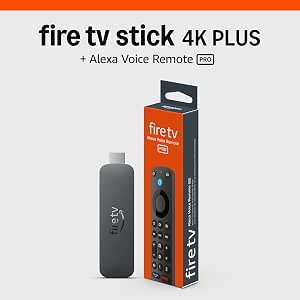 | Best for a Premium Remote | Maximum resolution: 2160p up to 60 fps | Video formats: Dolby Vision, HDR10, HDR10+, HLG | Audio: Dolby Atmos; HDMI audio passthrough up to 5.1 | VIEW ON AMAZON | See Our Full Breakdown |
| Amazon Fire TV Cube (Like-New), 4K Streaming Media Player with Alexa and Wi-Fi 6E |  | Best for Hands-Free Control | Condition: Refurbished, tested and certified | Processor: Octa-core | Connectivity: Wi-Fi 6E | VIEW ON AMAZON | See Our Full Breakdown |
| Fire TV Stick 4K Select + Luna Controller Bundle |  | Best for Cloud Gaming | Bundle contents: Fire TV Stick 4K Select and Luna Controller | Service: Amazon Luna | Connectivity: Wi-Fi Cloud Direct and Bluetooth | VIEW ON AMAZON | See Our Full Breakdown |
| Amazon Fire TV Stick 4K Select |  | Best Straightforward 4K Pick | Maximum resolution: 2160p up to 60 fps | Video formats: HDR10, HDR10+, HLG, H.265, H.264, VP9, AV1 | Processor: Quad-core 1.7 GHz | VIEW ON AMAZON | See Our Full Breakdown |
| Amazon Fire TV Stick HD with Alexa Voice Remote |  | Best Compact HD Option | Resolution: Full HD | Wireless connectivity: Wi-Fi 6 | Power: Powered by TV via included USB-C cable | VIEW ON AMAZON | See Our Full Breakdown |
| Fire TV Cube + Luna Controller Game Streaming Bundle |  | Best Premium Gaming Pick | Bundle Contents: Fire TV Cube, Luna Controller | Connectivity: Wi-Fi (Cloud Direct), Bluetooth | Gaming Service: Amazon Luna | VIEW ON AMAZON | See Our Full Breakdown |
| Amazon Fire TV Stick 4K Plus |  | Best New-Release Balance | Resolution: 2160p up to 60 fps | Processor: Quad-core 1.7 GHz | Storage: 8 GB | VIEW ON AMAZON | See Our Full Breakdown |
| Amazon Fire TV Stick 4K Max (Refurbished) |  | Best Value Flagship | Resolution: 4K Ultra HD | Storage: 16 GB | Connectivity: Wi-Fi 6E | VIEW ON AMAZON | See Our Full Breakdown |
| Amazon Fire TV Stick 4K Max (2nd Gen) Streaming Device |  | Best Overall Stick | Resolution: 2160p up to 60 fps | Processor: Quad-core 2.0 GHz | GPU: 850 MHz | VIEW ON AMAZON | See Our Full Breakdown |
| Amazon Fire TV Stick 4K (Refurbished) with Alexa Voice Remote |  | Best Budget 4K Entry | Resolution: 4K Ultra HD | Connectivity: Wi-Fi 6 | Audio Support: Dolby Atmos | VIEW ON AMAZON | See Our Full Breakdown |
| Amazon Fire TV Cube (3rd Gen) 4K Streaming Media Player with Wi-Fi 6E and Alexa |  | Best Premium Powerhouse | Processor: Octa-core (4 x 2.2 GHz + 4 x 2.0 GHz) | Wi-Fi: Wi-Fi 6E tri-band | Ports: HDMI 2.1 in/out, USB-A 2.0, Ethernet, IR extender | VIEW ON AMAZON | See Our Full Breakdown |
| Fire TV Stick 4K Max (International Version) with Alexa Voice Remote |  | Best Compact Performer for Travelers | Resolution: 4K Ultra HD | Processor: Quad-core, 750 MHz GPU | Wi-Fi: Wi-Fi 6 | VIEW ON AMAZON | See Our Full Breakdown |
| highend fire tv streaming device | Audio | Processor | Resolution | Storage |
|---|---|---|---|---|
| Amazon Fire TV Stick 4K Plus B | Dolby Atmos; HDMI audio passthrough up to 5.1 | Quad-core 1.7 GHz | — | 8 GB |
| Amazon Fire TV Cube | Dolby Atmos | Octa-core | — | — |
| Fire TV Stick 4K Select + Luna | — | — | 4K | — |
| Amazon Fire TV Stick 4K Select | HDMI passthrough for Dolby-encoded audio | Quad-core 1.7 GHz | — | 8 GB |
| Amazon Fire TV Stick HD with A | Bluetooth headphone support | — | Full HD | — |
| Fire TV Cube + Luna Controller | — | — | — | — |
| Amazon Fire TV Stick 4K Plus | Dolby Atmos, 7.1 surround, passthrough up to 5.1 | Quad-core 1.7 GHz | 2160p up to 60 fps | 8 GB |
| Amazon Fire TV Stick 4K Max | — | — | 4K Ultra HD | 16 GB |
| Amazon Fire TV Stick 4K Max | Dolby Atmos, 7.1 surround, passthrough up to 5.1 | Quad-core 2.0 GHz | 2160p up to 60 fps | 16 GB |
| Amazon Fire TV Stick 4K | — | — | 4K Ultra HD | — |
| Amazon Fire TV Cube | Dolby Atmos, 7.1 surround, HDMI pass-through | Octa-core (4 x 2.2 GHz + 4 x 2.0 GHz) | — | 16 GB |
| Fire TV Stick 4K Max | — | Quad-core, 750 MHz GPU | 4K Ultra HD | — |
More Details on Our Top Picks
Amazon Fire TV Stick 4K Plus Bundle with Alexa Voice Remote Pro
I’d choose this bundle when the remote matters as much as the streaming stick. It pairs 4K Dolby Vision and HDR10+ playback with Wi-Fi 6, while the Alexa Voice Remote Pro adds motion-activated backlighting, customizable shortcuts, and a finder function. Those controls can make late-night browsing and switching between favorite apps easier than with the standard remote bundled with the Fire TV Stick 4K Select. The tradeoff is that the stick itself remains a compact 8 GB device, so the bundle’s main distinction is its remote rather than a jump to a Cube-style set-top box. You’ll also need compatible equipment to benefit from 4K and Wi-Fi 6, and supported formats vary by service and title. I’d rank it for households that want a more capable everyday remote alongside high-end picture and sound support.
Pros:- Supports 4K at up to 60 fps with Dolby Vision and HDR10+
- Remote finder and motion-activated backlit buttons help with everyday use
- Two customizable remote buttons provide quick app shortcuts
- Wi-Fi 6 and Dolby Atmos support suit compatible home setups
Cons:- The 8 GB storage and stick format offer less flexibility than the Fire TV Cube
- Wi-Fi 6 benefits require a compatible router
- 4K, HDR, and Atmos availability depends on compatible equipment, services, and content
Best for: 4K TV owners who often misplace remotes or want backlit buttons and quick access to favorite apps
Not ideal for: Buyers seeking hands-free Alexa or a set-top box with more processing power; the Fire TV Cube is a better fit for those needs
- Maximum resolution:2160p up to 60 fps
- Video formats:Dolby Vision, HDR10, HDR10+, HLG
- Audio:Dolby Atmos; HDMI audio passthrough up to 5.1
- Processor:Quad-core 1.7 GHz
- Storage:8 GB
- Wi-Fi:Wi-Fi 6 dual-band, 2.4 GHz and 5 GHz
- Bluetooth:Bluetooth 5.2 + BLE
- Remote:Voice control, backlit motion-activated buttons, two customizable buttons, remote finder
Our verdict“Pick this bundle if you want strong 4K format support and a feature-rich remote more than a hands-free, set-top-style player.”
Amazon Fire TV Cube (Like-New), 4K Streaming Media Player with Alexa and Wi-Fi 6E
Among these five, this refurbished Cube is the clearest choice for buyers who want Alexa to work without picking up a remote. Its built-in microphones and speaker support hands-free voice commands, and its octa-core processor and Wi-Fi 6E distinguish it from stick-shaped options such as the Amazon Fire TV Stick 4K Plus Bundle with Alexa Voice Remote Pro. The Cube also supports connections to compatible cable boxes, consoles, and webcams, giving it a broader role in a media setup. The tradeoff is its refurbished condition: it is certified to look and work like new and carries the same limited warranty as a new device, but it may arrive in a generic box. It still depends on subscriptions for some services, and buyers who prefer a small HDMI stick may find the Cube’s set-top approach unnecessary.
Pros:- Hands-free Alexa uses built-in microphones and a speaker
- Octa-core processor supports fast app starts
- Wi-Fi 6E and 4K Dolby Vision, HDR, and Dolby Atmos support
- Can connect with compatible cable boxes, game consoles, and webcams
Cons:- Refurbished condition may not suit buyers who only want new hardware
- Set-top form factor is less compact than the Fire TV Stick 4K Select
- Streaming service subscriptions may be required
Best for: Viewers building a living-room media setup who want hands-free Alexa and voice control across compatible devices
Not ideal for: Buyers who want a simple, compact HDMI stick or prefer to avoid refurbished electronics
- Condition:Refurbished, tested and certified
- Processor:Octa-core
- Connectivity:Wi-Fi 6E
- Video:4K Ultra HD, Dolby Vision, HDR
- Audio:Dolby Atmos
- Voice assistant:Alexa hands-free with built-in microphones and speaker
- Privacy:Microphone off button
- Warranty:Same limited warranty as a new device
Our verdict“Choose the like-new Cube if hands-free Alexa and broader device control matter more than a compact stick format.”
Fire TV Stick 4K Select + Luna Controller Bundle
This bundle earns its place through a specific use: playing Amazon Luna cloud games on a TV without buying a console. The included controller connects through Cloud Direct for low-latency play, while Bluetooth lets it work with other devices. That gives the package a different purpose from the Fire TV Stick 4K Select, which focuses on streaming and offers Xbox cloud gaming only with a separate Game Pass subscription and compatible controller. The convenience comes with dependencies: Luna requires Prime or Luna Premium, and gameplay relies on a stable internet connection. Buyers who mainly watch films and shows may get little from the extra controller, while people seeking local console hardware should look elsewhere. I’d pick this for a household that wants to try cloud gaming on its existing TV and already has reliable broadband.
Pros:- Includes both the streaming stick and Luna Controller
- Cloud Direct is designed for low-latency Luna gameplay
- Does not require a dedicated game console
- Controller also supports Bluetooth connections to other devices
Cons:- Luna play requires Prime or Luna Premium
- Gameplay quality depends on a stable internet connection
- The controller adds little value for buyers who only watch video
Best for: TV viewers curious about Luna who have reliable broadband and want cloud gaming without a dedicated console
Not ideal for: Buyers who mainly stream video, have inconsistent internet, or do not want a Prime or Luna Premium subscription
- Bundle contents:Fire TV Stick 4K Select and Luna Controller
- Service:Amazon Luna
- Connectivity:Wi-Fi Cloud Direct and Bluetooth
- Resolution:4K
- Subscription:Prime or Luna Premium required
- Controller:Luna Controller with Cloud Direct and Bluetooth
Our verdict“Choose this bundle if Luna cloud gaming is a real part of your TV use and your internet connection can support it.”
Amazon Fire TV Stick 4K Select
The standard Fire TV Stick 4K Select is the most direct route here to 4K streaming with HDR10+ and an included Alexa remote. Its dual-band Wi-Fi and compact HDMI design keep setup simple, while AV1 support gives it a modern video format option. Compared with the Amazon Fire TV Stick 4K Plus Bundle with Alexa Voice Remote Pro, it lacks Dolby Vision and the remote’s backlighting, shortcuts, and finder feature. In return, it avoids making the upgraded remote the centerpiece, which suits viewers who just want to search by voice and control compatible TV or audio equipment. It can also access Xbox cloud gaming with a separate Game Pass subscription and controller. I’d place it below the more feature-rich bundle for high-end setups, but it makes sense when HDR10+ and uncomplicated 4K playback cover the need.
Pros:- Streams up to 4K at 60 fps with HDR10+
- Alexa remote supports voice search and compatible TV and audio controls
- Compact stick connects through HDMI
- Supports AV1 and Xbox cloud gaming with separate equipment and subscription
Cons:- Does not list Dolby Vision support, unlike the 4K Plus bundle and Fire TV Cube
- Xbox cloud gaming requires a separate subscription and compatible controller
- Some apps and titles require subscriptions or may not support 4K and HDR
Best for: Viewers with a 4K HDR10+ television who want a compact streamer and basic Alexa voice search
Not ideal for: Buyers who want Dolby Vision, a premium remote, or hands-free Alexa; the 4K Plus bundle or Cube better matches those priorities
- Maximum resolution:2160p up to 60 fps
- Video formats:HDR10, HDR10+, HLG, H.265, H.264, VP9, AV1
- Processor:Quad-core 1.7 GHz
- Storage:8 GB
- Wi-Fi:Dual-band, dual-antenna MIMO; 802.11a/b/g/n/ac
- Bluetooth:Bluetooth 5.0 and Bluetooth Low Energy
- Audio:HDMI passthrough for Dolby-encoded audio
- Warranty:90-day limited warranty
Our verdict“Choose this stick if you want compact 4K HDR10+ streaming and do not need Dolby Vision or an upgraded remote.”
Amazon Fire TV Stick HD with Alexa Voice Remote
This is the outlier for buyers who want a small, easy-to-move streamer and are content with Full HD. Its HDMI stick design, Wi-Fi 6 support, TV-powered setup via USB-C, and Bluetooth headphone support make it convenient for a secondary television or travel. That simplicity also defines its limit: unlike the Amazon Fire TV Stick 4K Select, it does not offer 4K resolution or HDR10+, so it is a poor match for someone building a high-end 4K setup. The Alexa remote handles voice search and compatible TV or soundbar controls, and the device provides access to apps and free ad-supported content. Some services still require subscriptions, and the TV needs an HDMI port. I’d include it for a buyer whose priority is portable Full HD viewing, not maximum picture detail.
Pros:- Compact HDMI stick is easy to move between TVs
- Wi-Fi 6 support
- Alexa remote includes power, volume, and preset app buttons
- Supports Bluetooth headphones and TV-powered setup via USB-C
Cons:- Full HD resolution falls short of the 4K options in this roundup
- Requires a TV with an HDMI port
- Some streaming services require separate subscriptions
Best for: People who want a portable streamer for a bedroom, guest room, or travel TV and are satisfied with Full HD
Not ideal for: Owners of 4K HDR televisions who want to use their display’s full capabilities; choose a 4K Fire TV Stick instead
- Resolution:Full HD
- Wireless connectivity:Wi-Fi 6
- Power:Powered by TV via included USB-C cable
- Connection:HDMI
- Remote:Alexa Voice Remote with power, volume, and preset app buttons
- Audio:Bluetooth headphone support
- Content:Streaming apps, live TV, and free ad-supported content
Our verdict“Choose this stick for portable Full HD streaming when compact setup matters more than 4K and HDR.”
Fire TV Cube + Luna Controller Game Streaming Bundle
This bundle stands out as the only option here that treats cloud gaming as the main event rather than a side feature. Pairing the Fire TV Cube with the Luna Controller means you get a hands-free Alexa streaming hub plus a controller with Cloud Direct technology, which connects straight to Amazon’s servers instead of routing through the TV — that translates to noticeably lower input lag compared with using a generic Bluetooth pad on the Fire TV Stick 4K Max. The tradeoff is cost and commitment: unlike the Fire TV Stick 4K Plus, which handles gaming casually, this setup assumes you’ll maintain a Prime or Luna Premium subscription and a fast, stable connection. Anyone on inconsistent broadband will find the experience frustrating.
Pros:- No traditional game console required
- Cloud Direct connectivity reduces input lag for responsive gameplay
- Controller doubles as a Bluetooth gamepad for other devices
- Fire TV Cube doubles as a full hands-free Alexa streaming hub
Cons:- Requires an ongoing Prime or Luna Premium subscription for meaningful game access
- Gameplay quality collapses without a strong, stable internet connection
Best for: Cord-cutters and casual gamers who want console-style play without buying a console
Not ideal for: Households with slow or unstable internet, since every game depends entirely on cloud streaming
- Bundle Contents:Fire TV Cube, Luna Controller
- Connectivity:Wi-Fi (Cloud Direct), Bluetooth
- Gaming Service:Amazon Luna
- Subscription Required:Yes (Prime or Luna Premium)
- Included Titles:Fortnite and rotating games for Prime members
Our verdict“Buy this if gaming is a priority and your broadband is fast; skip it if streaming movies is all you need.”
Amazon Fire TV Stick 4K Plus
The Fire TV Stick 4K Plus occupies a sensible middle ground: newer than the standard Fire TV Stick 4K, cheaper than the 4K Max, and brand new rather than refurbished. Compared with the Fire TV Stick 4K Max (2nd Gen), it drops Wi-Fi 6E for dual-band Wi-Fi 6 and halves the storage to 8 GB — differences that matter mainly if you install many apps or have a Wi-Fi 6E router. What you keep is the full premium media stack: Dolby Vision, HDR10+, Dolby Atmos, and AV1 codec support for efficient 4K streams. The Alexa Voice Remote handles search, TV controls, and smart home commands. Buyers wanting maximum headroom should step up to the Max; buyers wanting reliability without refurb caveats will find this the safer spend.
Pros:- Full 4K Ultra HD with Dolby Vision, HDR10+, and Dolby Atmos support
- Wi-Fi 6 holds streams steady on crowded home networks
- AV1 codec support enables efficient high-quality streams
- Alexa remote controls compatible TVs and smart home devices
Cons:- Only 8 GB of storage — half of what the 4K Max offers
- 4K, HDR, and Wi-Fi 6 benefits all depend on compatible TV, router, and services
Best for: First-time 4K streamers who want current hardware with full HDR support at a moderate spend
Not ideal for: Heavy app installers and cloud gamers who will quickly feel the 8 GB storage ceiling
- Resolution:2160p up to 60 fps
- Processor:Quad-core 1.7 GHz
- Storage:8 GB
- Wi-Fi:Dual-band Wi-Fi 6 (2.4 GHz and 5 GHz)
- Video Formats:Dolby Vision, HDR10+, HDR10, HLG, AV1
- Audio:Dolby Atmos, 7.1 surround, passthrough up to 5.1
- Bluetooth:Bluetooth 5.2 + BLE
- Ports:HDMI 2.1 with ARC support; micro USB
Our verdict“The balanced new-unit choice for buyers who want the premium feature set without paying Max-level prices.”
Amazon Fire TV Stick 4K Max (Refurbished)
This refurbished Fire TV Stick 4K Max is the smartest way into Amazon’s top-tier stick hardware — you get Wi-Fi 6E, 16 GB of storage, Dolby Vision, HDR10+, and Dolby Atmos at a lower entry point than the new Fire TV Stick 4K Max (2nd Gen), and the feature gap between them is small in daily streaming use. Compared with the Fire TV Stick 4K Plus, the doubled storage and 6E band make it better for app-heavy households and 4K streams on congested networks. The tradeoff is the refurbishment itself: units ship in generic Amazon packaging, and anyone who wants untouched retail hardware should pay the premium for new. Gaming via Xbox Game Pass or Luna is supported, but you’ll need to supply your own controller and subscriptions.
Pros:- Flagship Wi-Fi 6E connectivity for faster, more stable 4K streaming
- 16 GB of storage — double most standard streaming sticks
- Cloud gaming via Xbox Game Pass and Amazon Luna without a console
- Full Dolby Vision, HDR10+, and Dolby Atmos support
Cons:- Refurbished units arrive in generic Amazon-branded packaging
- Gaming requires a separate compatible controller and subscriptions
Best for: Value-conscious buyers who want flagship specs — Wi-Fi 6E and 16 GB storage — without flagship pricing
Not ideal for: Gift-givers and buyers who insist on sealed retail packaging
- Resolution:4K Ultra HD
- Storage:16 GB
- Connectivity:Wi-Fi 6E
- Audio Support:Dolby Atmos
- Video Support:Dolby Vision, HDR10+
- Condition:Refurbished (Like-New)
- Extras:Alexa Voice Control, Fire TV Ambient Experience
Our verdict“The best spec-per-dollar pick in this lineup for buyers comfortable with refurbished hardware.”
Amazon Fire TV Stick 4K Max (2nd Gen) Streaming Device
If I were ranking on raw capability alone, the Fire TV Stick 4K Max (2nd Gen) sits at the top of the stick lineup — and that’s exactly why it earns the lead slot among new units. Its 2.0 GHz quad-core processor and 850 MHz GPU outpace the Fire TV Stick 4K Plus, which shows up as snappier app launches and smoother menu navigation, while tri-band Wi-Fi 6E adds the uncrowded 6 GHz band for households with modern routers. The included Alexa Voice Remote Enhanced goes beyond the standard remote with volume and power controls for compatible TVs, soundbars, and receivers. The honest tradeoff: those advantages only materialize with compatible hardware. On an older Wi-Fi 5 router and a 1080p set, it performs nearly identically to cheaper sticks, making the premium harder to justify.
Pros:- Fastest Fire TV stick processor for quick app loads and fluid navigation
- Tri-band Wi-Fi 6E taps the less congested 6 GHz band
- 16 GB storage accommodates large apps, games, and downloads
- Enhanced remote controls compatible TVs, soundbars, and receivers
Cons:- Wi-Fi 6E and 4K HDR benefits require compatible router, TV, and services
- Cloud gaming and many services require separate subscriptions
Best for: Enthusiasts with Wi-Fi 6E routers and modern 4K HDR TVs who want the fastest Fire TV stick available
Not ideal for: Owners of older routers or non-4K TVs, since the premium hardware gains go largely unused
- Resolution:2160p up to 60 fps
- Processor:Quad-core 2.0 GHz
- GPU:850 MHz
- Storage:16 GB
- Wi-Fi:Wi-Fi 6E tri-band (2.4, 5, 6 GHz)
- Video Formats:Dolby Vision, HDR10+, HDR10, HLG, AV1
- Audio:Dolby Atmos, 7.1 surround, passthrough up to 5.1
- Bluetooth:Bluetooth 5.2 + BLE
- Remote:Alexa Voice Remote Enhanced
Our verdict“The most capable Fire TV stick you can buy new — worth it only if your router and TV can keep up.”
Amazon Fire TV Stick 4K (Refurbished) with Alexa Voice Remote
This refurbished Fire TV Stick 4K is the most affordable path into proper 4K HDR streaming in the roundup, and unlike the basic Fire TV Stick HD, it covers the full premium format list — Dolby Vision, HDR10+, and Dolby Atmos. Compared with the refurbished Fire TV Stick 4K Max, it steps down to Wi-Fi 6 and standard storage, so it’s better suited to straightforward movie and show streaming than heavy app installs or serious cloud gaming, even though Xbox Cloud Gaming is technically supported. The Alexa Voice Remote keeps navigation and smart home control simple. The compromises are the same as any refurb — generic packaging — plus the reality that premium content still requires subscriptions, so the sticker price isn’t the whole story.
Pros:- Full Dolby Vision, HDR10+, and Dolby Atmos support at the lowest 4K entry point
- Wi-Fi 6 keeps playback stable on busy home networks
- Xbox cloud gaming available without a console
- Alexa remote simplifies navigation and smart home control
Cons:- Standard storage limits how many apps and games you can install
- Refurbished units may arrive in generic packaging
- Most premium streaming content still requires paid subscriptions
Best for: Budget-minded streamers who want genuine 4K HDR picture quality without paying for Max-tier hardware
Not ideal for: Power users who need Wi-Fi 6E speeds and expanded storage for apps and gaming
- Resolution:4K Ultra HD
- Connectivity:Wi-Fi 6
- Audio Support:Dolby Atmos
- Video Support:Dolby Vision, HDR10+
- Condition:Refurbished (Like-New)
- Remote:Alexa Voice Remote
- Gaming:Xbox Cloud Gaming support
Our verdict“The cheapest legitimate way into 4K HDR Fire TV streaming — ideal for secondary TVs and casual viewers.”
Amazon Fire TV Cube (3rd Gen) 4K Streaming Media Player with Wi-Fi 6E and Alexa
The Fire TV Cube (3rd Gen) sits at the top of this lineup for buyers who want the most capable hardware Amazon makes. Its octa-core processor makes it noticeably quicker than the Fire TV Stick 4K Max when launching apps, scrubbing through menus, and handling heavy interfaces — a difference you feel daily rather than just on paper. The HDMI 2.1 input is the real differentiator: unlike every Stick model here, the Cube can sit between a cable box or game console and your TV, letting Alexa control the whole chain hands-free. That makes it behave like a mini AV hub rather than a simple streamer.
The tradeoffs are real, though. Wi-Fi 6E only pays off if your router broadcasts a 6 GHz network with WPA3 — otherwise you’re paying for bandwidth you can’t use. And it’s a bulky 1.13 lb box that occupies shelf space next to the TV, compared with a Stick that hides behind the panel entirely.
Pros:- Octa-core processor delivers the snappiest Fire TV interface in the lineup
- HDMI 2.1 input lets it control and pass through cable boxes and consoles
- Full-format support: Dolby Vision, HDR10+, and Dolby Atmos
- Wired Ethernet option for rock-solid 4K streaming
Cons:- Wi-Fi 6E requires a 6 GHz router with WPA3 to actually benefit
- Large 1.13 lb footprint won’t tuck behind a wall-mounted TV like a Stick
- Overkill if you only stream in HD
Best for: Home theater owners who want the fastest Fire TV experience and whole-system voice control over TVs, soundbars, and cable boxes
Not ideal for: Buyers with older Wi-Fi 5 routers or wall-mounted TVs with no shelf space — the Cube’s size and 6E-dependent speed go wasted
- Processor:Octa-core (4 x 2.2 GHz + 4 x 2.0 GHz)
- Wi-Fi:Wi-Fi 6E tri-band
- Ports:HDMI 2.1 in/out, USB-A 2.0, Ethernet, IR extender
- Video:Dolby Vision, HDR10+, HDR10, HLG up to 2160p/60
- Audio:Dolby Atmos, 7.1 surround, HDMI pass-through
- Storage:16 GB
- Dimensions:3.38 x 3.38 x 2.99 in, 1.13 lbs
Our verdict“If you want Fire TV’s ceiling — speed, connectivity, and hands-free hub control — the Cube is the one; everyone else can save money and space with a Stick.”
Fire TV Stick 4K Max (International Version) with Alexa Voice Remote
This international version of the Fire TV Stick 4K Max carves out a distinct niche: it packs nearly Cube-level streaming muscle into a dongle the size of a chocolate bar. The quad-core processor and Wi-Fi 6 keep app launches quick and 4K playback smooth — closer to the Fire TV Cube’s responsiveness than the standard Fire TV Stick 4K — while Dolby Vision, HDR10+, and Dolby Atmos cover the full premium format list. Compared with the domestic Fire TV Stick 4K Max (2nd Gen), this version’s appeal is regional flexibility: it’s configured for use outside the US, which matters if you’re buying for family abroad or moving between countries.
What you give up is everything the Cube adds — there’s no HDMI input, no Ethernet port, and no hands-free far-field Alexa, since the remote handles voice duties instead. The international firmware also means some apps and services may be limited or unavailable depending on where you plug it in.
Pros:- Near-flagship quad-core speed in a pocket-sized dongle
- Full Dolby Vision, HDR10+, and Atmos support
- Wi-Fi 6 keeps 4K streams stable on busy home networks
- Ideal for use across multiple countries and TVs
Cons:- International version may lack certain apps and services in some regions
- No Ethernet port or HDMI input like the Fire TV Cube
- Voice control is remote-only — no hands-free Alexa
Best for: Frequent travelers and expats who want a pocketable 4K streamer that works across regions and hides behind any TV
Not ideal for: Buyers in the US who want a permanent living-room hub — the domestic 2nd Gen Max or the Cube offer fuller app catalogs and more connectivity
- Resolution:4K Ultra HD
- Processor:Quad-core, 750 MHz GPU
- Wi-Fi:Wi-Fi 6
- Video Support:Dolby Vision, HDR, HDR10+
- Audio Support:Dolby Atmos
- Remote:Alexa Voice Remote (International Version)
- App Count:4,000+
Our verdict“A smart pick if you need a powerful, travel-friendly streamer that crosses borders — but US-based home theater builders should look at the Cube or domestic Max instead.”

How We Picked
I compared the 12 listed Fire TV options by looking at the features that change day-to-day use: 4K capability, device form, Alexa controls, Wi-Fi generation where specified, remote inclusion, and gaming bundle contents. I also weighed practical buying details, including whether a model is refurbished, sold as like-new, or marked as an international version. Those distinctions affect the decision even when two listings share a device family name.
The ranking gives priority to capable devices with a clear role for buyers seeking a high-end Fire TV setup. The 3rd Gen Cube ranks ahead for its combination of hands-free Alexa and Wi-Fi 6E; the 2nd Gen 4K Max follows as a more compact premium option. Bundles and Plus models earn their place when their remote or gaming extras solve a specific need, while HD and Select models rank lower for a high-end brief because their appeal is a simpler setup rather than the fullest feature set. Refurbished and international listings are ranked with extra attention to condition and compatibility considerations.
| highend fire tv streaming device | Audio | Processor | Wi-Fi |
|---|---|---|---|
| Amazon Fire TV Stick 4K Plus B | Dolby Atmos; HDMI audio passthrough up to 5.1 | Quad-core 1.7 GHz | Wi-Fi 6 dual-band, 2.4 GHz and 5 GHz |
| Amazon Fire TV Cube | Dolby Atmos | Octa-core | — |
| Fire TV Stick 4K Select + Luna | — | — | — |
| Amazon Fire TV Stick 4K Select | HDMI passthrough for Dolby-encoded audio | Quad-core 1.7 GHz | Dual-band, dual-antenna MIMO; 802.11a/b/g/n/ac |
| Amazon Fire TV Stick HD with A | Bluetooth headphone support | — | — |
| Fire TV Cube + Luna Controller | — | — | — |
| Amazon Fire TV Stick 4K Plus | Dolby Atmos, 7.1 surround, passthrough up to 5.1 | Quad-core 1.7 GHz | Dual-band Wi-Fi 6 (2.4 GHz and 5 GHz) |
| Amazon Fire TV Stick 4K Max | — | — | — |
| Amazon Fire TV Stick 4K Max | Dolby Atmos, 7.1 surround, passthrough up to 5.1 | Quad-core 2.0 GHz | Wi-Fi 6E tri-band (2.4, 5, 6 GHz) |
| Amazon Fire TV Stick 4K | — | — | — |
| Amazon Fire TV Cube | Dolby Atmos, 7.1 surround, HDMI pass-through | Octa-core (4 x 2.2 GHz + 4 x 2.0 GHz) | Wi-Fi 6E tri-band |
| Fire TV Stick 4K Max | — | Quad-core, 750 MHz GPU | Wi-Fi 6 |
Factors to Consider When Choosing Highend Fire Tv Streaming Devices
I’d choose a Fire TV device by matching its strengths to the room and the people using it. These broader checks can help prevent paying for features that will sit unused or choosing a bundle that adds setup work without improving your routine.
Match the device to the television
Start with the TV you plan to connect, including its resolution and available HDMI ports. A 4K streamer makes the most sense with a 4K display and suitable content; on an HD television, some of its headline capability may go unused. Check whether the TV’s ports and placement leave room for a stick and its adapter or make a larger Cube easier to position. Also check that the television supports the picture features you care about instead of assuming a streamer can add them by itself. If you expect to replace the TV soon, a 4K model can make more sense as a longer-term match.
Decide whether a stick or Cube suits the room
A stick is designed to sit behind the TV, which can keep a crowded entertainment area tidy. A Cube is a more visible device, but its hands-free Alexa controls give it a distinct role for people who want voice access without reaching for a remote. Think about where the device will sit and whether voices from across the room are useful in your household. A stick paired with a voice remote may be a better fit if you prefer direct control and a compact installation. Check your network and placement as well: a device’s Wi-Fi specification only helps when your router and signal can make use of it.
Pay for features your household will use
Remote upgrades and gaming bundles can add real convenience, but their value depends on your habits. A remote with added controls may suit a household that often misplaces remotes or relies on voice commands. A Luna controller bundle is more relevant if cloud gaming is part of the plan, and less compelling if the device will mainly serve movies and TV. Consider who will use the device most and whether they want a single remote, hands-free voice, or a controller. Don’t treat a bundle as automatically more capable; check what is included and whether each extra fits the room.
Treat refurbished and like-new labels as buying details
Refurbished and like-new listings can be appealing when the listed device is the one you want, but the label changes what you should inspect before ordering. Check the seller’s description for included remote, cables, power adapter, and any stated condition details. Confirm what return and warranty coverage applies to that particular listing rather than relying on the product family name. Compare the exact generation too: a refurbished older Max is not necessarily equivalent to the 2nd Gen model. These checks matter because the accessories and condition can shape the experience as much as the streamer itself.
Check regional compatibility before choosing an international model
An international version deserves a compatibility check before it becomes the centerpiece of a home setup. Verify that the device works with the services and Alexa features you plan to use in your region, and check the power connection and included remote details. A familiar model name does not guarantee that the listing has the same configuration as a local version. If you are buying for someone else, confirm their account region and preferred streaming apps first. When those details are unclear, a locally specified model can make setup more straightforward.
Frequently Asked Questions
Is the Fire TV Cube worth choosing over a 4K Max stick?
I’d choose the 3rd Gen Cube if hands-free Alexa and its Wi-Fi 6E specification fit the room and network. The 2nd Gen 4K Max is a better match for someone who wants a compact device and expects to use a remote. Check the TV’s placement and nearby outlets before choosing the Cube, since it sits outside the HDMI port area. If you rarely use voice controls, the Cube’s main distinction may not change your routine enough to justify choosing it over a stick.
Should I choose a Luna controller bundle if I mainly stream shows?
Only if you expect to use cloud gaming as well as video streaming. The controller adds a gaming route that a standard stick package does not provide, but it does not make sense as a reason to choose the bundle if games are not part of your plans. Consider who will use the controller and whether your network is suitable for game streaming. For a viewing-only setup, compare the standard 4K devices and remote bundles instead.
Does a 4K Fire TV device make sense with an HD television?
It can still stream content, but an HD television cannot show a 4K picture. That means one of the main reasons to choose a 4K model will not apply to that screen. If you expect to upgrade the TV, buying a 4K model now may suit your plans; otherwise, a simpler HD device may be a closer match. Check the features you will use today before paying for hardware intended for a different display.
What should I verify before buying a refurbished or like-new Fire TV device?
Check the exact model generation and the condition description, then confirm which accessories are included. Remote type matters, especially if you are comparing a bundle that names an Alexa Voice Remote Pro with a listing that may include a different remote. Read the return and warranty terms for the specific listing and seller. Finally, compare the refurbished model with the current-generation device by its actual features rather than assuming the shared family name means they are interchangeable.
How do I know if the international Fire TV Stick 4K Max will work for me?
Confirm regional support for the streaming apps, Alexa features, and account setup you rely on. Check the included power adapter and remote details against your household’s setup, too. The international label can signal a different configuration, so a model name alone does not answer these questions. If you cannot confirm compatibility from the listing, a locally specified model may be the simpler choice.
Conclusion
For the best overall combination of premium controls and connectivity, I’d choose the Amazon Fire TV Cube (3rd Gen). The best compact premium pick is the Fire TV Stick 4K Max (2nd Gen), while the best remote-focused choice is the 4K Plus Bundle with Alexa Voice Remote Pro. Beginners who want a simpler setup can start with the Fire TV Stick 4K Select, provided its capabilities match their TV and needs. For gaming, look at a Luna Controller Bundle; for an HD television, the Fire TV Stick HD may be a more fitting choice. I’d choose a refurbished, like-new, or international listing only after checking its condition, included accessories, and regional compatibility.