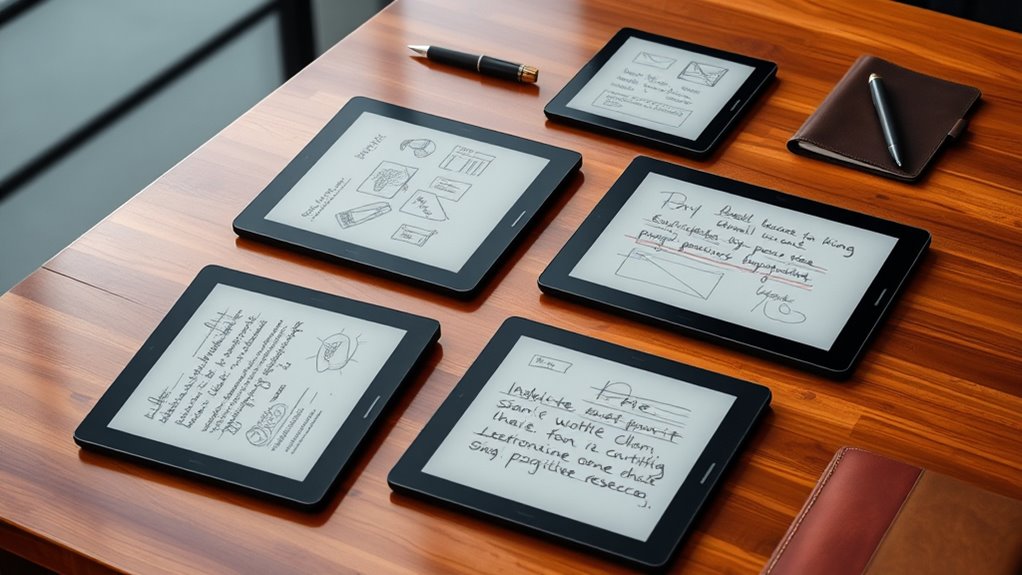

Choosing a premium E Ink tablet for note taking in 2026 means balancing display quality, writing experience, and versatility. The Amazon Kindle Scribe stands out for its integrated AI tools and long battery life, making it ideal for focused reading and writing. The reMarkable Paper Pro offers a fast, paper-like writing experience with excellent organization features, perfect for serious note-takers. Meanwhile, the BOOX Note Air 5 C brings color to the E Ink world, suitable for those who want a device that doubles as a reader and a creative tool, despite some limitations in color vibrancy. Each option has tradeoffs—whether it’s the AI features, color capabilities, or price—that influence which device best suits different user needs.

Get furniture and decor delivered free with Prime
- Fast, free delivery on millions of items
- Prime Video, Amazon Music and more included
- Member-only deals all year
Complete the kit


Key Takeaways
- The Kindle Scribe balances AI features and long battery life but is limited to Wi-Fi only.
- reMarkable models excel at natural writing feel and note organization but lack color and full app ecosystems.
- BOOX Note Air 5 C introduces color, yet E Ink color displays still lag behind LCDs in vibrancy and speed.
- Price varies significantly, with reMarkable being more expensive due to specialized features.
- Choosing the right device depends on whether you prioritize writing feel, color display, or integrated productivity tools.
| Amazon Kindle Scribe (32GB) – Digital Notebook with Premium Pen and AI Tools |  | Best Overall for Focused Reading and Writing | Display: 10.2-inch glare-free, 300 ppi front-lit | Storage Options: 16 GB, 32 GB, or 64 GB | Weight: 15.3 oz | VIEW ON AMAZON | See Our Full Breakdown |
| reMarkable Paper Pro with Marker Plus |  | Best for Natural Writing and Note Organization | Display Size: 11.8 inches | Color: Canvas Color | Digital Ink Response Time: 21 ms | VIEW ON AMAZON | See Our Full Breakdown |
| reMarkable Paper Pure with Marker Plus and Mist Green Sleeve Folio |  | Best for Focused Work with Seamless Cloud Integration | Display: 10.3 inches | Color: Black and white | Digital Ink Response Time: 21 ms | VIEW ON AMAZON | See Our Full Breakdown |
| BOOX Note Air 5 C 10.3″ E Ink Tablet with Color ePaper, 6GB RAM, 64GB Storage, Android 15 |  | Best for Color and Versatile Productivity | Screen Size: 10.3 inches | Display Technology: Kaleido 3 Color E Ink | Resolution: B/W: 2480 x 1860, Color: 1240 x 930 | VIEW ON AMAZON | See Our Full Breakdown |
| reMarkable Paper Pro with Marker Plus and Basalt Book Folio |  | Best for Premium Color Note Taking and Sketching | Display: 11.8-inch Canvas Color | Included Accessories: Marker Plus, Basalt Book Folio, USB-C | Features: Color display, adjustable lighting, handwriting to text | VIEW ON AMAZON | See Our Full Breakdown |
| premium eink tablets for note taking | Display | Included Accessories | Features |
|---|---|---|---|
| Amazon Kindle Scribe | 10.2-inch glare-free, 300 ppi front-lit | — | — |
| reMarkable Paper Pro with Mark | — | Marker Plus, 6 spare tips | Adjustable reading light, low-glare display, handwriting to text |
| reMarkable Paper Pure with Mar | 10.3 inches | Marker Plus, Mist Green Sleeve Folio | Note organization, handwriting to text |
| BOOX Note Air 5 C 10.3" E Ink | — | — | — |
| reMarkable Paper Pro with Mark | 11.8-inch Canvas Color | Marker Plus, Basalt Book Folio, USB-C | Color display, adjustable lighting, handwriting to text |
More Details on Our Top Picks
Amazon Kindle Scribe (32GB) – Digital Notebook with Premium Pen and AI Tools
The Kindle Scribe offers a 10.2-inch glare-free display that supports both reading and writing with a pen that feels remarkably natural. Its standout feature is the AI tools for note summarization and handwriting conversion, which can streamline your workflow significantly. Compared to the reMarkable, it provides a more integrated reading experience and longer battery life, but the AI features introduce a learning curve. Its limitation to Wi-Fi connectivity might be a downside for those who need constant internet access. The device’s ability to import and markup documents makes it versatile for students and professionals alike—though, as a refurbished device, packaging might be generic, and AI features may require some acclimation.
Pros:- High-quality 10.2-inch display suitable for reading and writing
- Includes a Premium Pen that mimics pen on paper
- Built-in AI tools for summarization and handwriting conversion
- Long battery life lasting weeks
Cons:- Refurbished device may come in generic packaging
- Limited to Wi-Fi; no cellular option
- AI features may require a learning curve for new users
Best for: Buyers seeking a balanced device with AI-powered features for note review and long-term reading.
Not ideal for: Those needing cellular connectivity or a new device with pristine packaging.
- Display:10.2-inch glare-free, 300 ppi front-lit
- Storage Options:16 GB, 32 GB, or 64 GB
- Weight:15.3 oz
- Connectivity:Wi-Fi 5, Bluetooth 5.2
- Battery Life:Up to 12 weeks for reading, 3 weeks for writing
- Supported Formats:AZW3, AZW, TXT, PDF, MOBI, EPUB, DOCX, DOC, HTML, RTF, JPEG, GIF, PNG, BMP, Audible AAX
Our verdict“A versatile, AI-enhanced device perfect for users who prioritize reading and note review in a premium package.”
reMarkable Paper Pro with Marker Plus
The reMarkable Paper Pro features an 11.8-inch Canvas Color display designed for versatile use, from sketching to reading. Its realistic paper-like writing experience is unmatched, and it supports handwriting-to-text conversion, making it ideal for detailed note-taking. Compared with the Paper Pure, it offers a larger display and more advanced organization tools, though it comes at a higher price point. The device’s low-glare screen and portability make it perfect for those who work both indoors and outdoors. However, it is limited to digital note-taking and reading, lacking the broader app ecosystem of Android or iOS devices, and accessories like the Marker Plus are necessary for full functionality.
Pros:- Large 11.8-inch color display for versatile use
- Realistic paper-like writing experience
- Portable and lightweight design
- Adjustable reading light
Cons:- Limited to digital note-taking and reading
- Requires compatible accessories
- Higher cost compared to basic e-readers
Best for: Serious note-takers and artists valuing a natural writing feel and organized notes.
Not ideal for: Users seeking a multi-purpose tablet with broader app support or color capabilities.
- Display Size:11.8 inches
- Color:Canvas Color
- Digital Ink Response Time:21 ms
- Included Accessories:Marker Plus, 6 spare tips
- Features:Adjustable reading light, low-glare display, handwriting to text
- Weight:Approx. 350 g
Our verdict“A premium choice for those who prioritize a natural writing feel and detailed organization in a dedicated note device.”
reMarkable Paper Pure with Marker Plus and Mist Green Sleeve Folio
The reMarkable Paper Pure offers a 10.3-inch black-and-white display with fast digital ink response, ideal for note-taking, review, and writing. Its organized notes with tags and folders provide efficient workflows, and it supports handwriting-to-text conversion. Compared to the Paper Pro, it is more affordable but offers fewer features in terms of color and multimedia. Its seamless integration with cloud services makes it suitable for users who need to sync notes across devices. The device’s higher price reflects its specialized focus, but it might be overkill for casual users or those who want vibrant color support.
Pros:- Fast digital ink response for smooth writing
- Organized notes with tags and folders
- Supports handwriting-to-text
- Cloud integration for seamless sync
Cons:- Limited to black-and-white display
- Requires subscription for unlimited cloud storage
- Higher price for a dedicated note device
Best for: Focused professionals and students who need fast, organized note-taking with cloud sync.
Not ideal for: People wanting color displays or a more multimedia-rich device.
- Display:10.3 inches
- Color:Black and white
- Digital Ink Response Time:21 ms
- Included Accessories:Marker Plus, Mist Green Sleeve Folio
- Features:Note organization, handwriting to text
- Price:Premium
Our verdict“Ideal for users who need fast, organized, and cloud-connected note-taking without the distraction of color.”
BOOX Note Air 5 C 10.3″ E Ink Tablet with Color ePaper, 6GB RAM, 64GB Storage, Android 15
The BOOX Note Air 5 C’s 10.3-inch color E Ink display with 4,096 colors marks a significant step for color in the E Ink space, suitable for reading, note-taking, and even light creative work. Its powerful hardware—including an octa-core processor, 6GB RAM, and 64GB storage—supports multitasking and opens access to Android apps. While the color display introduces vibrant possibilities, it still faces inherent limitations, such as slower refresh rates and darker tones compared to LCD screens. The device excels for those who want a secondary device for notes and color content but isn’t ideal for highly interactive or media-rich tasks due to E Ink’s slower performance.
Pros:- High-resolution color E Ink display with 4,096 colors
- Powerful hardware with octa-core processor and ample RAM
- Supports various document and image formats
- Lightweight and portable
Cons:- Color E Ink screens are darker and grayer than LCDs
- Slower refresh rates limit interactivity
- Color vibrancy still lags behind LCD screens
Best for: Users who want a multifunctional device combining note-taking, reading, and basic color content.
Not ideal for: People expecting LCD-like vibrancy and speed or those primarily focused on media consumption.
- Screen Size:10.3 inches
- Display Technology:Kaleido 3 Color E Ink
- Resolution:B/W: 2480 x 1860, Color: 1240 x 930
- Color Depth:4,096 colors
- Processor:Octa-core
- RAM:6GB
- Storage:64GB
- Connectivity:Wi-Fi, Bluetooth 5.1
Our verdict“A capable device for color content and note-taking, though it doesn’t fully replace LCD screens for vibrant media.”
reMarkable Paper Pro with Marker Plus and Basalt Book Folio
The reMarkable Paper Pro with 11.8-inch Canvas Color display offers a natural, paper-like experience in color, supporting detailed sketching, writing, and reading. Its adjustable lighting and organizational tools allow for seamless workflow, especially for creative professionals. Compared to the Paper Pure, it adds color capabilities, but this comes at a higher price, making it a premium investment. While its color display is better suited for artistic tasks than the BOOX, it faces the same inherent limitations of E Ink technology—darker tones and slower refresh rates—making it less ideal for fast-paced or highly vibrant content. Its premium accessories, like the Basalt Book Folio, enhance portability and overall experience.
Pros:- Color display supports artistic and note-taking in color
- Natural, paper-like writing experience
- Portable with adjustable lighting
- Includes premium accessories
Cons:- High cost for a dedicated note device
- Limited to specific stylus and accessories
- Requires compatible software for full features
Best for: Creative users and professionals seeking natural, color-based note taking and sketching.
Not ideal for: Budget-conscious buyers or those needing a device for fast, vibrant media consumption.
- Display:11.8-inch Canvas Color
- Included Accessories:Marker Plus, Basalt Book Folio, USB-C
- Features:Color display, adjustable lighting, handwriting to text
- Size:Approx. 340 g
Our verdict“A top-tier device for creative professionals wanting natural, color note-taking with premium build quality.”

How We Picked
Our selection process focused on devices that exemplify premium quality in the E Ink note-taking realm. I evaluated each model based on display quality, writing experience, features, and ecosystem integration. Devices had to offer a high-resolution display, reliable stylus support, and a user-friendly interface suitable for serious note-taking. We prioritized models with long battery life, robust build quality, and additional functionalities like AI tools or color support. Tradeoffs were carefully considered—no device is perfect, but each excels in specific areas aligned with different user needs.
| premium eink tablets for note taking | Included Accessories | Features |
|---|---|---|
| Amazon Kindle Scribe | — | — |
| reMarkable Paper Pro with Mark | Marker Plus, 6 spare tips | Adjustable reading light, low-glare display, handwriting to text |
| reMarkable Paper Pure with Mar | Marker Plus, Mist Green Sleeve Folio | Note organization, handwriting to text |
| BOOX Note Air 5 C 10.3" E Ink | — | — |
| reMarkable Paper Pro with Mark | Marker Plus, Basalt Book Folio, USB-C | Color display, adjustable lighting, handwriting to text |
Factors to Consider When Choosing Premium Eink Tablets For Note Taking
When selecting a premium E Ink tablet for note taking, it’s important to consider display size and quality, writing feel, and additional features like color support or AI tools. The ideal device should match your specific needs—whether that’s detailed note organization, color sketching, or seamless integration with cloud services. Budget, portability, and ecosystem compatibility also play critical roles in your decision-making process.Display Size and Quality
Choosing the right display size depends on your typical note-taking style. Larger screens, like 11.8 inches, are better for detailed sketches and extensive notes, but they may sacrifice portability. The quality of the E Ink display, including resolution and contrast, directly impacts readability and writing smoothness. Devices like the reMarkable Paper Pro excel here with fast response times and organized note features, while the BOOX offers color capabilities at the cost of some vibrancy and speed.
Writing Experience and Pen Support
A natural, paper-like writing feel is vital for serious note takers. The stylus quality and response time are key metrics. Devices like the reMarkable models are praised for their smooth digital ink, while the Kindle Scribe’s Premium Pen offers a familiar feel with added AI tools. Consider whether you need features like handwriting-to-text conversion or customizable pressure sensitivity, which can significantly improve productivity.
Color and Multimedia Capabilities
If color is important, options like the BOOX Note Air 5 C and reMarkable Paper Pro stand out, but it’s essential to understand the inherent limitations of E Ink color screens. They are generally darker and slower than LCDs, making them less suitable for highly interactive or media-rich tasks. For pure note-taking and sketching, monochrome devices may suffice, but for visual projects, color-capable devices are worth the premium.
Additional Features and Ecosystem
Integration with cloud services, app ecosystems, and AI tools can enhance your experience. Devices like the Kindle Scribe include AI-powered note summarization, which is useful for review-heavy workflows. Others, like reMarkable, focus on organization and seamless syncing. Evaluate whether you need extra features like adjustable lighting, expandability via microSD, or compatibility with productivity apps to maximize your investment.
Frequently Asked Questions
Are E Ink tablets suitable for extensive note-taking?
Yes, many E Ink tablets are designed specifically for focused note-taking, offering a natural writing experience and long battery life. Devices like the reMarkable and Kindle Scribe excel at this, providing fast response times and organized note management, though they may lack multitasking or multimedia support found in traditional tablets.
Can I read and annotate PDFs on these devices?
Most premium E Ink tablets support importing and annotating PDFs, making them excellent tools for reviewing documents. The Kindle Scribe’s support for various formats and built-in AI tools enhance this capability, while reMarkable models also excel in document markup, though some features may require a subscription or specific apps.
Is color support worth the extra cost?
If your work involves sketches, diagrams, or visual notes in color, then devices like the BOOX Note Air 5 C and reMarkable Paper Pro provide valuable capabilities. However, keep in mind that E Ink color screens are still limited in vibrancy and speed compared to LCD screens, so consider your specific needs carefully before investing in color.
How long does the battery typically last?
Most premium E Ink devices boast impressive battery life, often lasting several weeks on a single charge. The Kindle Scribe, for example, can last up to 12 weeks, while others like reMarkable models focus on optimizing power for extended use, making them ideal for travel or daily heavy use without frequent recharging.
What should I consider about stylus support?
Stylus support quality varies; some devices come with high-precision pens that mimic traditional writing tools, while others may have limited pressure sensitivity or response accuracy. Devices like the reMarkable and BOOX models support pressure-sensitive styluses, which are crucial for artists and detailed note-takers, whereas the Kindle Scribe’s Premium Pen offers a good balance for most writing needs.
Conclusion
For users primarily focused on detailed, organized note-taking and document review, the reMarkable Paper Pro offers a natural writing experience and excellent organization tools. Those who want a versatile device with AI-powered features and long battery life should consider the Kindle Scribe. Creative professionals or those who need color support will find the BOOX Note Air 5 C or reMarkable Paper Pro in color suitable, despite some limitations in vibrancy. Budget-conscious buyers or those seeking a device mainly for reading and annotation may prefer simpler, monochrome options, but for a true premium experience, these five devices stand out for their specialized strengths in 2026.
Halloween Picks

12-Foot Inflatable Pumpkin Halloween Archway with LED Lights

Thuodo 8 FT Tall Halloween Inflatable Three-Headed Dragon with LEDs

MGparty 14.5 ft Halloween Inflatable Walk-In Pumpkin House with LED Lights
As an affiliate, we earn on qualifying purchases.