Choosing the right smart door lock involves balancing security features with ease of use. The ULTRALOQ Bolt SE stands out as the overall best, thanks to its reliable connectivity and versatile access options. The Philips Fingerprint Door Lock offers seamless biometric security, making it ideal for high-security needs. Meanwhile, the Wyze Palm Lock introduces innovative palm vein recognition, though with some compatibility tradeoffs. These options illustrate common compromises: greater security often means higher costs or complexity, while more convenience can sometimes reduce security robustness. Continue reading for a detailed analysis of what each lock offers and which might fit your needs best.

Get furniture and decor delivered free — and shop member deals
- Fast, free delivery on millions of items
- Access to Prime Big Deal Days deals on October 6–7
- Prime Video, Amazon Music and more included
Complete the kit


Key Takeaways
- The top-ranked locks balance security features like biometrics and encryption with user-friendly access methods.
- Connectivity options (Wi-Fi, Z-Wave, Thread) significantly influence setup complexity and integration with home systems.
- Biometric options like fingerprint and palm vein recognition are increasingly reliable but often come at a higher price.
- Build quality and durability vary widely, affecting long-term reliability and maintenance needs.
- Tradeoffs between convenience and security are common: more advanced features may require more setup time or cost.
| ULTRALOQ Bolt SE Wi-Fi Smart Lock with Matter Over Thread |  | Best Overall | Fingerprint Storage: 50 fingerprints | Passcode Capacity: 50 passcodes | Connectivity: Wi-Fi (2.4 GHz), Matter over Thread | VIEW ON AMAZON | See Our Full Breakdown |
| Philips Fingerprint Door Lock with WiFi and Handles |  | Best for Multi-Method Access | Connectivity: Wi-Fi (2.4GHz) | Fingerprint Capacity: 50 fingerprints | PIN Code Capacity: Unlimited one-time, 100 user PINs | VIEW ON AMAZON | See Our Full Breakdown |
| Wyze Palm Lock Smart Door Lock with Palm Vein Recognition |  | Best Contactless Biometric | Biometric Technology: Palm vein recognition | Battery: Dual-battery system | Emergency Charging: USB-C | VIEW ON AMAZON | See Our Full Breakdown |
| Lockly Secure Pro Wi-Fi Smart Lock with Handle |  | Best for Residential & Commercial Use | Access Methods: PIN Genie keypad, fingerprint, app, voice, keys | Connectivity: Wi-Fi (requires hub) | IP Rating: IPX4 | VIEW ON AMAZON | See Our Full Breakdown |
| Kwikset HomeConnect 918 Contemporary Z-Wave Long Range Touchscreen Smart Lock |  | Best for Whole-Home Integration | Finish: Matte Black | Connectivity: Z-Wave 700 Long Range | User Codes: 250 | VIEW ON AMAZON | See Our Full Breakdown |
| eufy Security Smart Lock C220 – Fingerprint Keyless Entry Deadbolt |  | Best Overall for Convenience and Flexibility | Brand: eufy Security | Model Number: T8506 | Unlock Methods: Fingerprint, app, keypad, physical key, Apple Watch, Alexa/Google Voice Assistant | VIEW ON AMAZON | See Our Full Breakdown |
| Philips 4200 Series WiFi Keypad Deadbolt with Handle |  | Best for Smart Home Integration and Guest Access | Connectivity: 2.4GHz WiFi, no hub required | Unlock Methods: Fingerprint, PIN code, app, key | Fingerprint Unlock Speed: 0.3 seconds | VIEW ON AMAZON | See Our Full Breakdown |
| Tapo Smart Door Lock Wi-Fi Deadbolt with Palm & Fingerprint Recognition |  | Best for Privacy-Focused, Multi-Method Access | Unlock Methods: Palm, fingerprint, passcode, app, key | Battery Life: Over 1 year | Security: AES-128 encryption, auto-lock, failed attempt lockout | VIEW ON AMAZON | See Our Full Breakdown |
| Yamiry Keypad Smart Door Knob Lock with Fingerprint Keyless Entry |  | Best for Durability and Multi-Method Entry in Standard Doors | Material: Aluminum | Connectivity: Bluetooth (Wi-Fi gateway sold separately) | Unlock Methods: App, Password, Key Fob, Fingerprint, Key | VIEW ON AMAZON | See Our Full Breakdown |
| eufy Security Smart Lock C33 – Keypad Door Lock with Handle, Built-in Wi-Fi, Fingerprint, Keyless Entry |  | Best for All-in-One Family and Front Door Security | Brand: eufy Security | Model Number: T85L0111 | Power Source: 8 AA Batteries | VIEW ON AMAZON | See Our Full Breakdown |
| HIFAM Smart Door Lock with Face Recognition, Fingerprint, Video Doorbell & App Control |  | Best Overall for Versatile Security and Smart Features | Unlock Methods: 3D Face ID, Fingerprint, App, Password, IC Card, Physical Key, Video Intercom | Camera: 135-degree HD wide-angle with night vision | Connectivity: 2.4GHz Wi-Fi, Tuya App | VIEW ON AMAZON | See Our Full Breakdown |
| Kwikset HomeConnect 620 Z-Wave Long Range Keypad Smart Lock, Satin Nickel, Traditional |  | Best for Easy DIY Installation and Whole-Home Z-Wave Integration | Connectivity: Z-Wave 700 Long Range | User Codes: Up to 250 | Auto-Lock: Multiple intervals | VIEW ON AMAZON | See Our Full Breakdown |
| Veise VE027-K WiFi Smart Deadbolt Lock with 2 Knob Set, Matte Black |  | Best for Fast, Wireless DIY Installation with Multiple Entry Options | Connectivity: 2.4GHz WiFi | Fingerprint Capacity: 20 | Passcode Capacity: 100+ | VIEW ON AMAZON | See Our Full Breakdown |
| Smart Door Lock with Video Doorbell, Fingerprint Keypad, Deadbolt & Handle |  | Best for Integrated Video and Multi-Method Access | Unlock Methods: Fingerprint, password, IC card, app, backup key | Camera: Doorbell camera with two-way audio | Connectivity: 2.4GHz WiFi | VIEW ON AMAZON | See Our Full Breakdown |
| Philips WiFi Keypad Door Lock with Handle, App Control Smart Deadbolt Lock | 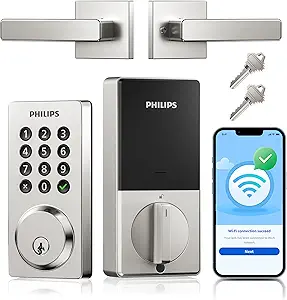 | Best for Reliable Remote Control and Customizable Access | Connectivity: WiFi | Password Capacity: Up to 100 | Auto Lock: Yes, 10-180 sec | VIEW ON AMAZON | See Our Full Breakdown |
| smart door locks security and convenience analysi | Connectivity |
|---|---|
| ULTRALOQ Bolt SE Wi-Fi Smart L | Wi-Fi (2.4 GHz), Matter over Thread |
| Philips Fingerprint Door Lock | Wi-Fi (2.4GHz) |
| Wyze Palm Lock Smart Door Lock | Wi-Fi |
| Lockly Secure Pro Wi-Fi Smart | Wi-Fi (requires hub) |
| Kwikset HomeConnect 918 Contem | Z-Wave 700 Long Range |
| eufy Security Smart Lock C220 | Built-in Wi-Fi (no bridge required) |
| Philips 4200 Series WiFi Keypa | 2.4GHz WiFi, no hub required |
| Tapo Smart Door Lock Wi-Fi Dea | Wi-Fi |
| Yamiry Keypad Smart Door Knob | Bluetooth (Wi-Fi gateway sold separately) |
| eufy Security Smart Lock C33 | Built-in Wi-Fi |
| HIFAM Smart Door Lock with Fac | 2.4GHz Wi-Fi, Tuya App |
| Kwikset HomeConnect 620 Z-Wave | Z-Wave 700 Long Range |
| Veise VE027-K WiFi Smart Deadb | 2.4GHz WiFi |
| Smart Door Lock with Video Doo | 2.4GHz WiFi |
| Philips WiFi Keypad Door Lock | WiFi |
More Details on Our Top Picks
ULTRALOQ Bolt SE Wi-Fi Smart Lock with Matter Over Thread
The ULTRALOQ Bolt SE stands out for its impressive versatility, offering fingerprint, passcodes, app control, voice commands, and mechanical keys. Compared with the Wyze Palm Lock, it provides a more traditional biometric option but lacks contactless palm vein technology. Its easy DIY installation and weather-resistant build make it suitable for exterior doors, while its long battery life of 18 months reduces maintenance. The need for a Matter over Thread hub for remote management is a minor inconvenience, but its compatibility with popular smart home ecosystems enhances overall convenience. This lock makes sense for homeowners wanting a reliable, all-in-one smart lock that integrates seamlessly with existing systems.
Pros:- Multiple access options including fingerprint, passcodes, app, and voice control
- Easy DIY installation with weather-resistant design
- Long battery life of up to 18 months
Cons:- Requires a compatible Matter over Thread hub for remote management
- Limited to 2.4 GHz Wi-Fi; no dual-band support
Best for: Homeowners seeking a highly adaptable, weatherproof lock for front or back doors with extensive smart home integration.
Not ideal for: Renters or users with limited smart home hubs, since Matter over Thread support requires additional setup.
- Fingerprint Storage:50 fingerprints
- Passcode Capacity:50 passcodes
- Connectivity:Wi-Fi (2.4 GHz), Matter over Thread
- Battery Life:18 months
- Material:Zinc alloy
- Water Resistance:IP65 Waterproof
Our verdict“Ideal for homeowners who want a versatile, reliable smart lock with broad integration capabilities.”
Philips Fingerprint Door Lock with WiFi and Handles
The Philips Fingerprint Door Lock offers a comprehensive set of unlocking methods—fingerprint, PIN codes, keys, and app—making it highly flexible. Unlike the ULTRALOQ Bolt SE, it emphasizes user convenience through multiple entry options, including voice control via Alexa and Google Assistant. Its Wi-Fi connectivity supports remote management, but it lacks an auto-lock sensor, which could be a drawback for those seeking automatic security. The optional exterior screw might require some DIY effort, and power source details are vague, which could concern users looking for a straightforward setup. Overall, this lock is well-suited for tech-savvy users who value multiple access methods and smart home integration.
Pros:- Multiple unlocking options including fingerprint, PIN, key, and app
- Remote management via Wi-Fi
- Supports voice control with Alexa and Google Assistant
Cons:- No auto-lock sensor; user must manually lock door
- Power source details not specified, potential installation challenges
Best for: Tech-savvy homeowners or apartment dwellers who want flexible, remote-controlled access with voice assistant support.
Not ideal for: Users seeking an auto-lock feature or a more straightforward, less DIY-intensive installation process.
- Connectivity:Wi-Fi (2.4GHz)
- Fingerprint Capacity:50 fingerprints
- PIN Code Capacity:Unlimited one-time, 100 user PINs
- Door Thickness Compatibility:1-3/8″ to 1-3/4″
- Additional Features:Auto locking, voice control
Our verdict“Great for users who want diverse access methods and voice control, but may miss automatic locking features.”
Wyze Palm Lock Smart Door Lock with Palm Vein Recognition
The Wyze Palm Lock introduces contactless palm vein recognition, offering a futuristic and fast unlocking experience. Unlike fingerprint-based locks like the ULTRALOQ Bolt SE, it provides a truly contactless biometric, which can be more hygienic and reliable in certain environments. Its dual-battery system with USB-C emergency charging minimizes the risk of lockouts, and the support for up to 50 shareable codes with anti-peep features enhances security. However, the need to hover the hand for recognition might not suit all users, and its IP53 rating offers only moderate weather resistance, limiting outdoor durability. It’s perfect for tech enthusiasts who prioritize contactless security and are okay with moderate weather exposure.
Pros:- Contactless palm vein recognition for fast, hygienic unlocking
- Dual-battery system with emergency USB-C charging
- Supports up to 50 shareable codes and anti-peep PINs
Cons:- Hovering recognition might be inconvenient for some
- Moderate weather resistance (IP53) limits outdoor use in severe weather
Best for: Tech-forward users wanting a contactless biometric solution with high security and convenience.
Not ideal for: Users in harsh climates or those preferring fingerprint or keypad methods over palm vein recognition.
- Biometric Technology:Palm vein recognition
- Battery:Dual-battery system
- Emergency Charging:USB-C
- Access Codes:Up to 50 shareable
- Connectivity:Wi-Fi
- Weather Resistance:IP53
Our verdict“Best suited for users seeking a hygienic, contactless biometric lock with smart battery management.”
Lockly Secure Pro Wi-Fi Smart Lock with Handle
The Lockly Secure Pro combines multiple access methods—PIN Genie keypad, fingerprint, app, voice, and keys—with a sturdy, IPX4-rated build suitable for both home and commercial settings. Unlike the ULTRALOQ Bolt SE, it emphasizes real-time alerts and remote management through its app, making it ideal for monitoring multiple users or high-traffic entrances. Its installation is straightforward for DIY enthusiasts, but the optional Wi-Fi hub is required for full remote features, which can add complexity and cost. The fingerprint sensor, while reliable, may occasionally misrecognize users, especially in low-light conditions. This lock suits those who need versatile access and remote monitoring for busy environments.
Pros:- Multiple secure unlocking options including biometric and PIN
- Remote access with real-time activity alerts
- Durable IPX4 rated design suitable for various environments
Cons:- Requires optional Wi-Fi hub for full remote features
- Installation may be slightly complex for some users
Best for: Business owners or busy households needing a durable, multi-method lock with remote management.
Not ideal for: Users seeking a simple, standalone lock that does not require additional hubs or extensive setup.
- Access Methods:PIN Genie keypad, fingerprint, app, voice, keys
- Connectivity:Wi-Fi (requires hub)
- IP Rating:IPX4
- Emergency Backup:9V battery port
- Fingerprint Storage:Up to 99 fingerprints
- Compatibility:Voice assistants
Our verdict“Perfect for users who need a robust, multi-access smart lock with remote monitoring in high-traffic areas.”
Kwikset HomeConnect 918 Contemporary Z-Wave Long Range Touchscreen Smart Lock
The Kwikset HomeConnect 918 leverages Z-Wave Long Range technology, providing expansive coverage for larger homes. Its sleek matte black touchscreen supports up to 250 user codes, making it ideal for multi-user households or rental properties. Unlike Wi-Fi-only locks such as the Wyze Palm Lock, it relies on hubs like Ring Alarm or Samsung SmartThings, which means more setup but greater compatibility with broader smart home systems. Its SmartKey re-keying feature adds a layer of security, and its auto-lock scheduling enhances convenience. However, it lacks built-in Wi-Fi, so remote status updates depend on a hub, which could be a barrier for users seeking standalone operation. This lock suits users invested in Z-Wave ecosystems and needing extended range coverage.
Pros:- High capacity with 250 user codes
- Long-range Z-Wave 700 for extensive coverage
- SmartKey re-keying for added security
Cons:- Requires a compatible Z-Wave hub, not standalone
- No built-in Wi-Fi, limiting direct remote control
Best for: Homeowners with existing Z-Wave hubs who want a high-capacity, touchscreen smart lock for multiple users.
Not ideal for: Users seeking a completely standalone smart lock without the need for hubs or who prefer Wi-Fi directly integrated into the lock.
- Finish:Matte Black
- Connectivity:Z-Wave 700 Long Range
- User Codes:250
- Auto-Lock:Scheduled
- Security:S2 encryption, Grade 2 BHMA
- Installation:DIY with screwdriver
Our verdict“Excellent for Z-Wave users looking for a high-capacity, integrated smart lock with extensive home coverage.”
eufy Security Smart Lock C220 – Fingerprint Keyless Entry Deadbolt
The eufy Security Smart Lock C220 stands out for its six unlocking methods, especially the rapid self-learning AI fingerprint sensor that opens in under a second, making it ideal for busy households. Compared with the Philips 4200 Series, it offers more unlock options, including voice assistants and Apple Watch, providing greater versatility. Its built-in Wi-Fi eliminates the need for a bridge, simplifying remote control, which is a significant convenience upgrade over locks relying on external hubs. However, while it boasts a 15-minute drill-free installation and an 8-month battery life, the security certification is BHMA Grade 3—less robust than Grade 2 options—meaning it’s suitable for less vulnerable entry points. Tradeoffs include potential battery variability with high usage and limited bore compatibility without spacers. This lock makes sense for tech-savvy homeowners who want multiple access options in a quick-install package, but those seeking higher-grade security or larger bore compatibility might prefer other options.
Pros:- Six convenient unlock methods, including ultra-fast fingerprint recognition
- Built-in Wi-Fi for remote control without a bridge
- Long-lasting 8-month battery life on standard AA batteries
- Quick, drill-free installation compatible with most deadbolts
Cons:- Battery life may vary significantly with frequent use
- Only fits bores under 54mm without the spacer
- Security certification is BHMA Grade 3, not the higher Grade 2
Best for: Tech-savvy homeowners seeking easy, multi-method access and remote control without extra hubs.
Not ideal for: Security-conscious users needing Grade 2 or higher certification for high-risk doors or those with non-standard bore sizes.
- Brand:eufy Security
- Model Number:T8506
- Unlock Methods:Fingerprint, app, keypad, physical key, Apple Watch, Alexa/Google Voice Assistant
- Battery Life:Approx. 8 months (8 AA batteries)
- Connectivity:Built-in Wi-Fi (no bridge required)
- Certification:BHMA Grade 3
- Operating Temperature:-22°F to 158°F (-30°C to 70°C)
- Waterproof Rating:IP53
Our verdict“Ideal for users who want a versatile, easy-to-install smart lock with multiple access options and remote control capabilities.”
Philips 4200 Series WiFi Keypad Deadbolt with Handle
The Philips 4200 Series WiFi Keypad Deadbolt excels at integrating seamlessly with home WiFi, offering remote lock/unlock, real-time status, and flexible PIN management directly through its app. Unlike the eufy C220, which supports multiple unlocking methods, this lock emphasizes ease of use with a 0.3-second fingerprint unlock and a fully DIY installation that includes a matching handle. It’s perfect for Airbnb hosts or families needing frequent guest access, thanks to its ability to generate one-time or recurring PIN codes. Its reliance on WiFi without an external hub simplifies setup but introduces a dependency on proximity to the router (within 33 ft). The auto-lock feature is default off, requiring manual activation, which could be a drawback for users seeking fully automatic security. While it offers excellent user management, it lacks the multi-method flexibility of locks like the eufy or Tapo models.
Pros:- Fast, reliable fingerprint access (0.3 seconds)
- No hub needed—connects directly via WiFi
- Flexible PIN and guest code options for multiple users
- Includes matching handle for a complete look
Cons:- Batteries are not included, requiring additional purchase
- Requires close proximity to WiFi router—within 33 ft
- Auto-lock feature needs manual setup
Best for: Homeowners who prioritize easy remote management, guest access, and WiFi integration without extra hubs.
Not ideal for: Users in large homes with WiFi signal issues or those requiring higher security grades, as it lacks Grade 2 certification.
- Connectivity:2.4GHz WiFi, no hub required
- Unlock Methods:Fingerprint, PIN code, app, key
- Fingerprint Unlock Speed:0.3 seconds
- Auto-Lock Timer:0-180 seconds (off by default)
- Battery Life:Up to 6 months
- Door Thickness Compatibility:1-3/8″ to 1-3/4″
- Default Door Orientation:Right-opening (resettable for left)
Our verdict“Best suited for users wanting straightforward remote control and guest management via WiFi, with easy installation and flexible access options.”
Tapo Smart Door Lock Wi-Fi Deadbolt with Palm & Fingerprint Recognition
The Tapo Wi-Fi Deadbolt offers a compelling mix of security and convenience through its palm vein and fingerprint recognition, alongside passcode and app control. Compared to the eufy C220, which leans on fingerprint and app, the Tapo adds palm recognition, enhancing biometric security. Its local data storage ensures privacy, addressing concerns about cloud-based vulnerabilities. Installation is straightforward, taking about 15 minutes without drilling, similar to other locks on the list. While its battery life exceeds a year, it requires app control for full functionality and updates, unlike the more standalone Philips lock. Its AES-128 encryption and auto-lock features keep security tight, but the lock’s size and compatibility might limit use on certain doors. This lock suits those prioritizing biometric security and data privacy, though it may be less suited for users who prefer keypad or voice controls exclusively.
Pros:- Multiple secure access methods including palm and fingerprint
- Local data storage for enhanced privacy
- Easy, drill-free installation in 15 minutes
- Over a year of battery life
Cons:- Requires app for full control and updates
- Limited compatibility with only standard lock sizes
- Battery replacement needed after over a year
Best for: Security-conscious users who want biometric options and local data privacy with easy installation.
Not ideal for: Users who prefer keypad or voice-only locks and do not want to manage app-based updates or control.
- Unlock Methods:Palm, fingerprint, passcode, app, key
- Battery Life:Over 1 year
- Security:AES-128 encryption, auto-lock, failed attempt lockout
- Connectivity:Wi-Fi
- Installation:15 minutes, no drilling
- Compatibility:Standard lock sizes
Our verdict“Best for privacy-minded users who want biometric security and local data control combined with easy DIY installation.”
Yamiry Keypad Smart Door Knob Lock with Fingerprint Keyless Entry
The Yamiry Keypad Smart Door Knob combines rugged durability with multiple unlocking options, including fingerprint, password, key fob, app, and physical key. Compared with the eufy or Philips locks, it emphasizes a sturdy aluminum build and straightforward screwdriver-only installation on most American standard doors. Its capacity to store up to 50 passwords, fingerprints, and key fobs makes it versatile for families or small businesses. However, remote access depends on a Wi-Fi gateway sold separately, and Bluetooth-only operation limits control range without this hardware. While the lock’s physical robustness is a major advantage, its reliance on additional hardware for remote access is a tradeoff. This model suits those needing a durable, multi-method lock with easy installation and substantial credential storage, but users requiring immediate remote access without extra purchases should consider other options.
Pros:- Five unlocking methods including fingerprint and app control
- Heavy-duty aluminum construction resists tampering
- Easy screwdriver-only installation on most standard doors
- Lifetime support and solid warranty
Cons:- Remote control requires an additional Wi-Fi gateway
- Bluetooth-only operation without extra hardware
- Not compatible with all smart home ecosystems
Best for: Families or small businesses needing a durable, multi-method lock with straightforward DIY setup.
Not ideal for: Users wanting immediate remote access without additional hardware purchases or those in need of higher-grade security certification.
- Material:Aluminum
- Connectivity:Bluetooth (Wi-Fi gateway sold separately)
- Unlock Methods:App, Password, Key Fob, Fingerprint, Key
- Credential Capacity:50 passwords, fingerprints, key fobs
- Installation:Screwdriver only
- Warranty:1-year product coverage, lifetime support
Our verdict“Ideal for those seeking a rugged, multi-method lock with simple DIY installation and large credential capacity, willing to add hardware for remote access.”
eufy Security Smart Lock C33 – Keypad Door Lock with Handle, Built-in Wi-Fi, Fingerprint, Keyless Entry
The eufy Security Smart Lock C33 offers a comprehensive solution with a built-in handle, making it suitable for front doors that need both security and aesthetics. Its adaptive fingerprint recognition and keypad provide quick, keyless access, while integrated Wi-Fi allows remote control, real-time notifications, and event logs—features that surpass traditional mechanical locks. In comparison to the Philips or Tapo locks, the C33’s all-in-one design and Wi-Fi connectivity make it a strong choice for busy households or families managing multiple users. Installation is straightforward, fitting left- and right-hand doors in about 15 minutes. However, it’s powered by 8 AA batteries, which could need frequent replacement depending on usage, and its IP53 rating offers only basic water and dust resistance. This lock is best for users wanting a complete, easy-to-install, smart front door solution with remote capabilities.
Pros:- Adaptive fingerprint recognition for speedy, keyless entry
- Built-in Wi-Fi enables remote control and notifications
- Easy 15-minute installation without drilling
- Fits both left- and right-hand doors
Cons:- Requires 8 AA batteries, which may need frequent replacement
- IP53 rating offers only basic water and dust resistance
- Battery life depends heavily on usage
Best for: Families or households seeking a single, stylish, and fully integrated smart lock for main entry points.
Not ideal for: Users in harsh environments requiring higher water/dust resistance or those seeking a higher security grade.
- Brand:eufy Security
- Model Number:T85L0111
- Power Source:8 AA Batteries
- Connectivity:Built-in Wi-Fi
- Lock Type:Electronic Deadbolt with Handle
- Water Resistance Rating:IP53
- Installation:15 minutes, no drilling
- Warranty:18-month coverage
Our verdict“Perfect for families wanting a stylish, all-in-one smart lock with remote management and biometric access on their main door.”
HIFAM Smart Door Lock with Face Recognition, Fingerprint, Video Doorbell & App Control
The HIFAM DF18 stands out for its impressive 7-in-1 unlocking options, combining biometric, app, card, keypad, key, and video intercom methods. Compared with the Veise VE027-K, it offers more unlock options, including face recognition and a video doorbell, making it ideal for households that prioritize maximum flexibility and security. However, its reliance on 2.4GHz Wi-Fi and limited reviews suggest it may face connectivity or reliability issues for some users. The built-in HD camera with night vision enhances security, especially for those who want visual verification without additional devices. The long-lasting battery and emergency charging port add practical resilience, but the small customer base means fewer confirmed long-term user experiences. This pick is best for users seeking a comprehensive smart lock with video capabilities for diverse environments, from homes to hotels.
Pros:- Seven unlocking methods including face recognition and video doorbell
- Built-in HD wide-angle camera with night vision
- App management with access logs and remote control
- Long-lasting 8000mAh battery with emergency Type-C charging
Cons:- Limited to 2.4GHz Wi-Fi, which may restrict connectivity
- Relatively few customer reviews, leaving some performance aspects uncertain
Best for: Homeowners or small business operators who want a highly flexible, multi-method unlock system with video security.
Not ideal for: Users on a tight budget or those with limited Wi-Fi bandwidth, since the lock only supports 2.4GHz networks and has limited reviews.
- Unlock Methods:3D Face ID, Fingerprint, App, Password, IC Card, Physical Key, Video Intercom
- Camera:135-degree HD wide-angle with night vision
- Connectivity:2.4GHz Wi-Fi, Tuya App
- Battery:8000mAh lithium, Type-C emergency charging
- Door Thickness Compatibility:40-60mm
- Recommended Uses:Residential, Commercial
Our verdict“This smart lock suits those seeking an all-in-one security hub with video and biometric options, especially in hospitality or multi-tenant settings.”
Kwikset HomeConnect 620 Z-Wave Long Range Keypad Smart Lock, Satin Nickel, Traditional
The Kwikset HomeConnect 620 offers a straightforward, traditional keypad design with robust Z-Wave Long Range connectivity, making it an excellent choice for users who already operate Z-Wave hubs like Ring Alarm or SmartThings. Its support for up to 250 user codes and auto-lock scheduling makes it ideal for busy households managing multiple users, but its lack of biometric options means it won’t appeal to those seeking fingerprint or face recognition. Compared to the Veise VE027-K, it benefits from a more established ecosystem and easy re-keying with SmartKey Security. While installation is simple, the need for a compatible hub adds an extra cost and setup step. This model is perfect for those who want reliable, long-range Z-Wave connectivity combined with straightforward code management and simple DIY setup.
Pros:- Easy installation with just a screwdriver
- Long-range Z-Wave 700 connectivity for reliable hub communication
- Supports up to 250 user codes with a dedicated programming code
- SmartKey re-keying for quick access changes
Cons:- Requires a separately sold Z-Wave hub for remote control and automation
- No biometric or touchscreen options, limiting advanced access features
Best for: Homeowners integrating Z-Wave hubs who prefer a traditional keypad for multiple users and scheduled auto-lock features.
Not ideal for: Users seeking biometric or app-only control, or those without a Z-Wave hub, as it requires extra hardware and lacks direct app control.
- Connectivity:Z-Wave 700 Long Range
- User Codes:Up to 250
- Auto-Lock:Multiple intervals
- Batteries:4x AA, 12 months
- Door Thickness:1-3/8″ to 2″
- Security Certification:Grade 2 BHMA
Our verdict“This lock makes sense for Z-Wave users wanting a dependable keypad with extensive user management and easy DIY installation.”
Veise VE027-K WiFi Smart Deadbolt Lock with 2 Knob Set, Matte Black
The Veise VE027-K stands out for its quick, 10-15 minute DIY installation and impressive eight unlock methods, including a rapid 0.2s fingerprint scan, app control, and voice compatibility with Alexa and Google Assistant. Compared with the Philips WiFi Keypad Deadbolt, it offers more flexible unlocking options and a weatherproof rating that makes it suitable for outdoor use. Its IP65 weather rating and long battery life of up to 240 days make it a strong choice for outdoor settings where durability matters. However, it only supports 2.4GHz WiFi and batteries are not included, which can be inconvenient for some users. Its user capacity of 20 fingerprints and 100 passcodes suits smaller households or short-term rentals better than large families or commercial environments. This lock is ideal for those seeking quick, versatile installation and multiple unlocking options in outdoor or high-traffic residential applications.
Pros:- Eight unlocking methods including ultra-fast fingerprint recognition
- Quick, tool-free installation in 10-15 minutes
- Weatherproof IP65 rated for outdoor durability
- Remote app management without hub required
Cons:- Batteries are not included, requiring additional purchase
- Limited to 2.4GHz WiFi networks, which may restrict connectivity
Best for: Homeowners or renters needing a fast, versatile, weatherproof lock with multiple access methods and simple DIY installation.
Not ideal for: Users wanting biometric control with larger capacity, or those with only 5GHz WiFi networks, since it only supports 2.4GHz.
- Connectivity:2.4GHz WiFi
- Fingerprint Capacity:20
- Passcode Capacity:100+
- Weatherproof Rating:IP65
- Installation Time:10-15 minutes
- Battery Life:Up to 240 days
Our verdict“This lock offers a quick, installation-friendly solution for outdoor residential use with multiple flexible unlocking options.”
Smart Door Lock with Video Doorbell, Fingerprint Keypad, Deadbolt & Handle
The Smart Door Lock with Video Doorbell combines five access methods—fingerprint, password, IC card, app, and backup key—alongside a built-in doorbell camera with two-way audio. This integration appeals to users who want a comprehensive security system in a single device. Compared with the Philips WiFi Keypad Deadbolt, this lock provides a visual security feature with its video doorbell, although the camera cannot be activated on-demand, limiting real-time surveillance. The inclusion of USB-C emergency power and multiple backup options makes it reliable even during power failures. Installation is straightforward with an included template, but the device is comparatively bulky and only supports 2.4GHz WiFi. It’s ideal for those seeking an all-in-one, outdoor-ready security solution with video and multiple entry options but less so for users prioritizing remote camera viewing.
Pros:- Five unlocking methods for flexible access
- Built-in doorbell camera with two-way audio
- USB-C emergency power backup
- Includes installation template for quick setup
Cons:- Camera cannot be manually activated for real-time viewing
- Batteries are not included
- Limited to 2.4GHz WiFi
Best for: Homeowners wanting an integrated video doorbell with multiple access options and easy installation.
Not ideal for: Users seeking on-demand camera viewing or advanced smart home integrations beyond basic WiFi connectivity.
- Unlock Methods:Fingerprint, password, IC card, app, backup key
- Camera:Doorbell camera with two-way audio
- Connectivity:2.4GHz WiFi
- Power:4 AAA batteries, USB-C emergency
- Features:Auto-lock, anti-peeping keypad
- Installation:Includes template
Our verdict“This device is best suited for users who want an all-in-one security and communication solution for outdoor entrances.”
Philips WiFi Keypad Door Lock with Handle, App Control Smart Deadbolt Lock
The Philips WiFi Keypad Deadbolt delivers reliable remote access via app control and customizable passcodes, making it a solid choice for users who prefer traditional keyless entry with added convenience. Its support for up to 100 user passwords and auto-lock scheduling caters well to families or small offices managing multiple users. Compared to the Veise VE027-K, it offers more extensive password options and a more durable, weather-resistant build, though it lacks biometric options altogether. Its installation is straightforward within 15 minutes, but the device requires WiFi, and batteries are not included, adding a layer of setup complexity. This lock is most suitable for users seeking a durable, weatherproof, app-enabled deadbolt with simple, customizable access control.
Pros:- Remote access and control via app
- Supports up to 100 user passcodes with flexible options
- Weather-resistant and easy to install
- Auto-lock feature for added security
Cons:- Batteries are not included, requiring additional purchase
- No biometric or touchscreen options
Best for: Homeowners or small businesses needing reliable, remote-controlled access with customizable passcodes.
Not ideal for: Users wanting biometric control or those without stable WiFi, as remote features depend on connection.
- Connectivity:WiFi
- Password Capacity:Up to 100
- Auto Lock:Yes, 10-180 sec
- Batteries:8 AA batteries, 24 months
- Water Resistance:IP54
- Installation:Standard US deadbolt, 15 min
Our verdict“This lock suits those seeking a durable, customizable deadbolt with reliable remote management and weatherproof design.”
How We Picked
Products were evaluated based on a combination of performance, ease of installation, security features, connectivity options, build quality, and value. Priority was given to locks that offered reliable access control, robust encryption, and seamless integration with smart home ecosystems. We compared user reviews, technical specifications, and industry standards to identify which locks deliver on both security and convenience. The ranking reflects a balance of these factors, favoring options that provide comprehensive security while remaining accessible to a broad range of users.Factors to Consider When Choosing Smart Door Locks Security And Convenience Analysis
When selecting a smart door lock focused on security and convenience, it’s essential to consider several key factors. These can dramatically influence how well the lock fits your home, your security needs, and your daily routines. Understanding these factors helps avoid common pitfalls like over-investing in unnecessary features or choosing incompatible technology. The right choice depends on your specific priorities—be it maximum security, ease of use, or smart home integration.Security Features and Encryption
Look for locks that use advanced encryption standards and multiple access methods, such as biometric, keypad, or app-based controls. A lock with biometric authentication adds a layer of security, but may come with higher costs and occasional false rejections. Ensure the lock has tamper alerts and durable construction, especially if you live in an area prone to break-ins. Avoid models that lack proper encryption, as they can be vulnerable to hacking.
Connectivity and Ecosystem Compatibility
Consider how the lock connects to your existing smart home system. Wi-Fi-enabled locks are easier to set up but rely on your network stability. Z-Wave or Zigbee options often integrate better with home automation hubs but may require additional setup. Compatibility with voice assistants like Alexa or Google Assistant increases convenience, but verify whether the lock supports your preferred platform upfront to prevent frustration later.
Ease of Installation and Maintenance
Some locks are designed for DIY installation, while others may require professional help. Think about your comfort level and the complexity of the installation process. Maintenance needs, such as battery life and sensor calibration, also matter—locks with long-lasting batteries reduce hassle, but some may need frequent attention. Choose a model with clear instructions and accessible support to avoid future headaches.
Build Quality and Durability
Security hinges on the lock’s physical robustness. Look for products made from high-grade materials like solid steel or zinc alloys. Weatherproofing is essential if the lock will be used outdoors, ensuring resistance to rain, dust, and temperature fluctuations. Cheaper models may save money initially but often compromise on longevity, leading to higher replacement costs over time.
Cost and Value
Higher-priced locks often include more sophisticated security features and better build quality. However, evaluate whether those features align with your actual needs. For many homeowners, a mid-range lock provides a solid balance of security and affordability. Be cautious of extremely cheap options that may lack essential security measures, but also avoid overpaying for bells and whistles you won’t use.
Frequently Asked Questions
Can I replace my existing deadbolt with a smart lock myself?
In most cases, yes. Many smart locks are designed for straightforward DIY installation, often fitting over existing deadbolts or replacing them entirely. Check the product specifications for compatibility with your current door setup, including thickness and backset measurements. Follow the manufacturer’s instructions carefully, and consider professional help if your door or existing hardware is unusual or complex to ensure security and proper operation.
Will a smart lock work if the Wi-Fi goes down?
This depends on the lock’s connectivity options. Wi-Fi-only locks typically require an active internet connection for remote access or features, but many models include local access methods like keypad or biometric authentication that work without internet. Locks with Z-Wave or Bluetooth might still operate if connected to a hub or device locally, but always verify if the lock’s core functions remain accessible during internet outages to avoid lockouts.
Are biometric locks reliable enough for everyday use?
Modern biometric locks, especially those with fingerprint or palm vein recognition, have improved significantly in accuracy and speed. They are generally reliable when properly maintained and calibrated, offering a quick and secure way to unlock without keys or codes. However, environmental factors like dirt, moisture, or injuries can affect sensor performance. For critical security, combining biometrics with other access methods provides added reassurance.
How long do smart lock batteries typically last?
Battery life varies depending on usage and features but generally ranges from several months to over a year. Many locks use standard batteries like AA or replaceable lithium cells, which are easy to swap out. Some models include low-battery alerts to prevent lockouts, but it’s wise to choose a lock with energy-efficient components and straightforward battery replacement procedures to minimize inconvenience.
Is it worth paying extra for a lock with video or face recognition?
Adding video or face recognition features can enhance security by providing visual verification of visitors, but these features often come with a higher price and increased complexity. They are most beneficial if you want an integrated security system with real-time monitoring. For most users, a reliable biometric or keypad lock offers sufficient security, but if you value visual confirmation or remote surveillance, investing in these advanced options makes sense.
Conclusion
For most homeowners seeking an all-around solution, the ULTRALOQ Bolt SE offers a balanced mix of security, ease of use, and smart home compatibility—making it the best overall choice. Those prioritizing high-security features, like biometric access, may find the Philips Fingerprint Door Lock better suited. If budget is a concern, the Wyze Palm Lock provides innovative recognition technology at a more accessible price point. For beginners or those looking for simple installs, models with straightforward setups and clear instructions will serve well. Ultimately, your choice should reflect your specific security needs, budget, and preferred access methods.
As an affiliate, we earn on qualifying purchases.Fall Picks
fall essentials