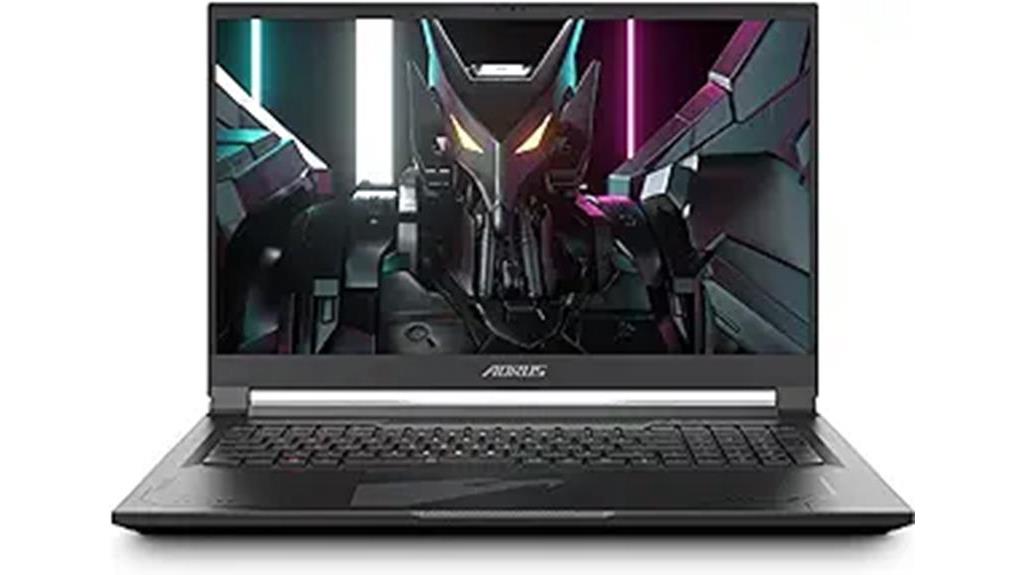

If you are searching for a GIGABYTE AORUS 17X review, the central question is whether its 17.3-inch screen and RTX 4080 still suit your needs better than newer, smaller AORUS models. I rank the AORUS Master 16 Gen 2 with RTX 5090 first for maximum listed graphics and processor power, the AORUS 17X with RTX 4080 as my best large-screen gaming pick, and the RTX 5080 Master 16 as a strong middle ground. The tradeoff is clear: the 17X gives you more screen and a matte panel, but the 16-inch Masters offer OLED, newer graphics options, and 32GB of memory in the listed configurations.

Get furniture and decor delivered free with Prime
- Fast, free delivery on millions of items
- Prime Video, Amazon Music and more included
- Member-only deals all year
My ranking weighs the hardware against the kind of buyer each laptop suits, not just the largest number on a spec sheet. These are all substantial gaming machines, but their displays, memory, weight, and configuration details point to different uses. I also flag listing inconsistencies where they could affect a purchase decision.
Complete the kit


Key Takeaways
- Best listed performance: The AORUS Master 16 Gen 2 with RTX 5090 pairs that GPU with a Ryzen 9 9955HX3D, 32GB memory, and a 240Hz OLED screen.
- Best match for the 17X brief: The AORUS 17X RTX 4080 combines a 17.3-inch matte QHD screen, 240Hz refresh rate, and Core i9-13980HX.
- Best balance of newer graphics and OLED: The RTX 5080 Master 16 keeps 32GB memory and a 240Hz OLED panel, but has a 1TB SSD.
- Best lower-tier large-screen option: The AORUS 17 RTX 4070 offers a 17.3-inch anti-glare display, though it has 16GB memory and weighs 6.17 pounds.
- Check configuration details: Some listings have conflicting processor or Windows edition information, so confirm the exact configuration before ordering.
| GIGABYTE AORUS Master 16 Gen 2 Gaming Laptop |  | Best Overall for Maximum Listed Performance | Processor: AMD Ryzen 9 9955HX3D, 16 cores, up to 5.4GHz | Graphics: NVIDIA GeForce RTX 5090 Laptop GPU, 24GB GDDR7 | Display: 16-inch OLED, 2560 × 1600, 240Hz, 1ms | VIEW ON AMAZON | See Our Full Breakdown |
| GIGABYTE AORUS 17X Gaming Laptop, 17.3-inch QHD 240Hz, Intel Core i9-13980HX, RTX 4080, 16GB DDR5, 1TB SSD |  | Best 17-Inch AORUS 17X Gaming Pick | Processor: Intel Core i9-13980HX, up to 5.6GHz | Graphics: NVIDIA GeForce RTX 4080 Laptop GPU, 12GB GDDR6 | Display: 17.3-inch QHD LCD, 2560 × 1440, 240Hz, matte | VIEW ON AMAZON | See Our Full Breakdown |
| GIGABYTE AORUS Master 16 Gen 2 Gaming Laptop |  | Best High-End Balance with RTX 5080 | Processor: AMD Ryzen 9 9955HX3D | Graphics: NVIDIA GeForce RTX 5080 Laptop GPU | Display: 16-inch OLED, 2560 × 1600, 240Hz | VIEW ON AMAZON | See Our Full Breakdown |
| GIGABYTE AORUS Master 16 Gaming Laptop, Intel Core Ultra 9 275HX, 32GB DDR5, 1TB SSD, RTX 5070 Ti |  | Best Intel-Based OLED Middle Ground | Processor: Intel Core Ultra 9 275HX | Graphics: NVIDIA GeForce RTX 5070 Ti Laptop GPU, 12GB | Display: 16-inch OLED, 2560 × 1600, 240Hz | VIEW ON AMAZON | See Our Full Breakdown |
| GIGABYTE AORUS 17 Gaming Laptop, 17.3-inch QHD 240Hz, Intel Core i7-13700H, RTX 4070, 16GB DDR5, 1TB SSD |  | Best Alternative for a Large Anti-Glare Screen | Processor: Intel Core i7-13700H, 14 cores, up to 5.0GHz | Graphics: NVIDIA GeForce RTX 4070, 8GB GDDR6 | Display: 17.3-inch QHD, 2560 × 1440, 240Hz, anti-glare | VIEW ON AMAZON | See Our Full Breakdown |
| gigabyte aorus 17x review high performance gaming laptop | Processor | Graphics | Display | Memory |
|---|---|---|---|---|
| GIGABYTE AORUS Master 16 Gen 2 | AMD Ryzen 9 9955HX3D, 16 cores, up to 5.4GHz | NVIDIA GeForce RTX 5090 Laptop GPU, 24GB GDDR7 | 16-inch OLED, 2560 × 1600, 240Hz, 1ms | 32GB DDR5 5600MHz |
| GIGABYTE AORUS 17X Gaming Lapt | Intel Core i9-13980HX, up to 5.6GHz | NVIDIA GeForce RTX 4080 Laptop GPU, 12GB GDDR6 | 17.3-inch QHD LCD, 2560 × 1440, 240Hz, matte | 16GB DDR5 5600 |
| GIGABYTE AORUS Master 16 Gen 2 | AMD Ryzen 9 9955HX3D | NVIDIA GeForce RTX 5080 Laptop GPU | 16-inch OLED, 2560 × 1600, 240Hz | 32GB DDR5 |
| GIGABYTE AORUS Master 16 Gamin | Intel Core Ultra 9 275HX | NVIDIA GeForce RTX 5070 Ti Laptop GPU, 12GB | 16-inch OLED, 2560 × 1600, 240Hz | 32GB DDR5 5600MHz |
| GIGABYTE AORUS 17 Gaming Lapto | Intel Core i7-13700H, 14 cores, up to 5.0GHz | NVIDIA GeForce RTX 4070, 8GB GDDR6 | 17.3-inch QHD, 2560 × 1440, 240Hz, anti-glare | 16GB DDR5 5600MHz |
More Details on Our Top Picks
GIGABYTE AORUS Master 16 Gen 2 Gaming Laptop
I rank this Master 16 first because its listed Ryzen 9 9955HX3D and RTX 5090 Laptop GPU are the most ambitious pairing in this group. The 24GB of graphics memory, 32GB system memory, and 2TB SSD give it a strong spec-sheet advantage over the AORUS 17X, which lists an RTX 4080 and 16GB RAM. That added headroom makes this model the clearest fit for buyers who want a high-end gaming and creator machine rather than the biggest display.
The 16-inch 240Hz OLED trades screen area for a high-refresh panel with a sharper 2560 × 1600 resolution than the 17X’s QHD screen. OLED and Dolby Vision are appealing for both games and video, while vapor-chamber cooling is intended to manage demanding hardware. At 5.1 pounds, it is still a substantial laptop, though lighter on paper than the 17X’s 6.2 pounds. I would pause before ordering because the listing also mentions a Ryzen AI 9 465, conflicting with the specified Ryzen 9 9955HX3D. Confirm the exact processor configuration first.
Pros:- RTX 5090 Laptop GPU with 24GB GDDR7 and Ryzen 9 9955HX3D listed
- 16-inch 2560 × 1600 OLED panel with a 240Hz refresh rate
- 32GB DDR5 memory and a 2TB NVMe SSD
- Vapor-chamber cooling and Wi-Fi 7
Cons:- The listing also names a different Ryzen AI 9 processor
- A 16-inch screen is smaller than the AORUS 17X display
- At 5.1 pounds, it is not a lightweight travel laptop
Best for: A buyer prioritizing the strongest listed GPU and CPU combination, a 240Hz OLED display, and extra SSD capacity for games or creative projects.
Not ideal for: Someone who wants a 17-inch screen, a lighter everyday carry, or a listing with fully consistent processor details.
- Processor:AMD Ryzen 9 9955HX3D, 16 cores, up to 5.4GHz
- Graphics:NVIDIA GeForce RTX 5090 Laptop GPU, 24GB GDDR7
- Display:16-inch OLED, 2560 × 1600, 240Hz, 1ms
- Memory:32GB DDR5 5600MHz
- Storage:2TB PCIe NVMe M.2 SSD
- Weight:5.1 pounds
Our verdict“I put this Master 16 first for its top listed hardware, provided you verify the processor configuration before buying.”
GIGABYTE AORUS 17X Gaming Laptop, 17.3-inch QHD 240Hz, Intel Core i9-13980HX, RTX 4080, 16GB DDR5, 1TB SSD
This is the most direct match for readers specifically seeking an AORUS 17X review. Its combination of a Core i9-13980HX, RTX 4080 Laptop GPU, and 17.3-inch QHD screen focuses on fast, large-screen gaming. The 240Hz refresh rate targets smooth motion, while the matte, anti-glare finish is a practical contrast with the glossy OLED panels on the Master 16 models. Its stated 100% DCI-P3 coverage also gives creators more color range than the 17-inch AORUS RTX 4070 option’s 100% sRGB claim.
Compared with the RTX 5090 Master 16, the 17X gives up listed graphics memory and system memory, and its 16GB RAM may constrain demanding multitasking or creator workflows. It also weighs 6.2 pounds, the heaviest listed system here, so I would treat it as a desktop replacement rather than a frequent travel companion. Its Thunderbolt 4, Wi-Fi 6E, and Windows 11 Pro add useful flexibility, but this configuration’s greatest appeal is the large matte panel paired with RTX 4080 graphics—not portability or maximum memory.
Pros:- 17.3-inch QHD matte display with a 240Hz refresh rate
- Core i9-13980HX and RTX 4080 Laptop GPU
- 100% DCI-P3 coverage and Windows 11 Pro
- Thunderbolt 4, HDMI, and Wi-Fi 6E
Cons:- 16GB memory is less than the 32GB in both Master 16 models
- At 6.2 pounds, it is the heaviest listed laptop
- Its 1TB SSD is smaller than the RTX 5090 Master 16’s 2TB drive
Best for: A gamer who wants a 17.3-inch matte QHD screen, a fast refresh rate, and an RTX 4080-class system for a mostly stationary setup.
Not ideal for: A frequent traveler or someone who wants 32GB memory, OLED, or the strongest listed GPU in this roundup.
- Processor:Intel Core i9-13980HX, up to 5.6GHz
- Graphics:NVIDIA GeForce RTX 4080 Laptop GPU, 12GB GDDR6
- Display:17.3-inch QHD LCD, 2560 × 1440, 240Hz, matte
- Memory:16GB DDR5 5600
- Storage:1TB Gen4 M.2 SSD
- Weight:6.2 pounds
Our verdict“I recommend the 17X to buyers who value a large matte screen and RTX 4080 graphics more than lighter weight or 32GB memory.”
GIGABYTE AORUS Master 16 Gen 2 Gaming Laptop
The second Master 16 configuration keeps the same broad appeal as the RTX 5090 version—Ryzen 9 9955HX3D, 32GB memory, and a 240Hz OLED screen—but lists an RTX 5080 and a 1TB SSD. That makes it a compelling middle position in this lineup: still a premium, high-spec 16-inch system, but not the maximum-GPU choice. Against the 17X, it offers OLED and double the listed system memory in a smaller chassis; against the RTX 5090 Master, it gives up graphics tier and storage capacity.
The 2560 × 1600 OLED panel and stated 100% DCI-P3 gamut suit buyers who want one machine for games, media, and color-aware creative work. Its vapor-chamber cooling, dedicated keyboard airflow zone, Wi-Fi 7, and USB4 are useful supporting features, though they do not change the basic tradeoff: this is still a 2.3kg laptop with a 16-inch screen. The description and title disagree on whether Windows 11 Home or Pro is installed. I would confirm the OS edition as well as the exact GPU configuration before settling on this model.
Pros:- Ryzen 9 9955HX3D and RTX 5080 Laptop GPU
- 16-inch 2560 × 1600 OLED panel with a 240Hz refresh rate
- 32GB DDR5 memory and Wi-Fi 7
- Vapor-chamber cooling and USB4 connectivity
Cons:- The listed storage is 1TB rather than the 2TB in the RTX 5090 version
- The Windows 11 edition is described inconsistently
- At 2.3kg, it remains a sizeable system to carry
Best for: A buyer who wants a high-end 16-inch OLED gaming laptop with 32GB memory and an RTX 5080, without choosing the RTX 5090 configuration.
Not ideal for: Someone who needs a 17-inch display, a 2TB drive, or certainty about the Windows edition from the current listing details.
- Processor:AMD Ryzen 9 9955HX3D
- Graphics:NVIDIA GeForce RTX 5080 Laptop GPU
- Display:16-inch OLED, 2560 × 1600, 240Hz
- Memory:32GB DDR5
- Storage:1TB SSD
- Weight:2.3kg
- Connectivity:Wi-Fi 7, USB4, HDMI 2.1, MicroSD
Our verdict“I see this as the more balanced Master 16 choice for OLED and 32GB memory when RTX 5090-level hardware is not the priority.”
GIGABYTE AORUS Master 16 Gaming Laptop, Intel Core Ultra 9 275HX, 32GB DDR5, 1TB SSD, RTX 5070 Ti
This Intel-powered Master 16 makes sense for buyers who want a modern 16-inch OLED gaming laptop but do not need the RTX 5080 or RTX 5090 configurations above. Its Core Ultra 9 275HX, RTX 5070 Ti, and 32GB DDR5 give it a capable-looking base for gaming and creative workloads, while the 1TB SSD is half the stated capacity of the RTX 5090 Master. The 240Hz OLED panel matches the refresh rate of the more expensive Master listings, so the display is not the obvious compromise.
Compared with the AORUS 17X, this option is smaller and lists twice as much memory, but it swaps the 17.3-inch matte LCD for a glossy 16-inch OLED. The glossy finish can be less convenient around bright windows or overhead lights; buyers who prefer anti-glare should favor the 17X. At 5.5 pounds, this is not light for a 16-inch laptop, either. I rank it below the AMD Master configurations because its listed GPU is a tier down from the RTX 5080 and RTX 5090, but its Intel platform and 32GB memory make it a distinct alternative rather than a cut-down 17X.
Pros:- Intel Core Ultra 9 275HX with an RTX 5070 Ti Laptop GPU
- 16-inch 2560 × 1600 OLED panel with a 240Hz refresh rate
- 32GB DDR5 5600MHz memory
- WINDFORCE Infinity EX cooling and broad wired connectivity
Cons:- Glossy screen finish may reflect nearby light
- 1TB storage is below the RTX 5090 Master 16’s 2TB
- Listed weight is 5.5 pounds
Best for: A buyer seeking an Intel Core Ultra 9, RTX 5070 Ti, 32GB memory, and a high-refresh OLED screen in a gaming-and-creator laptop.
Not ideal for: Someone who prioritizes matte anti-glare viewing, the largest screen, or the higher-tier RTX 5080 and RTX 5090 configurations.
- Processor:Intel Core Ultra 9 275HX
- Graphics:NVIDIA GeForce RTX 5070 Ti Laptop GPU, 12GB
- Display:16-inch OLED, 2560 × 1600, 240Hz
- Memory:32GB DDR5 5600MHz
- Storage:1TB PCIe NVMe M.2 SSD
- Weight:5.5 pounds
Our verdict“I would choose this Master 16 for its Intel-and-OLED combination, but not if a matte 17-inch panel or higher graphics tier matters more.”
GIGABYTE AORUS 17 Gaming Laptop, 17.3-inch QHD 240Hz, Intel Core i7-13700H, RTX 4070, 16GB DDR5, 1TB SSD
The AORUS 17 is a large-screen alternative for buyers who want the footprint and fast QHD panel associated with the 17X, but whose listed configuration steps down to an RTX 4070 and Core i7-13700H. Its 17.3-inch 2560 × 1440 anti-glare screen reaches 240Hz and lists 100% sRGB coverage. That makes it a more modest gaming option than the RTX 4080 17X, yet the shared screen size and refresh rate may matter more than raw GPU tier for someone focused on everyday play and a roomy viewing area.
It brings some practical touches that distinguish it from the 17X, including a full-size keyboard with numeric keypad, a 1080p IR camera, a 99Wh battery, and Thunderbolt 4/USB4 connectivity. Still, its 16GB memory and 6.17-pound weight place it behind the Master 16 options for memory capacity and carrying convenience. The supplied listing also warns that a custom configuration may arrive in opened and resealed packaging, so I would check the seller and fulfillment details. This is my lower-ranked pick because the RTX 4070 is a step down from the 17X RTX 4080 and the newer Master graphics options.
Pros:- 17.3-inch QHD anti-glare display with a 240Hz refresh rate
- RTX 4070 graphics and Core i7-13700H processor
- Thunderbolt 4/USB4, HDMI 2.1, and Wi-Fi 6E
- Numeric keypad and 1080p IR camera
Cons:- 16GB memory is less than the Master 16 models’ 32GB
- At 6.17 pounds, it is cumbersome to carry regularly
- The listing notes possible opened and resealed packaging for a custom configuration
Best for: A buyer who wants a 17.3-inch anti-glare QHD screen, numeric keypad, and broad connectivity in a less graphics-focused AORUS configuration.
Not ideal for: Someone seeking the stronger RTX 4080 17X configuration, 32GB memory, or a lighter laptop for frequent travel.
- Processor:Intel Core i7-13700H, 14 cores, up to 5.0GHz
- Graphics:NVIDIA GeForce RTX 4070, 8GB GDDR6
- Display:17.3-inch QHD, 2560 × 1440, 240Hz, anti-glare
- Memory:16GB DDR5 5600MHz
- Storage:1TB PCIe NVMe SSD
- Weight:6.17 pounds
Our verdict“I would choose this AORUS 17 for its large anti-glare screen and useful ports, not as a substitute for the 17X’s RTX 4080 performance tier.”

How We Picked
I ranked these five systems by how convincingly their listed hardware serves high-performance gaming, with special attention to the AORUS 17X experience: fast QHD gameplay, a large screen, capable graphics, and practical connectivity. The strongest GPU-and-CPU pairing earns the top performance position, but it does not automatically make a laptop the right fit for everyone. Screen size, panel type, memory, storage, and carrying weight all affect day-to-day use.
I compared each product’s stated specifications and descriptions rather than treating model names as proof of identical hardware. That distinction matters here: the 17X RTX 4080 has a 17.3-inch matte LCD and 16GB of memory, while both Master 16 options list OLED panels and 32GB. The RTX 5090 Master ranks first for raw listed capability; the 17X ranks as the more direct choice for buyers who want a large-screen AORUS gaming laptop. I also account for the listed drawbacks, including weight and conflicting configuration details. I do not assume benchmark results, upgrade paths, or battery performance that the supplied product information does not establish.
| gigabyte aorus 17x review high performance gaming laptop | Processor | Graphics |
|---|---|---|
| GIGABYTE AORUS Master 16 Gen 2 | AMD Ryzen 9 9955HX3D, 16 cores, up to 5.4GHz | NVIDIA GeForce RTX 5090 Laptop GPU, 24GB GDDR7 |
| GIGABYTE AORUS 17X Gaming Lapt | Intel Core i9-13980HX, up to 5.6GHz | NVIDIA GeForce RTX 4080 Laptop GPU, 12GB GDDR6 |
| GIGABYTE AORUS Master 16 Gen 2 | AMD Ryzen 9 9955HX3D | NVIDIA GeForce RTX 5080 Laptop GPU |
| GIGABYTE AORUS Master 16 Gamin | Intel Core Ultra 9 275HX | NVIDIA GeForce RTX 5070 Ti Laptop GPU, 12GB |
| GIGABYTE AORUS 17 Gaming Lapto | Intel Core i7-13700H, 14 cores, up to 5.0GHz | NVIDIA GeForce RTX 4070, 8GB GDDR6 |
Factors to Consider When Choosing Gigabyte Aorus 17x Review High Performance Gaming Laptop
The right AORUS choice depends on what you expect from a high-performance gaming laptop: the highest listed GPU tier, a large screen, an OLED panel, or a more manageable balance of features. I would use the following distinctions to narrow the field.Choose GPU tier before comparing screen size
For the strongest listed graphics configuration, I would start with the RTX 5090 Master 16, followed by the RTX 5080 Master and RTX 5070 Ti Master. The RTX 4080 in the AORUS 17X remains a substantial option on paper, and it pairs with a Core i9, but its 16GB memory is lower than the 32GB listed on the Master models. The AORUS 17’s RTX 4070 sits lower in this lineup. These are product specifications, not a promise of frame rates: game settings, cooling behavior, and resolution can affect actual results.
Decide between OLED and a large matte panel
The Master 16 models list 2560 × 1600 OLED displays at 240Hz, giving them a higher-resolution aspect than the 17.3-inch QHD screens in the AORUS 17 and 17X. The 17X and AORUS 17 answer a different need: more screen area and a matte or anti-glare finish, which may be more comfortable in brighter rooms. The Intel Master 16 listing specifies a glossy screen, so buyers sensitive to reflections should weigh that against OLED. I would choose by viewing environment and panel preference, not refresh rate alone.
Match memory and storage to the workload
The 32GB configurations belong to the three Master 16 listings, while both 17-inch systems list 16GB. That difference matters when you keep many applications open or combine gaming with heavier creative tasks. Storage ranges from a 1TB SSD on four models to 2TB on the RTX 5090 Master 16. If a large game library or active project files need to stay installed, that extra capacity is useful; if not, the 1TB options may be adequate. The supplied information does not establish upgrade access, so I would not count on an easy memory or storage change without confirming the exact configuration.
Treat weight and portability honestly
None of these is an especially light gaming laptop. The listed 16-inch systems weigh between 5.1 and 5.5 pounds, while the AORUS 17 and 17X exceed six pounds. That makes the 16-inch models more appealing if the laptop will move between home, school, or work, but even they are better viewed as powerful portable computers than effortless daily carries. A 17.3-inch system makes more sense when it will usually sit on a desk, where the larger screen can be enjoyed without regularly hauling the chassis.
Confirm the exact listing configuration
Two entries have details worth checking before purchase. The RTX 5090 Master 16 description also names a different Ryzen AI processor, and the RTX 5080 Master listing conflicts on Windows 11 Home versus Pro. The AORUS 17 custom configuration includes a note about opened and resealed packaging. I would verify the processor, operating system, and condition with the seller’s exact listing details rather than assuming similar model names guarantee the same components.
Frequently Asked Questions
Is the AORUS 17X the best laptop in this lineup for gaming?
It is my best pick for buyers who specifically want a 17.3-inch AORUS 17X with RTX 4080 graphics, a Core i9, and a matte 240Hz QHD screen. It is not the strongest listed hardware overall: the RTX 5090 and RTX 5080 Master 16 models have higher listed GPU tiers and 32GB memory. I would choose the 17X for its screen size and matte finish, not because it leads every category.
Which model has the strongest listed graphics hardware?
The AORUS Master 16 Gen 2 with the RTX 5090 Laptop GPU has the highest graphics tier in the supplied specifications, with 24GB of GDDR7 listed. It also pairs that GPU with a Ryzen 9 9955HX3D and 32GB memory. The product description contains a conflicting processor reference, so confirm the exact processor configuration before deciding that it is the right match.
Should I choose a 16-inch OLED or a 17.3-inch QHD model?
I would choose a 16-inch OLED Master for its listed 2560 × 1600 resolution, 240Hz refresh rate, and 32GB memory configurations. The 17.3-inch AORUS options make more sense if a larger screen and matte or anti-glare viewing are higher priorities. The Intel Master 16 is listed with a glossy finish, so the 17X may suit a bright room better for buyers who prefer less screen reflection.
Is 16GB of memory enough for these gaming laptops?
It may suit a buyer focused on gaming and everyday tasks, but the two 17-inch systems list 16GB DDR5, compared with 32GB on all three Master 16 models. That difference can matter for multitasking and creative workloads as well as future demands. I would favor a 32GB configuration if you routinely run demanding applications alongside games, and confirm whether memory can be upgraded before relying on that as a later fix.
Which AORUS option is easiest to carry?
The RTX 5090 Master 16 is the lightest by listed weight at 5.1 pounds, followed by the Intel Master 16 at 5.5 pounds. The 17-inch AORUS models are over six pounds, and the RTX 5080 Master 16 is listed at 2.3kg. These are still powerful, sizable laptops rather than ultralight machines, so I would favor a 16-inch model for more frequent moves and a 17.3-inch system for a mostly stationary setup.
Conclusion
For maximum listed performance, I would choose the RTX 5090 AORUS Master 16, after confirming its processor details. For a buyer who came here specifically for an AORUS 17X review and wants a large matte display with RTX 4080 graphics, the 17X is the most direct match, provided 16GB memory and 6.2-pound weight suit the plan. Choose the RTX 5080 Master 16 for OLED and 32GB memory with a step down from the top GPU tier; pick the Intel RTX 5070 Ti Master for its distinct Intel-and-OLED combination. The AORUS 17 is the large anti-glare alternative for buyers who can accept its lower listed graphics tier. I would make the final call based on screen preference, memory needs, and confirmed configuration—not model name alone.
Halloween Picks

Thuodo 8 FT Tall Halloween Inflatable Three-Headed Dragon with LEDs

Jenaai 5.3-Foot Motion-Activated Halloween Animatronic Skeleton

12-Foot Inflatable Pumpkin Halloween Archway with LED Lights
As an affiliate, we earn on qualifying purchases.