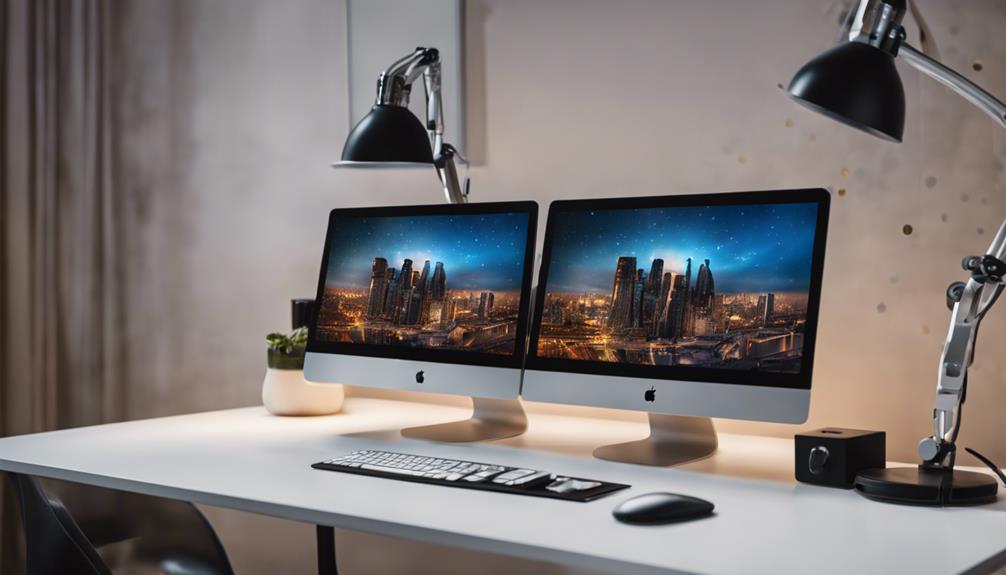
Finding the right dual monitor stand can transform your workspace, making multitasking more comfortable and organized. The Amazon Basics Adjustable Dual Monitor Desk Mount stands out as the best overall for its balance of affordability and reliable performance. The MOUNT PRO Dual Monitor Stand offers full motion flexibility, ideal for those needing precise positioning. However, choosing the perfect stand involves tradeoffs between stability, adjustability, and workspace footprint. Continue reading for a detailed breakdown of the top options and what makes each one unique.
Complete the kit


Key Takeaways
- The most adjustable stands, like MOUNT PRO, provide superior flexibility but tend to be pricier and bulkier.
- Freestanding models, such as VIVO STAND-V002FG, offer easier installation without clamping but may take up more desk space.
- VESA compatibility is a must-have feature for most monitors, but the size and weight limits vary significantly between models.
- Build quality and stability differ, with premium options offering more durable materials and smoother motion.
- Budget-friendly options like Amazon Basics deliver solid performance but may lack some advanced features found in higher-end models.
| Amazon Basics Adjustable Dual Monitor Desk Mount |  | Best Overall for Large Monitors | Supports Monitors Up To: 32 inches | Weight Capacity Per Arm: 22 lbs | VESA Compatibility: 75x75mm, 100x100mm | VIEW ON AMAZON | See Our Full Breakdown |
| MOUNT PRO Dual Monitor Stand – Full Motion Desk Mount for 2 Monitors up to 27 inches, 17.6 lbs, Height Adjustable, Swivel, Tilt, Rotation, VESA 75×75/100×100, Black |  | Best for Ergonomic Adjustability and Moderate-Sized Monitors | Monitor Compatibility: 13-27 inches | Maximum Monitor Weight: 17.6 lbs | Height Adjustment: Up to 18.1 inches | VIEW ON AMAZON | See Our Full Breakdown |
| ErGear Dual Monitor Arm for 13–32″ Screens, Adjustable VESA Mount with Tool-Free Installation |  | Best for Wide Compatibility and Easy Setup | Supported Screen Size: 13–32 inches | Max Load: 19.8 lbs | VESA Compatibility: 75x75mm, 100x100mm | VIEW ON AMAZON | See Our Full Breakdown |
| VIVO Dual Monitor Desk Mount, Holds 2 Screens up to 30 inches and 22 lbs Each, Fully Adjustable Steel Stand with C-Clamp and Grommet, Black |  | Best for Heavy Monitors and Sturdy Steel Construction | Screen Size Compatibility: up to 30 inches | Weight Capacity: 22 lbs | VESA Compatibility: 75x75mm, 100x100mm | VIEW ON AMAZON | See Our Full Breakdown |
| VIVO Freestanding Dual Monitor Stand with Adjustable Arms and Glass Base, Black, STAND-V002FG | 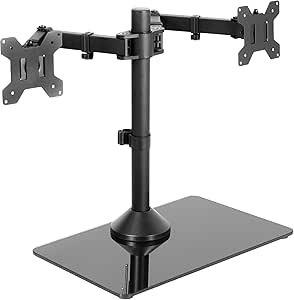 | Best for Aesthetic and Flexible Positioning | Compatibility: Monitors 13″ to 32″ up to 22 lbs | Base Material: Tempered glass | Base Dimensions: 42.5 cm x 26 cm | VIEW ON AMAZON | See Our Full Breakdown |
| HUANUO FlowLift Dual Monitor Stand, Fully Adjustable Desk Mount for 13–32″ Screens |  | Best Overall Dual Monitor Stand | Monitor Size Range: 13–32 inches | Monitor Weight Range: 4.4–19.8 lbs | VESA Compatibility: 75x75mm or 100x100mm | VIEW ON AMAZON | See Our Full Breakdown |
| WALI Adjustable Dual Monitor Arm for 13-32 inch Screens, 22 lbs per Arm |  | Best for Space-Saving Ergonomics | Screen Size Compatibility: 13-32 inches | Max Load Capacity: 22 lbs per arm | VESA Pattern: 75x75mm and 100x100mm | VIEW ON AMAZON | See Our Full Breakdown |
| VIVO Dual Monitor Stand, Fully Adjustable Arms for 17 to 32 inch Screens, Mechanical Articulating Desk Mount, VESA 75×75/100×100, Max 19.8 lbs, Black |  | Best for Versatility in Adjustable Viewing | Screen Compatibility: 17-32 inches | Weight Capacity: 19.8 lbs per monitor | VESA Pattern: 75x75mm, 100x100mm | VIEW ON AMAZON | See Our Full Breakdown |
| MountUp Dual Monitor Desk Mount for 32 Inch Screens, Fully Adjustable with C-Clamp and Grommet Base |  | Best Ergonomic Support for Large Monitors | Maximum Screen Size: 32 inches | Maximum Weight per Arm: 17.6 lbs | VESA Compatibility: 75x75mm, 100x100mm | VIEW ON AMAZON | See Our Full Breakdown |
| VIVO Dual Monitor Desk Stand for 2 Screens up to 27 Inch |  | Best Budget Freestanding Option | Screen Size Compatibility: 13″ to 27″ | Maximum Weight: 22 lbs per monitor | VESA Compatibility: 75x75mm or 100x100mm | VIEW ON AMAZON | See Our Full Breakdown |
| ErGear Dual Monitor Stand, Adjustable Desk Mount for 2 Monitors up to 32 Inches |  | Best Overall for Versatile Large-Screen Support | Monitor Size Compatibility: 13 to 32 inches | Weight Limit per Monitor: 17.6 lbs | VESA Mounting Hole Spacing: 75×75 mm or 100×100 mm | VIEW ON AMAZON | See Our Full Breakdown |
| HUANUO Free Standing Dual Monitor Stand for 13-32 Inch Monitors, Glass Base |  | Best for Flexible Placement and Easy Repositioning | Monitor Size Compatibility: 13-32 inches | VESA Pattern Compatibility: 75 x 75 mm and 100 x 100 mm | Weight Capacity: 22 lbs per arm | VIEW ON AMAZON | See Our Full Breakdown |
| Perlegear Dual Monitor Stand with Power Strip for 2 Screens up to 32 Inch |  | Best for Integrated Power and Multi-Feature Flexibility | Compatibility: 13-32 inches | VESA Pattern: 75 x 75 mm or 100 x 100 mm | Weight Capacity: 22 lbs per arm | VIEW ON AMAZON | See Our Full Breakdown |
| dual monitor stand | VESA Compatibility |
|---|---|
| Amazon Basics Adjustable Dual | 75x75mm, 100x100mm |
| MOUNT PRO Dual Monitor Stand | 75×75 mm, 100×100 mm |
| ErGear Dual Monitor Arm for 13 | 75x75mm, 100x100mm |
| VIVO Dual Monitor Desk Mount | 75x75mm, 100x100mm |
| VIVO Freestanding Dual Monitor | — |
| HUANUO FlowLift Dual Monitor S | 75x75mm or 100x100mm |
| WALI Adjustable Dual Monitor A | — |
| VIVO Dual Monitor Stand | — |
| MountUp Dual Monitor Desk Moun | 75x75mm, 100x100mm |
| VIVO Dual Monitor Desk Stand f | 75x75mm or 100x100mm |
| ErGear Dual Monitor Stand | — |
| HUANUO Free Standing Dual Moni | — |
| Perlegear Dual Monitor Stand w | — |
More Details on Our Top Picks
Amazon Basics Adjustable Dual Monitor Desk Mount
This mount stands out by supporting larger monitors up to 32 inches and 22 lbs per arm, making it ideal for users with bigger screens who need full motion flexibility. Unlike smaller, less adjustable options, it offers tilt, swivel, rotation, and multiple mounting options, which help customize your workspace. However, it requires careful tension adjustment to ensure stability, especially with larger monitors, and its stability can vary if improperly set. Compared with lighter-duty mounts like the WALI Dual Arm, this model provides greater capacity at the expense of slightly more setup effort. This pick is perfect for those prioritizing size support and flexible positioning but willing to fine-tune tension for stability.
Pros:- Supports large monitors up to 32 inches and 22 lbs per arm
- Full motion adjustment including tilt, swivel, and rotation
- Multiple mounting options for secure attachment
Cons:- Proper tension adjustment is necessary for stability
- Stability may vary depending on monitor size and setup
Best for: Users with large monitors up to 32 inches looking for full motion and flexible mounting options.
Not ideal for: People with smaller desks or lighter monitors who don’t need full motion or large capacity, as this mount is bulkier and more complex.
- Supports Monitors Up To:32 inches
- Weight Capacity Per Arm:22 lbs
- VESA Compatibility:75x75mm, 100x100mm
- Mounting Options:C-clamp, grommet
- Tilt Range:-45° to +90°
- Swivel Range:±90°
- Rotation:360°
- Item Weight:7.8 pounds
Our verdict“This mount is best suited for users with large, heavy monitors who need maximum flexibility and are comfortable with some setup effort.”
MOUNT PRO Dual Monitor Stand – Full Motion Desk Mount for 2 Monitors up to 27 inches, 17.6 lbs, Height Adjustable, Swivel, Tilt, Rotation, VESA 75×75/100×100, Black
This model excels by accommodating monitors from 13 to 27 inches with a maximum weight of 17.6 lbs per arm, making it ideal for users with mid-sized screens seeking high adjustability. Its height adjustment of up to 18.1 inches and full motion capabilities surpass many basic mounts, like the Amazon Basics model, providing a more ergonomic setup. Compared to the ErGear arm, it offers a wider tilt range and a more stable V-shaped base, but it requires monitors to be balanced during installation, and the base can occupy significant desk space. This stand makes the most sense for those who want versatile movement for monitors within a moderate size range, especially in tighter workspaces.
Pros:- Supports monitors up to 27 inches and 17.6 lbs
- Height adjustment up to 18.1 inches for ergonomic positioning
- Full motion including tilt, swivel, and rotation
Cons:- Requires monitors to be balanced during installation
- Base may take up significant desk space
Best for: Professionals using monitors between 13 and 27 inches who prioritize ergonomic flexibility.
Not ideal for: Owners of larger monitors over 27 inches or those with limited desk space, as the base may be bulky.
- Monitor Compatibility:13-27 inches
- Maximum Monitor Weight:17.6 lbs
- Height Adjustment:Up to 18.1 inches
- VESA Compatibility:75×75 mm, 100×100 mm
- Tilt Range:-90° to +70°
- Swivel Range:-90° to +90°
- Rotation:360°
- Material:Metal
Our verdict“This mount is a strong choice for users with medium-sized monitors seeking flexible, ergonomic positioning in a workspace with room to spare.”
ErGear Dual Monitor Arm for 13–32″ Screens, Adjustable VESA Mount with Tool-Free Installation
This arm supports a broad range of monitor sizes from 13 to 32 inches and up to 19.8 lbs, making it versatile for various setups. Its tool-free VESA mounting simplifies installation, unlike some models like the Amazon Basics mount, which may require more fine-tuning. The ErGear offers flexible height, tilt, swivel, and rotation adjustments that help customize your workspace ergonomically. However, it’s recommended primarily for wooden desks without crossbeams, as compatibility with certain desk types can be limited. Compared to the VIVO steel stand, it provides easier installation and broader size support but may require careful verification of VESA compatibility before purchase. This is ideal for users seeking wide monitor compatibility and straightforward installation.
Pros:- Supports monitors from 13 to 32 inches and up to 19.8 lbs
- Easy tool-free VESA mounting and cable management
- Flexible adjustments for ergonomic positioning
Cons:- Recommended only for wooden desks without crossbeams
- Limited to specified size and weight range
Best for: Users with a variety of monitor sizes up to 32 inches who want quick, tool-free setup.
Not ideal for: Users with desks featuring thick or crossbeamed surfaces, or monitors outside the specified size/weight range.
- Supported Screen Size:13–32 inches
- Max Load:19.8 lbs
- VESA Compatibility:75x75mm, 100x100mm
- Height Adjustment:Up to 17.5 inches
- Tilt:+80°/-50°
- Swivel:±90°
- Rotation:360°
Our verdict“This arm is well-suited for users who need flexible, quick-install monitor support across a wide size range and have suitable desks.”
VIVO Dual Monitor Desk Mount, Holds 2 Screens up to 30 inches and 22 lbs Each, Fully Adjustable Steel Stand with C-Clamp and Grommet, Black
This stand supports large monitors up to 30 inches and 22 lbs each, making it suitable for heavier setups compared to the VIVO glass-based model. Its steel construction offers durability, and full adjustment of tilt, swivel, rotation, and height allows for ergonomic positioning. Unlike the glass-base stand, this one’s steel frame provides more stability if monitors are pulled forward or backward, but it may require some assembly experience due to its sturdiness. The clamp may not fit desks thicker than 3.25 inches, which could limit compatibility. Compared to the VIVO glass model, it prioritizes stability over aesthetic appearance. It’s ideal for users needing a robust, heavy-duty mount that can handle larger, heavier monitors.
Pros:- Supports monitors up to 30 inches and 22 lbs
- Fully adjustable tilt, swivel, rotation, and height
- Sturdy steel construction for heavy-duty stability
Cons:- Assembly may be more complex due to its sturdiness
- Clamp may not fit thicker desks over 3.25 inches
Best for: Professionals with heavy or larger monitors who need maximum stability and durability.
Not ideal for: Users with very thick desks or who prefer a more aesthetic or minimalist setup, as the steel frame is bulkier.
- Screen Size Compatibility:up to 30 inches
- Weight Capacity:22 lbs
- VESA Compatibility:75x75mm, 100x100mm
- Mounting Options:C-clamp, Grommet
- Tilt Range:+90° to -90°
- Swivel:180°
- Rotation:360°
- Material:Steel
Our verdict“This mount is best for users with heavy, large monitors needing a durable, highly stable solution.”
VIVO Freestanding Dual Monitor Stand with Adjustable Arms and Glass Base, Black, STAND-V002FG
This freestanding stand combines a glass base with adjustable arms supporting monitors up to 32 inches and 22 lbs each, emphasizing style alongside function. Its removable VESA plates facilitate quick mounting, and the flexible arms allow tilt, swivel, rotation, and height adjustment. Compared to clamp-based mounts like the Amazon Basics, this stand offers a cleaner look and more freedom of placement, but the stability can be affected if monitors are pulled too far forward or backward. The glass base provides stability, yet it requires bolting down for maximum security, which may complicate setup. This option is ideal for aesthetic-conscious users who want flexible positioning without desk clamps but are willing to secure the stand firmly.
Pros:- Supports monitors up to 32 inches and 22 lbs
- Flexible adjustments for ergonomic setup
- Sturdy tempered glass base for stability
Cons:- Monitor stability may be compromised if pulled too far
- Requires bolting down for maximum stability
Best for: Design-focused users seeking a stylish, flexible dual monitor setup with aesthetic appeal.
Not ideal for: Users with very thick desks or those who prefer a more straightforward clamp setup, as assembly and stability depend on proper securing.
- Compatibility:Monitors 13″ to 32″ up to 22 lbs
- Base Material:Tempered glass
- Base Dimensions:42.5 cm x 26 cm
- Mounting Hole Pattern:75x75mm or 100x100mm
- Adjustments:+90° to -90° tilt, 360° swivel, 360° rotation, height
- Warranty:3 years
Our verdict“This stand appeals most to users prioritizing aesthetics and flexible positioning in a stylish, secure setup.”
HUANUO FlowLift Dual Monitor Stand, Fully Adjustable Desk Mount for 13–32″ Screens
The HUANUO FlowLift stands out for its comprehensive adjustability, supporting monitors from 13 to 32 inches with a full range of tilt, swivel, and rotation. Compared to the VIVO model, it offers a higher maximum height adjustment (15.75 inches vs. VIVO’s adjustable arms), making it better suited for ergonomic setups. However, it requires a wooden desk surface and is limited to monitors with VESA holes, which may exclude some ultralight or non-standard displays. Its sturdy clamp and grommet options help secure heavy monitors securely, and cable management keeps your workspace tidy. The main tradeoff is its compatibility restrictions and the need for specific desk materials, making it less ideal for glass or plastic desks.
Pros:- Full range of ergonomic adjustments including height, tilt, swivel, and rotation
- Supports a wide monitor size range up to 32 inches
- Secure mounting options with cable management
Cons:- Requires wood or similar sturdy desk material; not suitable for glass or plastic surfaces
- Limited compatibility to monitors with VESA holes
Best for: Professionals seeking a highly adjustable, stable mount for multiple monitors on a wooden desk
Not ideal for: Owners of glass or plastic desks, or those with monitors lacking VESA compatibility
- Monitor Size Range:13–32 inches
- Monitor Weight Range:4.4–19.8 lbs
- VESA Compatibility:75x75mm or 100x100mm
- Desk Thickness Range:0.59″ – 3.54″
- Material:Wood (recommended)
- Mounting Options:C-Clamp & Grommet
Our verdict“This stand is perfect for users needing maximum flexibility and stability on solid wood desks with VESA-compatible monitors.”
WALI Adjustable Dual Monitor Arm for 13-32 inch Screens, 22 lbs per Arm
The WALI Dual Monitor Arms excel at freeing up desk space with their sleek, adjustable design supporting monitors up to 32 inches and 22 lbs each. Compared with MountUp, WALI offers a slightly longer extension (up to 19.3 inches), providing more reach for versatile positioning. Its full motion adjustments—including tilt, swivel, and rotation—make ergonomic customization straightforward. Installation is simplified with multiple mounting options, but it’s best suited for desks without crossbeams, similar to the VIVO arm, which can be limited by desk structure. Heavy monitors above 22 lbs aren’t supported, and verifying VESA compatibility beforehand can prevent surprises.
Pros:- Extends up to 19.3 inches for flexible positioning
- Supports up to 22 lbs per arm with full motion adjustments
- Multiple mounting options for versatility
Cons:- Not suitable for very heavy monitors over 22 lbs
- Requires a desk without obstructive crossbeams
Best for: Users wanting to maximize space and achieve ergonomic comfort with large monitors on a sturdy desk
Not ideal for: Desks with crossbeams or monitors exceeding 22 lbs
- Screen Size Compatibility:13-32 inches
- Max Load Capacity:22 lbs per arm
- VESA Pattern:75x75mm and 100x100mm
- Adjustments:Tilt +70°/-45°, Swivel +90°/-90°, Rotation 360°, Extend up to 19.3″ , Height up to 17.3″
- Mounting Options:C-clamp and Grommet
- Item Weight:3.7 kg
Our verdict“Ideal for users needing large, adjustable monitor setups that optimize desk space and ergonomics on stable desks.”
VIVO Dual Monitor Stand, Fully Adjustable Arms for 17 to 32 inch Screens, Mechanical Articulating Desk Mount, VESA 75×75/100×100, Max 19.8 lbs, Black
The VIVO Dual Monitor Stand offers excellent flexibility with fully articulating arms supporting 17 to 32-inch screens up to 19.8 lbs each. It’s a solid choice for those prioritizing precise positioning, with tilt, swivel, and 360° rotation. Compared to MountUp, its heavy-duty clamp and grommet options provide a more stable mount, especially on uneven surfaces. Assembly can be somewhat complex, and the arms may extend past the desk edge, which could be a concern in tight spaces. It’s best suited for users who need maximum adjustability and have monitors within the specified weight limits but may not support very heavy or ultralight monitors that lack VESA compatibility.
Pros:- Full articulation with tilt, swivel, and rotation
- Supports large monitors up to 32 inches
- Multiple mounting options for stability
Cons:- Assembly can be intricate and time-consuming
- Arms may extend past the desk edge in some setups
Best for: Designers or programmers who need highly adjustable monitors on a stable, versatile mount
Not ideal for: Users with ultralight or non-VESA-compatible monitors, or tight desk spaces
- Screen Compatibility:17-32 inches
- Weight Capacity:19.8 lbs per monitor
- VESA Pattern:75x75mm, 100x100mm
- Tilt:+90° to -90°
- Swivel:180°
- Rotation:360°
Our verdict“Best suited for users requiring maximum flexibility and stability for large, VESA-compatible monitors in spacious work areas.”
MountUp Dual Monitor Desk Mount for 32 Inch Screens, Fully Adjustable with C-Clamp and Grommet Base
The MountUp Dual Monitor Mount shines when supporting large screens up to 32 inches and 17.6 lbs per arm. It offers a high degree of adjustability, including full rotation, tilt, swivel, and height adjustments, making it ideal for ergonomic setups. Compared with WALI, MountUp’s installation instructions are clearer, and its sturdy build offers reliable stability. However, it requires a sturdy desk for optimal performance and supports only VESA patterns of 75x75mm or 100x100mm. Some users might find the cable management features basic, and its maximum weight limit could be restrictive for very heavy or ultrawide monitors.
Pros:- Supports large monitors up to 32 inches
- Full articulation including rotation and height adjustment
- Easy to install with versatile mounting options
Cons:- Requires a sturdy desk surface for stability
- Limited to VESA 75x75mm or 100x100mm patterns
Best for: Professionals with large monitors seeking precise ergonomic positioning and sturdy mounting
Not ideal for: Desks that are thin or unstable, or monitors exceeding 17.6 lbs
- Maximum Screen Size:32 inches
- Maximum Weight per Arm:17.6 lbs
- VESA Compatibility:75x75mm, 100x100mm
- Adjustment:360° rotation, height adjustment, tilt +90°/-90°, swivel 180°
- Base Types:C-Clamp, Grommet
Our verdict“Ideal for users with large, VESA-compatible monitors who need ergonomic flexibility on a stable, sturdy desk.”
VIVO Dual Monitor Desk Stand for 2 Screens up to 27 Inch
The VIVO Dual Monitor Desk Stand offers a straightforward, freestanding solution for dual monitors up to 27 inches, with a heavy-duty base that provides excellent stability. Its full articulation—tilt, swivel, and rotation—enables precise ergonomic positioning comparable to more expensive models like MountUp, but its maximum monitor size and weight limits are more restrictive. Assembly is generally simple, making it a good choice for beginners or those who prefer not to drill into desks. However, its need for bolting down for certain movements and the limited weight capacity of 22 lbs per monitor may limit its use with very heavy or ultrawide displays. It’s best for smaller, VESA-compatible monitors in space-constrained setups.
Pros:- Supports dual monitors up to 27 inches
- Heavy-duty base provides excellent stability
- Easy to assemble and adjust
Cons:- Requires bolting down for some movements
- Limited to 22 lbs weight per monitor
Best for: Budget-conscious users who need a reliable, adjustable freestanding mount for 13-27 inch monitors
Not ideal for: Heavy or ultrawide monitors exceeding 27 inches or 22 lbs per monitor
- Screen Size Compatibility:13″ to 27″
- Maximum Weight:22 lbs per monitor
- VESA Compatibility:75x75mm or 100x100mm
- Base Dimensions:13″ x 10.5″
- Adjustments:+90° to -90° tilt, 180° swivel, 360° rotation, height adjustable
Our verdict“A solid, budget-friendly choice for smaller dual monitor setups requiring full articulation and stability.”
ErGear Dual Monitor Stand, Adjustable Desk Mount for 2 Monitors up to 32 Inches
This stand stands out for supporting larger monitors up to 32 inches and 17.6 lbs each, making it a versatile choice for those with sizeable displays. Its full adjustability—height, tilt, swivel, and rotation—ensures ergonomic comfort, similar to the VIVO Dual Monitor Desk Mount, but with a more robust height adjustment range. Compared with the HUANUO Free Standing Dual Monitor Stand, it offers more stable mounting options on sturdy desks, though its reliance on VESA compatibility and potential installation challenges limit flexibility on certain desk types. Overall, this model balances size capacity with adjustable precision, though it requires monitors with VESA holes and may be tricky to install on desks with beams.
Pros:- Supports large monitors up to 32 inches and 17.6 lbs each
- Full adjustability including tilt, swivel, and rotation
- Helps free up desk space and manages cables neatly
Cons:- Requires monitors to have VESA mounting holes
- Installation can be challenging on tables with beams or panels
Best for: Professionals or gamers with large monitors seeking a sturdy, fully adjustable mount for ergonomic setup.
Not ideal for: Users with desks that have thick panels or uneven surfaces, as installation may be difficult or unstable.
- Monitor Size Compatibility:13 to 32 inches
- Weight Limit per Monitor:17.6 lbs
- VESA Mounting Hole Spacing:75×75 mm or 100×100 mm
- Material:Metal
- Maximum Arm Span:31.22 inches
- Height Adjustment:Yes
Our verdict“This stand suits users who need robust support for sizable monitors and a highly adjustable setup on stable desks.”
HUANUO Free Standing Dual Monitor Stand for 13-32 Inch Monitors, Glass Base
This model shines in versatility, supporting monitors from 13 to 32 inches with a sturdy tempered glass base that offers stability without the need for drilling—unlike the Perlegear Dual Monitor Stand with its built-in power strip. Its flexible adjustment options, including 180° swivel and 80° tilt, make it ideal for shared workspaces or frequent repositioning. However, its weight—due to the glass base—can make moving it cumbersome, and improper balancing may compromise stability, especially on uneven surfaces. Compared to the ErGear Dual Monitor Stand, it offers more freedom of placement but at the cost of added weight and potential stability concerns if not set up carefully.
Pros:- Supports a wide range of monitor sizes and VESA patterns
- Flexible adjustments including swivel, tilt, and rotation
- No drilling required in free-standing mode with a large, stable glass base
Cons:- Heavy to move frequently due to the glass base
- Requires tools for height adjustment
- Potential stability issues if not properly balanced
Best for: Users needing a stable, easily repositioned stand that can adapt to different desk environments without permanent mounting.
Not ideal for: People who move their desks often or require a lightweight, portable solution, as the glass base adds significant weight.
- Monitor Size Compatibility:13-32 inches
- VESA Pattern Compatibility:75 x 75 mm and 100 x 100 mm
- Weight Capacity:22 lbs per arm
- Base Dimensions:11.8 x 16.5 inches
- Adjustment Range:180° swivel, 80° tilt, 50° tilt downward, 360° rotation
- Pole Height:18.7 inches
Our verdict“Ideal for users who prioritize flexible placement and stability without permanent mounting, willing to handle the weight.”
Perlegear Dual Monitor Stand with Power Strip for 2 Screens up to 32 Inch
This stand combines sturdy support for two monitors up to 32 inches and 22 lbs each with a built-in power strip that simplifies cable management—making it a strong choice for cluttered workspaces. Its adjustable arms, similar to the VIVO Dual Monitor Desk Mount, include tilt, swivel, and rotation, with height adjustable from approximately 11 to 15 inches. The inclusion of a power strip adds a layer of convenience for busy desks, though some users find assembly complex and must verify monitor VESA compatibility beforehand. Compared to the HUANUO Free Standing Stand, it offers more integrated features for power management but is slightly more involved to set up.
Pros:- Supports large monitors up to 32 inches and 22 lbs each
- Built-in power strip with USB ports and outlets
- Adjustable tilt, swivel, rotation, and height for ergonomic comfort
Cons:- Requires checking monitor VESA compatibility before purchase
- Assembly can be complex for some users
- Limited to monitors up to 32 inches
Best for: Tech-heavy workstations or multitaskers who need a dual monitor setup with easy access to power and USB devices.
Not ideal for: Those with non-standard monitors that lack VESA compatibility or who prefer minimalist setups without integrated power components.
- Compatibility:13-32 inches
- VESA Pattern:75 x 75 mm or 100 x 100 mm
- Weight Capacity:22 lbs per arm
- Material:Carbon steel, tempered glass
- Adjustments:Tilt ±45°, swivel ±90°, rotation 360°, height 10.79″–14.92″
- Power Strip:6.5ft cable, USB-A, USB-C, 3 AC outlets
Our verdict“Best suited for users who need a reliable, feature-rich dual monitor stand with integrated power options for a tidy workspace.”

How We Picked
In selecting these dual monitor stands, I focused on key factors that impact everyday use. Performance measures included stability, range of motion, and compatibility with various monitor sizes and weights. Usability considerations such as ease of installation, cable management, and adjustability flexibility were also prioritized. I evaluated build quality and durability to ensure long-term reliability. Finally, value was a central criterion—balancing cost against features and quality, ensuring each pick offers a meaningful advantage for its price point. This approach helps identify options suitable for different user needs, from casual setups to professional workstations.Factors to Consider When Choosing Dual Monitor Stand
Choosing the right dual monitor stand involves several considerations beyond basic features. Understanding your workspace, monitor size, and usage habits can help you pick a stand that enhances comfort and productivity. It’s worth considering how much adjustability you need, the stability of the mount, and whether you prefer a clamp or freestanding design. Additionally, compatibility with your monitor’s VESA mounting pattern and weight capacity should align with your specific models. Avoid common pitfalls like underestimating the weight or size of your monitors, which can lead to instability or compatibility issues. Budgeting for quality support and durability often pays off in the long run, especially for daily use.Adjustability and Range of Motion
Look for stands that offer a wide range of tilt, swivel, and height adjustment. This flexibility helps you find an ergonomic position, reducing neck and eye strain. However, more complex movement options often come with higher costs and potential wobbliness if not well-made. Consider how frequently you might need to reposition your monitors and whether the stand’s adjustment mechanisms are smooth and easy to use. For dynamic workflows, full motion arms can be more beneficial than static mounts, but they also tend to be bulkier and more expensive.
Build Quality and Stability
Durability hinges on materials such as steel or high-quality aluminum, which resist bending and wobbling. A stable stand prevents monitors from shifting during use, especially for larger screens. Clamping bases are generally more secure, but they require a sturdy desk edge, while freestanding models provide versatility at the expense of desk space. When opting for a stand, check reviews for stability reports, particularly when supporting heavier monitors. Investing in a high-quality model can save frustration and potential damage over time.
Compatibility and Size Limits
Ensure the stand supports your monitor’s size and weight, especially if you have larger or heavier models. Most stands specify maximum monitor dimensions and weight capacity—ignoring these can lead to instability or damage. VESA compatibility is crucial; most monitors now use 75×75 or 100×100 mounts, but always verify before purchasing. For multi-monitor setups, consistency in size and weight support simplifies adjustment and maintains visual uniformity. Mismatched monitors may wobble or tilt unevenly, detracting from the ergonomic benefits.
Ease of Installation and Cable Management
Simple, tool-free installation is a significant advantage, especially for those who frequently reconfigure their workspace. Some stands include integrated cable management channels, which help keep cords organized and prevent clutter. Be cautious of overly complex mounting mechanisms that can extend setup time or require additional tools. Well-designed cable channels can improve aesthetics and reduce accidental disconnects or tangles, making your workspace safer and more professional-looking.
Price and Long-term Value
While budget options can meet basic needs, investing in a more durable and adjustable stand often provides better long-term value. Cheaper models may lack stability or smooth adjustment, leading to frustration over time. Conversely, premium options with enhanced features like gas springs or heavy-duty construction might come at a higher initial cost but can significantly improve user experience. Evaluate how much you plan to use your setup daily and whether features like full motion or integrated power strips justify the additional expense.
Frequently Asked Questions
Can I use a dual monitor stand with ultrawide monitors?
Many dual monitor stands support ultrawide monitors, but compatibility depends on the size, weight, and VESA mounting pattern. Larger screens may require stands with higher weight capacity and more robust construction. It’s essential to check the maximum monitor size and weight supported before purchase. Some stands are specifically designed for ultrawide screens, offering wider VESA compatibility and more stable support, making them a better choice if you work with expansive displays.
Is a clamp or freestanding dual monitor stand better for my desk?
Clamping stands are ideal if you want to maximize desk space and secure your monitors firmly to the edge. They tend to be more stable and less likely to wobble during adjustments. Freestanding models, on the other hand, do not require desk clamping, making installation easier and providing flexibility to move the setup around. However, they usually occupy more desk area and might be less stable on uneven surfaces. Your choice depends on your workspace layout and stability preferences.
How important is VESA compatibility for a dual monitor stand?
VESA compatibility is fundamental because it determines whether your monitors can attach securely to the stand. Most modern monitors use standard VESA patterns—75×75 or 100×100—but some larger or older models may vary. Confirming this compatibility prevents disappointment and ensures a stable mount. Additionally, check the weight capacity and size limits to avoid mounting monitors that are too heavy or large, which could compromise safety and stability.
Are dual monitor stands suitable for gaming setups?
Yes, many dual monitor stands are suitable for gaming, especially those with high adjustability and stability. Full-motion arms allow quick repositioning for optimal viewing angles, which is helpful during gaming sessions. However, some models might introduce slight wobbling if not built with high-quality materials, so paying attention to build quality is wise. For competitive or immersive gaming, choosing a stand with a sturdy base and smooth articulation can enhance your overall experience.
What should I consider if I want a dual monitor stand with a power strip?
A dual monitor stand with a built-in power strip, like the Perlegear model, can simplify cable management and reduce clutter. When choosing such a stand, verify the power strip’s capacity and outlet count to meet your needs. Also, consider whether the stand’s design allows easy access to outlets and if it maintains stability with the added weight of the power strip. This feature is particularly useful for busy workspaces with multiple devices requiring power and charging options.
Conclusion
For most users, the Amazon Basics Adjustable Dual Monitor Desk Mount makes an excellent starting point, offering reliable performance at an accessible price. If you need maximum flexibility and full motion, the MOUNT PRO Dual Monitor Stand suits professionals and creative users well. Those seeking a premium, highly durable option should consider higher-end models like the ErGear Dual Monitor Arm. Beginners or casual users will appreciate the simplicity of the VIVO Dual Monitor Desk Mount, while those with larger or heavier monitors might prioritize stands with higher weight capacities. Ultimately, your choice depends on your workspace, monitor specs, and how you intend to use your dual setup.