
For extra USB ports, the right hub depends on how many devices you connect and whether they need power, fast data, or just a simple expansion. My best overall pick is the AGEEN 16-Port USB 3.2 Gen 2 Hub, which stands out for its large port count, powered design, and individual switches. The Anker Ultra Slim 4-Port Hub is a simpler fit for a laptop bag, while the Wenter 11-Port Powered Hub suits a crowded desktop. The main tradeoffs are port count versus desk space, powered operation versus portability, and data ports versus charging or display features. Read on for the full breakdown and guidance on choosing a hub for your setup.

Get furniture and decor delivered free with Prime
- Fast, free delivery on millions of items
- Prime Video, Amazon Music and more included
- Member-only deals all year
Complete the kit


Key Takeaways
- AGEEN is the most expandable data hub in this group: its 16 ports, 10Gbps specification, external power adapter, and per-port switches serve setups with many peripherals.
- Powered hubs suit device-heavy desks better than simple splitters: the Wenter, JESWO, and Atolla add external power and individual controls, though they need more space and another power connection.
- Compact four-port hubs prioritize easy expansion: Anker, UGREEN, and Acer are simpler choices when a few extra USB-A ports matter more than charging or a high port count.
- Mixed-port desktop hubs vary in connector layout: the 7-port models include USB-A and USB-C, but buyers should check which ports handle data and whether the host connection matches their computer.
- Multiport adapters solve a different problem: intpw and Denlane combine USB expansion with features such as HDMI, card readers, or audio, making them useful when a laptop needs more than USB ports alone.
| AGEEN 16-Port USB 3.2 Gen 2 Hub |  | Best for Maximum Port Expansion | USB ports: 16 | USB standard: USB 3.2 Gen 2; backward compatible with USB 3.1, 3.0, and 2.0 | Advertised data rate: Up to 10Gbps | VIEW ON AMAZON | See Our Full Breakdown |
| Acer USB Hub 4-Port USB 3.0 Splitter with Type-C Power Port |  | Best Compact Powered-Input Pick | USB ports: 4 | Data interface: USB 3.0 | Advertised data rate: Up to 5Gbps | VIEW ON AMAZON | See Our Full Breakdown |
| 4Ft 7-Port USB Hub 3.0 for Desktop, 4 USB-A & 3 USB-C Ports |  | Best for Mixed USB-A and USB-C Devices | USB-A ports: 4 | USB-C ports: 3 | Cable length: 4 feet | VIEW ON AMAZON | See Our Full Breakdown |
| Anker Ultra Slim 4-Port USB 3.0 Data Hub |  | Best Slim Data-Only Pick | USB ports: 4 | Interface: USB 3.0 | Advertised data rate: Up to 5Gbps | VIEW ON AMAZON | See Our Full Breakdown |
| ONFINIO USB Hub 7 Port with Individual On/Off Switches | 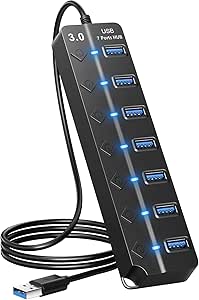 | Best for Switching Peripherals Individually | USB ports: 7 | USB standard: USB 3.0; backward compatible with USB 2.0 and 1.0 | Advertised data rate: Up to 5Gbps | VIEW ON AMAZON | See Our Full Breakdown |
| intpw USB C Hub Multiport Adapter with 4K HDMI, 100W PD, USB-A & SD/TF Card Reader, Aluminum Design |  | Best for USB-C Laptop Setups | Total ports: 9 | HDMI output: Up to 4K at 60Hz | Power Delivery: Up to 100W pass-through | VIEW ON AMAZON | See Our Full Breakdown |
| UGREEN USB 3.0 Hub 4-Port Ultra-Slim USB A Splitter |  | Best Compact USB-A Pick | Interface: USB 3.0 | Ports: 4 USB-A | Maximum data transfer rate: 5Gbps | VIEW ON AMAZON | See Our Full Breakdown |
| Wenter 11-Port Powered USB 3.0 Hub with Individual Switches |  | Best for Maximum Desk Expansion | Total ports: 11 | Data ports: 10 USB 3.0 | Charging ports: 1 | VIEW ON AMAZON | See Our Full Breakdown |
| Atolla 8-Port USB 3.0 Hub with Individual Switches and Charging Port |  | Best Mid-Size Powered Hub | Total ports: 8 | Data ports: 7 USB 3.0 | Dedicated charging ports: 1, up to 2.4A | VIEW ON AMAZON | See Our Full Breakdown |
| USB Hub 4 Port, USB Splitter 1 in 4 Out, USB Extender Hub for Laptop PC |  | Best for Simple Everyday Accessories | Ports: 4 USB ports | Interface: USB 3.0 | Maximum data transfer rate: 5Gbps | VIEW ON AMAZON | See Our Full Breakdown |
| Denlane 8-in-2 USB-C Hub with USB-A Ports, SD/TF Card Reader, and 3.5 mm Audio |  | Best for Mixed Connections | Port configuration: 8-in-2 | Total USB ports: 5 | USB 3.0 ports: 1, up to 5 Gbps | VIEW ON AMAZON | See Our Full Breakdown |
| USB-A to USB-C Hub, 7-Port USB 3.0 Hub with 3 USB-C and 4 USB-A Ports |  | Best for a USB-C Port Mix | Total ports: 7 | USB-C ports: 3 | USB-A ports: 4 | VIEW ON AMAZON | See Our Full Breakdown |
| Powered USB Hub, JESWO 11 Port USB 3.0 Hub, 10 USB 3.0 Data Transfer Ports + 1 Smart Charging Port, USB Hub Powered with Individual LED On/Off Switches and 12V/3A Power Adapter |  | Best for a Large Powered Setup | Total ports: 11 | USB 3.0 data ports: 10, up to 5 Gbps | Smart charging ports: 1, up to 2.4A | VIEW ON AMAZON | See Our Full Breakdown |
| 4FT 7-Port USB 3.0 Hub Multiport Adapter for Desktop, Laptop |  | Best for Flexible Desktop Placement | USB-A ports: 7 | Interface: USB 3.0 | Data transfer rate: Up to 5 Gbps | VIEW ON AMAZON | See Our Full Breakdown |
| usb hubs for extra port | Dimensions | Cable length | Weight |
|---|---|---|---|
| AGEEN 16-Port USB 3.2 Gen 2 Hu | — | — | — |
| Acer USB Hub 4-Port USB 3.0 Sp | 4.13 × 1.18 × 0.35 inches | 2 feet | 1.6 ounces |
| 4Ft 7-Port USB Hub 3.0 for Des | — | 4 feet | — |
| Anker Ultra Slim 4-Port USB 3. | 4.23 × 1.23 × 0.39 inches | — | 1.28 ounces |
| ONFINIO USB Hub 7 Port with In | 6.6 × 1.7 × 0.7 inches | 3.3 feet | 0.16 kg |
| intpw USB C Hub Multiport Adap | — | 19.7 inches | — |
| UGREEN USB 3.0 Hub 4-Port Ultr | 3.1 × 0.8 × 0.3 inches | — | 33g |
| Wenter 11-Port Powered USB 3.0 | — | — | — |
| Atolla 8-Port USB 3.0 Hub with | 6.2 × 1.69 × 0.9 inches | 100cm | 256g |
| USB Hub 4 Port | 3.94 × 1.18 × 0.39 inches | — | 1.5 ounces |
| Denlane 8-in-2 USB-C Hub with | — | — | — |
| USB-A to USB-C Hub | 4.1 x 0.67 x 1.3 inches | 3.2 ft | 0.15 lb |
| Powered USB Hub | — | — | — |
| 4FT 7-Port USB 3.0 Hub Multipo | 1.2 x 0.66 x 5.3 inches | 4 ft | — |
More Details on Our Top Picks
AGEEN 16-Port USB 3.2 Gen 2 Hub
For a desk crowded with peripherals, the AGEEN’s 16 ports make it the most expansive option in this group. Its advertised 10Gbps USB 3.2 Gen 2 speed is also a step above the 5Gbps hubs here, including the ONFINIO 7-Port USB Hub, which can matter when moving large files between compatible devices. Individual switches make it easier to shut off unused connections without pulling cables, while the included 96W adapter is intended to support a busy setup. That extra capacity comes with a bigger footprint and a permanent power adapter, so it is less suited to a travel bag or a minimal laptop setup. The 10Gbps rate depends on compatible host ports and devices, and the supplied details do not specify per-port power output.
Pros:- 16 ports accommodate more peripherals than any of the other reviewed hubs.
- Advertised 10Gbps transfer rate exceeds the 5Gbps rate of the ONFINIO 7-Port USB Hub.
- Individual switches let users disable connections without unplugging devices.
- Includes a 96W adapter and surge protection.
Cons:- The 16-port design and external power adapter take more desk space than compact four-port hubs.
- The product details do not state per-port power limits or how the adapter’s power is distributed.
- The advertised maximum speed requires compatible host and peripheral connections.
Best for: Desktop users with many USB peripherals who want individual port controls and an included power adapter.
Not ideal for: Travelers and laptop users who need a small, bus-powered hub with a clearly stated charging output for each port.
- USB ports:16
- USB standard:USB 3.2 Gen 2; backward compatible with USB 3.1, 3.0, and 2.0
- Advertised data rate:Up to 10Gbps
- Power adapter:96W, 12V/8A
- Port controls:Individual on/off switches with dimmable blue LEDs
- Protection:Surge protection
- Housing:Aluminum alloy
- Supported operating systems:Windows, macOS, Linux, Unix
Our verdict“Choose the AGEEN if you need a powered desktop hub with the largest port count here and can accommodate its size.”
Acer USB Hub 4-Port USB 3.0 Splitter with Type-C Power Port
The Acer suits buyers who need a few extra connections in a light, tidy package: its four USB 3.0 ports share a slim body, and the 2-foot cable gives a little more placement flexibility than a very short lead. Its Type-C input is for powering the hub, not for transferring data or charging another device, so it should not be mistaken for a multiport USB-C dock. Compared with Anker’s Ultra Slim 4-Port USB 3.0 Data Hub, Acer adds that separate power input, which may help when attached peripherals need steadier hub power. The tradeoff is modest expansion: the ONFINIO hub offers seven ports for users with more devices. The Acer’s 5Gbps rate is useful for compatible data transfers, but the listed Windows 11 minimum conflicts with its broader operating-system compatibility details.
Pros:- Four USB 3.0 ports provide up to 5Gbps data transfer.
- Separate USB-C power input can supply power to the hub.
- Two-foot cable and 1.6-ounce weight suit portable setups.
- Compatible operating systems listed include macOS, Windows, Chrome OS, and Linux.
Cons:- The USB-C port is power input only and does not carry data or charge other devices.
- Four ports may be insufficient for users with several peripherals.
- The listed Windows 11 minimum version conflicts with the broader compatibility list.
Best for: Laptop and desktop owners who want four USB-A connections, a longer cable, and the option to power the hub through USB-C.
Not ideal for: Buyers seeking a USB-C data hub, device charging from the hub, or enough ports for a large peripheral setup.
- USB ports:4
- Data interface:USB 3.0
- Advertised data rate:Up to 5Gbps
- Power input:USB Type-C
- Cable length:2 feet
- Dimensions:4.13 × 1.18 × 0.35 inches
- Weight:1.6 ounces
- Housing:ABS
- Listed compatible operating systems:macOS, Windows, Chrome OS, Linux
Our verdict“Pick the Acer for portable four-port expansion when a separate USB-C power input is useful and extra charging ports are not needed.”
4Ft 7-Port USB Hub 3.0 for Desktop, 4 USB-A & 3 USB-C Ports
With four USB-A and three USB-C ports, this hub gives a desktop user room for a mixed set of older and newer peripherals without relying on a row of adapters. Its 4-foot cable is the main ergonomic advantage over the shorter Acer four-port hub: the hub can sit closer to devices while the computer stays elsewhere on the desk. The listed 5Gbps rate supports data transfer, and the 15W Type-C port is specified at 5V/3A for high-power devices. That output should not be read as a guarantee that every port charges devices; the supplied information says the hub is for data transfer and advises external power for high-power devices. Compared with the ONFINIO 7-Port USB Hub, the port mix and long lead are more distinctive, while its aluminum housing adds bulk versus a slim plastic splitter.
Pros:- Seven connections include both four USB-A and three USB-C ports.
- Four-foot cable offers more placement flexibility than the Acer’s 2-foot lead.
- Advertised 5Gbps data rate supports compatible transfers.
- Aluminum casing is specified for heat dissipation.
Cons:- Product details describe data transfer rather than general device charging.
- High-power devices may require external power.
- The 15W Type-C output does not establish charging capability for all connected devices.
Best for: Desktop users connecting a blend of USB-A and USB-C peripherals who need a long cable for flexible placement.
Not ideal for: Anyone choosing a hub primarily to charge several devices or seeking an explicitly powered model with a bundled adapter.
- USB-A ports:4
- USB-C ports:3
- Cable length:4 feet
- Advertised data rate:Up to 5Gbps
- Type-C port output:15W (5V/3A)
- Housing:Aluminum
- Supported operating systems:Windows, Mac OS, Linux
Our verdict“Choose this hub for a desktop mix of USB-A and USB-C devices when cable reach matters more than broad charging support.”
Anker Ultra Slim 4-Port USB 3.0 Data Hub
The Anker is a straightforward choice when the problem is simply too few USB-A data ports. It turns one connection into four and advertises up to 5Gbps, while its 1.28-ounce, slim plastic body takes little space beside a laptop. Unlike the Acer four-port hub, it has no listed separate power input, and its stated purpose is data only, so buyers should not expect device charging. That makes it a better fit for keyboards, mice, and flash drives than for a setup needing powered peripherals. Compared with the ONFINIO seven-port hub, Anker offers less capacity but a smaller, simpler footprint. Its listed operating-system details name Linux and Windows versions; check compatibility for the specific host before buying if using another system.
Pros:- Adds four USB 3.0 data ports to a single USB-A connection.
- Advertised transfer rate reaches 5Gbps.
- Slim 1.28-ounce design is easy to carry.
- Heat-resistant plastic housing.
Cons:- Data-only design does not support charging.
- No separate power input is listed for power-hungry devices.
- Four ports offer less expansion than the ONFINIO seven-port hub.
Best for: Laptop users who need a light, low-profile way to connect a keyboard, mouse, and occasional USB-A data device.
Not ideal for: Users who need USB-C connections, extra power for demanding peripherals, or more than four added ports.
- USB ports:4
- Interface:USB 3.0
- Advertised data rate:Up to 5Gbps
- Dimensions:4.23 × 1.23 × 0.39 inches
- Weight:1.28 ounces
- Housing:Plastic
- Listed supported operating systems:Linux, Windows 10, Windows Vista
- Warranty:18 months
Our verdict“Pick the Anker if a compact four-port USB-A data hub is all your laptop setup needs.”
ONFINIO USB Hub 7 Port with Individual On/Off Switches
The ONFINIO stands out among the simpler hubs here because it pairs seven USB 3.0 ports with individual on/off switches. That makes it easier to leave cables connected and disable a device when it is not needed. Its 3.3-foot cable also gives more reach than the Acer’s 2-foot lead, though this model’s plastic body is larger than the Anker Ultra Slim four-port hub. The advertised 5Gbps rate suits compatible data transfers, and the listing says high-power devices should receive extra power. No power adapter is specified, so buyers should not assume the hub can supply enough power to every connected peripheral. Compared with the AGEEN 16-Port hub, it has fewer ports and no stated adapter, but takes a more modest approach for users who want several connections and per-port control.
Pros:- Seven USB 3.0 ports expand beyond the four-port Acer and Anker hubs.
- Individual on/off switches allow connected devices to be disabled without unplugging.
- 3.3-foot cable gives more placement reach than the Acer’s 2-foot cable.
- Advertised 5Gbps transfer rate and backward compatibility with USB 2.0 and 1.0 devices.
Cons:- No power adapter is specified, and high-power devices may need extra power.
- Plastic body is larger than the Anker’s slim four-port design.
- Advertised 5Gbps is below the AGEEN hub’s stated 10Gbps rate.
Best for: Users with several USB peripherals who want to switch individual connections and can provide extra power when their devices need it.
Not ideal for: Buyers who need a bundled powered hub, explicit per-port charging output, or the fastest advertised transfers in this group.
- USB ports:7
- USB standard:USB 3.0; backward compatible with USB 2.0 and 1.0
- Advertised data rate:Up to 5Gbps
- Cable length:3.3 feet
- Port controls:Individual on/off switches with indicator lights
- Housing:Plastic
- Dimensions:6.6 × 1.7 × 0.7 inches
- Weight:0.16 kg
- Operating systems:Linux, Mac OS X 10.6, Windows 10, Windows Vista, Windows XP
Our verdict“Choose the ONFINIO if you want seven data ports with individual switches and already have a plan for powering demanding devices.”
intpw USB C Hub Multiport Adapter with 4K HDMI, 100W PD, USB-A & SD/TF Card Reader, Aluminum Design
I’d choose the intpw 9-in-1 when extra ports need to do more than add USB-A sockets. It combines two USB 3.0 ports and two USB 2.0 ports with 4K at 60Hz HDMI and SD/TF readers, giving a laptop a useful mix for displays, accessories, and card transfers. Compared with the UGREEN USB 3.0 Hub, it suits a USB-C laptop setup with varied connections, while the UGREEN is simpler and lighter for adding four USB-A ports.
The tradeoff is that its charging and data paths have limits: the 100W PD port passes power only, and the USB-C 3.0 port does not charge or carry video. You’ll also need to supply a power adapter, with at least 65W recommended. I’d skip it if you only need basic USB-A expansion.
Pros:- Combines USB-A ports, SD/TF readers, HDMI, and pass-through power in one adapter.
- Supports 4K video output at 60Hz.
- Aluminum enclosure is designed to dissipate heat.
- 19.7-inch cable offers more placement flexibility than a short, directly attached hub.
Cons:- The PD port passes power but does not transfer data or video.
- Power adapter is not included; at least 65W is recommended.
- The USB-C 3.0 port does not support charging or video output.
Best for: USB-C laptop owners who need USB-A accessories, an external 4K display, and SD or TF card access from one hub.
Not ideal for: Buyers who only need several USB-A ports or expect every USB-C port to carry data, power, and video.
- Total ports:9
- HDMI output:Up to 4K at 60Hz
- Power Delivery:Up to 100W pass-through
- USB-A ports:2 USB 3.0 and 2 USB 2.0
- Card readers:SD and TF
- Cable length:19.7 inches
- Material:Aluminum
- Compatibility:MacBook Pro/Air, MacBook M1/M2/M3, iPad Pro, iPhone 17 Series
Our verdict“Pick the intpw if your USB-C laptop needs display, card-reader, and USB-A connections together; choose the UGREEN if four basic USB-A ports are enough.”
UGREEN USB 3.0 Hub 4-Port Ultra-Slim USB A Splitter
For a bag-ready way to add everyday USB-A connections, I’d favor the UGREEN four-port hub. It turns one USB-A connection into four and supports up to 5Gbps, so file transfers can benefit from USB 3.0 while a keyboard, mouse, or flash drive gets its own port. At 33g and 0.3 inches thick, it takes less space than the powered Wenter 11-Port Hub, which is better suited to a fixed desk with many devices.
This is a focused splitter, not a laptop expansion dock: it has no USB-C, HDMI, or power delivery, and all four ports share one host connection. Its plastic body also lacks the aluminum construction of the intpw adapter. I’d choose it for portable USB-A expansion and skip it if your setup needs charging or a display connection.
Pros:- Expands one USB-A connection into four ports.
- Supports data transfer up to 5Gbps.
- Lightweight 33g body is easy to carry.
- Plug-and-play compatibility spans several operating systems and consoles.
Cons:- Only supports USB-A connections.
- Does not provide USB-C or power delivery.
- No external power adapter is listed for devices that need more power.
Best for: Travelers and console owners who need to connect several low-power USB-A accessories to one USB-A port.
Not ideal for: USB-C-only laptop users or anyone who needs power delivery, display output, or powered support for high-draw devices.
- Interface:USB 3.0
- Ports:4 USB-A
- Maximum data transfer rate:5Gbps
- Dimensions:3.1 × 0.8 × 0.3 inches
- Weight:33g
- Material:Plastic
- Color:Black
- Compatibility:Windows, macOS, Linux, Chrome OS, Xbox Series, PS5, and other USB-A devices
Our verdict“Choose the UGREEN for compact, fast USB-A expansion on the go; pick the intpw if your laptop also needs USB-C features, HDMI, or card readers.”
Wenter 11-Port Powered USB 3.0 Hub with Individual Switches
When the goal is to keep many USB devices connected at one desk, the Wenter 11-port hub offers the most data connections in this group: ten USB 3.0 data ports plus a separate charging port. Its individual switches and LED indicators let you turn devices off without unplugging them, which is handy for a workstation with peripherals that are not always in use. Compared with the Atolla 8-Port Hub, Wenter gives you three more data ports and a higher stated per-port charging current.
The size and powered setup make it less suited to travel or a spare laptop bag. The enclosure is plastic, and the listed power-cable length conflicts between 120 and 150 cm, so I wouldn’t plan a tight cable run around that detail. I’d pick the Wenter for a crowded desk, while a compact four-port hub makes more sense for a few accessories.
Pros:- Provides ten USB 3.0 data ports and one dedicated charging port.
- Individual switches and LEDs make connected devices easy to manage.
- Includes a 12V/3A power adapter.
- Supports USB 3.0, 2.0, 1.1, and 1.0 devices.
Cons:- Power-cable length is listed inconsistently as 120 cm or 150 cm.
- Plastic enclosure is less substantial than the aluminum intpw adapter.
- Powered multiport format is less portable than the UGREEN four-port hub.
Best for: Desktop users who regularly connect numerous USB peripherals and want separate switches plus a dedicated charging port.
Not ideal for: Travelers, minimal setups, or buyers who need dependable published cable dimensions for a precise desk layout.
- Total ports:11
- Data ports:10 USB 3.0
- Charging ports:1
- Maximum data transfer rate:5Gbps
- Power adapter:12V/3A
- Maximum charging current:Up to 2.4A per port
- USB cable length:100cm (3.3ft)
- Power cable length:Listed as either 120cm (4ft) or 150cm (5ft)
- Compatibility:Windows, Mac OS, Linux; USB 3.0, 2.0, 1.1, and 1.0
Our verdict“Choose Wenter for a busy, mostly stationary desk that needs many switched USB connections; choose Atolla if seven data ports are enough in a smaller hub.”
Atolla 8-Port USB 3.0 Hub with Individual Switches and Charging Port
The Atolla 8-port hub is a practical middle ground for a desk that needs several data connections but not the Wenter’s ten. It supplies seven USB 3.0 data ports and a dedicated charging port, with individual switches for controlling attached devices. That makes it easier to manage a mix of drives and peripherals than a simple four-port splitter such as the UGREEN, while its powered adapter gives the setup more support than an unpowered travel hub.
Its main compromise is scale: the Wenter adds three data ports and also lists individual controls, so Atolla is the better fit only when seven data connections cover the workload. The plastic enclosure and 256g weight make it a desk accessory rather than a particularly light travel pick. I’d skip it if you need USB-C or video output, which the intpw adapter provides.
Pros:- Offers seven USB 3.0 data ports plus a dedicated charging port.
- Individual switches allow ports to be controlled separately.
- Includes a 5V/4A power adapter.
- Supports up to 5Gbps data transfer and broad Windows, Mac, and Linux compatibility.
Cons:- Plastic enclosure rather than the aluminum construction of the intpw hub.
- Provides fewer data ports than the Wenter 11-Port Hub.
- At 256g, it is less convenient to carry than the UGREEN four-port hub.
Best for: Home-office users who need several switched USB-A data ports and a separate port for charging a device.
Not ideal for: USB-C laptop owners seeking HDMI or card readers, or desktop users who need more than seven data ports.
- Total ports:8
- Data ports:7 USB 3.0
- Dedicated charging ports:1, up to 2.4A
- Maximum data transfer rate:Up to 5Gbps
- Power adapter:5V/4A
- Cable length:100cm
- Dimensions:6.2 × 1.69 × 0.9 inches
- Weight:256g
- Compatibility:Windows, Mac OS X, Linux
Our verdict“Pick Atolla if seven switched USB-A data ports meet your desk needs; choose Wenter for more connections or UGREEN for a much smaller travel hub.”
USB Hub 4 Port, USB Splitter 1 in 4 Out, USB Extender Hub for Laptop PC
If you mainly need extra sockets for a keyboard, mouse, printer, or flash drive, this VIENON four-port hub keeps the setup straightforward: one USB-A connection becomes four, and one port supports up to 5Gbps transfers. A soft blue status light gives a quick indication that the hub is working. Compared with the UGREEN four-port hub, it is a similar basic USB-A expansion choice; the supplied details emphasize the LED and list more use cases, while UGREEN specifies a much lighter 33g weight.
This hub is explicitly aimed at data and low-power peripherals, so it is not a charging solution for laptops, tablets, or high-power devices. The plastic body and lack of USB-C or external power keep its role narrow. I’d choose it for an uncomplicated desktop or laptop accessory setup, and move to the powered Atolla or Wenter if several devices need more support.
Pros:- Expands one USB-A port into four USB ports.
- Supports data transfers up to 5Gbps.
- Plug-and-play design works with Windows, macOS, and Linux.
- Compact body and blue LED suit a simple everyday desk setup.
Cons:- Designed for data and low-power peripherals, not charging laptops or tablets.
- Does not include USB-C or power delivery.
- Plastic enclosure is less substantial than the aluminum intpw adapter.
Best for: Laptop and desktop users who want four USB-A connections for low-power accessories, with a status light for a quick check.
Not ideal for: Buyers who need USB-C, power delivery, or charging support for laptops, tablets, and other high-power devices.
- Ports:4 USB ports
- Interface:USB 3.0
- Maximum data transfer rate:5Gbps
- Dimensions:3.94 × 1.18 × 0.39 inches
- Weight:1.5 ounces
- Enclosure material:Plastic
- Additional features:LED indicator, plug and play
- Compatibility:Windows, macOS, Linux, laptops, desktops, Xbox, PS4, and USB-A devices
Our verdict“Choose this VIENON hub for four basic USB-A accessory connections and a status light; choose Atolla or Wenter if you need powered ports and individual switches.”
Denlane 8-in-2 USB-C Hub with USB-A Ports, SD/TF Card Reader, and 3.5 mm Audio
I’d choose the Denlane when extra ports need to cover more than USB-A peripherals: it adds SD and TF card readers, a 3.5 mm audio jack, and USB-C data alongside five USB ports. That mix makes it more useful for a compatible tablet or laptop than a basic splitter such as the Anker Ultra Slim 4-Port USB 3.0 Data Hub. The tradeoff is that only one USB port reaches 5 Gbps; its four USB 2.0 ports are better for keyboards, mice, and other modest-speed accessories than fast drives. Its compact aluminum body and plug-and-play setup suit a portable desk kit, but buyers should check their device’s port and operating system compatibility before choosing it.
Pros:- Combines USB-A and USB-C data, SD/TF readers, and 3.5 mm audio
- One USB 3.0 port supports transfers up to 5 Gbps
- Compact aluminum enclosure
- Plug-and-play operation
Cons:- Four USB-A ports are limited to USB 2.0 speeds
- Only one port supports USB 3.0 transfer speeds
- Requires a compatible device port and operating system
Best for: Laptop and tablet users who want card-reader, audio, and everyday USB-A connections in one compact hub.
Not ideal for: People who regularly transfer large files across several USB ports, since only one port supports USB 3.0 speeds.
- Port configuration:8-in-2
- Total USB ports:5
- USB 3.0 ports:1, up to 5 Gbps
- USB 2.0 ports:4, up to 480 Mbps
- USB-C data ports:1
- Card reader:SD and TF
- Audio:3.5 mm adapter
- Enclosure:Aluminum, silver
Our verdict“Pick the Denlane if card access and audio matter as much as adding everyday USB ports, and skip it if you need several fast drive connections.”
USB-A to USB-C Hub, 7-Port USB 3.0 Hub with 3 USB-C and 4 USB-A Ports
For someone whose accessories are split between USB-C and USB-A, this hub offers a more balanced port mix than the 4FT 7-Port USB 3.0 Hub Multiport Adapter, which provides seven USB-A ports and a separate Type-C power connection. Here, the three USB-C and four USB-A ports are all described as data connections supporting up to 5 Gbps, so it can reduce adapter swapping across mixed peripherals. The 3.2-foot cable also gives some room to position it beside a laptop or monitor. Its limits are clear: USB-C Power Delivery, laptop charging, and video output are absent. I’d treat it as a data-only expansion hub, not a docking station or charging solution.
Pros:- Three USB-C and four USB-A data ports
- Data transfer speeds up to 5 Gbps
- 3.2-foot cable allows flexible placement
- Plug-and-play compatibility across several operating systems
Cons:- USB-C Power Delivery is not supported
- No video output
- USB-C ports are for data rather than charging
Best for: Laptop owners with a mix of USB-C and USB-A data accessories who want one hub for both connector types.
Not ideal for: People who need to charge a laptop through the hub or connect a display, since it supports neither Power Delivery nor video output.
- Total ports:7
- USB-C ports:3
- USB-A ports:4
- Data transfer speed:Up to 5 Gbps
- Cable length:3.2 ft
- Dimensions:4.1 x 0.67 x 1.3 inches
- Weight:0.15 lb
- Power Delivery:Not supported
Our verdict“Choose this model for mixed USB-C and USB-A data accessories, but look elsewhere for laptop charging or display connections.”
Powered USB Hub, JESWO 11 Port USB 3.0 Hub, 10 USB 3.0 Data Transfer Ports + 1 Smart Charging Port, USB Hub Powered with Individual LED On/Off Switches and 12V/3A Power Adapter
When a desk has more devices than a compact splitter can handle, the JESWO gives you 10 USB 3.0 data ports and individual switches to manage connections without repeatedly unplugging them. That is a more suitable fit for a fixed collection of drives and peripherals than the Denlane 8-in-2, whose mix of readers and audio is more versatile but offers far fewer high-speed USB connections. The included 36W adapter is required for full operation, so this is a powered desk hub rather than a simple travel accessory. One port is described as a smart charging port up to 2.4A, but the listing does not specify port spacing, dimensions, or cable lengths clearly enough to judge desk fit. Its size and power setup may be excessive for just a mouse and keyboard.
Pros:- Ten USB 3.0 data ports support up to 5 Gbps
- Individual on/off switches with LED indicators
- Includes a 36W, 12V/3A power adapter
- Separate smart charging port rated up to 2.4A
Cons:- Requires the included power adapter for full functionality
- The listing does not give clear dimensions for desk-fit planning
- Does not provide the card-reader or audio connections found on the Denlane
Best for: Desktop users connecting several USB 3.0 peripherals who want port-by-port switches and an included power adapter.
Not ideal for: Travelers or minimal laptop setups that need a small, bus-powered hub with card readers or mixed connector types.
- Total ports:11
- USB 3.0 data ports:10, up to 5 Gbps
- Smart charging ports:1, up to 2.4A
- Power adapter:12V/3A, 36W
- Port controls:Individual on/off switches with LED indicators
- Power requirement:Adapter required for full functionality
- Listed operating systems:Windows, macOS, Linux
Our verdict“Choose the JESWO for a powered workstation with many USB data devices, and skip it if portability or mixed media connections matter more.”
4FT 7-Port USB 3.0 Hub Multiport Adapter for Desktop, Laptop
The standout here is the four-foot cable: it lets me place seven USB-A ports within reach on a desk even when the computer sits under it or farther back. That makes this a better fit for a spread-out desktop setup than the USB-A to USB-C 7-Port Hub, whose shorter 3.2-foot cable offers less placement flexibility and includes USB-C data ports. The aluminum body and stated 5 Gbps transfer rate suit a cluster of USB-A peripherals and drives. Its extra Type-C connection is described as a 15W power port, while the product data says the ports support data only and do not charge devices; I’d check the intended use of that Type-C port before buying. This is also a USB-A-focused hub, so it won’t expand USB-C data connections.
Pros:- Four-foot cable helps place ports within reach
- Seven USB-A ports support data transfer up to 5 Gbps
- Aluminum enclosure
- Compatible with Windows, macOS, Linux, Chrome OS, and Unix
Cons:- USB-A focused, with no USB-C data ports listed
- Product data says its ports do not charge devices
- The Type-C port’s 15W power role may not suit buyers expecting data or laptop charging
Best for: Desktop users who need seven USB-A connections positioned away from a tower or laptop.
Not ideal for: People seeking USB-C data ports, laptop Power Delivery, or a hub that charges connected devices.
- USB-A ports:7
- Interface:USB 3.0
- Data transfer rate:Up to 5 Gbps
- Cable length:4 ft
- Additional port:Type-C, 15W (5V/3A) for power
- Material:Aluminum
- Dimensions:1.2 x 0.66 x 5.3 inches
- Compatibility:Windows, macOS, Linux, Chrome OS, Unix
Our verdict“Pick this hub when cable reach and multiple USB-A data ports are priorities, but verify the Type-C port’s role if you need charging.”

How We Picked
I compared the 14 options by how well they address the core need: adding usable ports to a computer. I gave weight to port count and type, stated data speeds, external power, individual switches, cable reach, and whether the device also adds functions such as HDMI or card reading. Those details affect whether a hub fits a compact laptop setup, a fixed workstation, or a group of power-hungry peripherals.
The ranking favors flexibility for the widest range of extra-port needs, then separates compact basic hubs, powered desktop hubs, and multifunction adapters by their intended use. A high port count alone does not make a hub a better choice: power requirements, cable placement, and host connector can matter more for a particular buyer. Product specifications provided here do not establish compatibility with every device or the performance of every port, so buyers should confirm the port layout and power needs for their own equipment.
Factors to Consider When Choosing Usb Hubs For Extra Ports
Before choosing a hub, map the devices you want to connect and the ports each one needs. A hub can add connections, but it cannot make every port suitable for every task. These checks help match the hub to your computer and avoid paying for features or capacity your setup will not use.
Count the Ports You Will Use at Once
Count the devices you connect simultaneously, then leave room for one or two additions. A hub that is full on day one can turn a small expansion into another replacement project. For a mouse, keyboard, and occasional flash drive, a four-port model may be easier to place than an eleven- or sixteen-port unit. A desk with storage drives, cameras, and printers benefits more from a larger powered hub. Check whether the advertised total includes ports with different functions, since a charging port or host connector may not work as a regular data port.
Match the Hub to the Host Connection
Start with the port on your computer: USB-A and USB-C are not interchangeable without the right connection. Some products in this group are USB-A splitters, while the intpw and Denlane are USB-C multiport adapters. A hub with a long cable can help when the computer sits under a desk or at the far side of a monitor, but the cable still needs to reach without tension. Avoid assuming that a USB-C plug means every attached port supports the same functions. Check the product’s port map and your computer’s capabilities before buying.
Choose Powered or Bus-Powered for Your Devices
A basic hub draws power from its host, which keeps the setup compact but can limit what it can reliably support at once. External power can make a desktop hub a better match for several connected devices, especially when some need more power. It also adds a power adapter and takes up an outlet. Do not treat a charging port as proof that every data port can charge a phone quickly. Match the hub’s stated power details to the needs of the connected equipment and the computer.
Separate Data Speed From Charging Claims
Data speed and charging are different capabilities, even when they appear in the same product listing. A stated 5Gbps or 10Gbps figure describes a data link under supported conditions; it does not promise that every connected device reaches that speed at once. The computer’s port, cable, device, and shared hub bandwidth can all affect transfers. If you routinely move large files, prioritize the stated data specification and verify which ports support it. If your goal is charging, look for explicit charging output details rather than relying on a port count or a word such as powered.
Plan for Placement, Cable Reach, and Controls
Think about where you will reach the ports during daily use. A short slim hub may sit neatly beside a laptop, while a longer cable can bring desktop ports closer to a keyboard or monitor. Individual switches help disconnect peripherals without unplugging cables, but they add controls that may be unnecessary for a simple travel setup. LEDs can show which ports are active, though they may add visual clutter on a nightstand or shared desk. Measure the cable path and available surface before choosing a large hub.
Pay for Extra Functions Only When You Need Them
A multiport adapter can consolidate ports such as HDMI, card readers, audio, and USB into one connection, which is useful when a laptop has limited built-in ports. It also introduces more compatibility questions: display output depends on the computer and adapter support, and the host may need to provide power for attached devices. If your only goal is adding USB connections, a simpler hub avoids paying for functions you will leave unused. If you need one compact connection for a monitor, memory cards, and peripherals, the extra functions may reduce cable swapping. Check the exact display, reader, and charging specifications before relying on them.
Frequently Asked Questions
Should I choose a powered hub for an external drive and several other devices?
It may be a better fit if you plan to connect several devices at the same time or use equipment with notable power needs. Models such as the Wenter, JESWO, and Atolla include external power, while compact four-port options focus on simpler expansion. External power does not automatically guarantee compatibility with every drive or device, so check the hub’s specifications and the device’s requirements. Also account for the adapter and outlet the hub will occupy.
Will a USB hub make every connected device charge faster?
No. A hub’s data ports, charging ports, and power input can have different capabilities. The Atolla and JESWO list a separate charging port, but that detail does not establish the charging output for every other port. Check the stated charging power and compare it with the device’s requirements. For reliable charging, connect the device directly to its charger if the hub’s output is unclear or insufficient.
Is a USB-C hub the right choice if my laptop has only USB-C ports?
A USB-C hub or adapter is a natural option when the computer lacks USB-A ports, but confirm that its host connector and functions match your laptop. The intpw and Denlane combine USB-C connectivity with additional features, while the listed USB-A hubs may require a compatible computer port or an adapter. USB-C alone does not guarantee display output, high charging power, or the same data speed across every port. Check your laptop’s port capabilities and the hub’s port map before choosing.
Can I connect a monitor through any of these hubs?
The intpw listing specifically includes 4K HDMI, and the Denlane listing focuses on USB-A, card readers, and audio. The other listed hubs are primarily for adding USB ports and do not specify HDMI. Even with an HDMI-equipped adapter, display support depends on the laptop’s USB-C capabilities and the adapter’s stated video support. Confirm resolution and refresh-rate details if the monitor is central to your setup.
How many ports should I buy if I may add devices later?
Base the choice on devices you use together, then leave a little headroom for likely additions. A four-port hub keeps a small setup compact, but a desk with several peripherals may be better served by an eight-, eleven-, or sixteen-port model. More ports can mean a larger body, external power, and more cables to manage. If you are unsure, list your current devices and expected additions before deciding whether extra capacity is worth the space.
Conclusion
For the broadest mix of capacity, speed, external power, and per-port control, I recommend the AGEEN 16-Port USB 3.2 Gen 2 Hub as the best overall choice for a busy desk. The Anker Ultra Slim 4-Port Hub is my best value-style pick for someone who only needs a few simple USB-A ports, while the Wenter 11-Port Powered Hub is a strong desktop option when individual switches and external power matter. For beginners, I would start with a compact four-port hub such as the Acer or UGREEN if their computer has a matching USB-A connection. Choose the intpw when HDMI and card reading matter alongside extra ports, and the Denlane when its reader and audio connections better match your laptop setup. Match the host connector, power needs, and number of simultaneously used devices before settling on a model.
Halloween Picks
halloween
As an affiliate, we earn on qualifying purchases.